People · Events · Communities

Disclosure: Melora Connect is our product, and it appears on this list. Competitor details come from public pricing pages and software directories, and every entry, ours included, says what to watch out for.
Quick answer: The best chamber of commerce software depends on your stage and staff time. Chambers often shortlist Melora Connect (from $3,000/year, setup and migration done with you), GrowthZone ChamberMaster (about $3,900/year, built for chambers), Glue Up (from $3,000/year, event-heavy and international), MemberClicks MC Trade (from $3,500/year) and WildApricot ($66/month, very small chambers).
Key takeaways
-
Start with your workflows and stage of growth, not a feature list.
-
Compare three-year cost, including onboarding and per-contact pricing.
-
Ask who migrates your data: it decides how long the project takes.
-
Hold every vendor to the same five demo questions.
Choosing the best chamber of commerce software feels simple at first. Compare a few feature lists, pick one, move on. Then the chamber grows. There are more renewals to chase, more events to run, more committees to support, and more board questions to answer. The system that worked in year one starts to strain.
This guide helps you find the best chamber of commerce software for a growing chamber. It covers what the software should do, the four types of platform you will meet, five platforms chambers often shortlist with their starting prices, how your needs change as you grow, and the questions that separate a good demo from a good fit. It is written for chamber executives, membership directors, and the board members who approve the purchase.
What is chamber of commerce software?
Chamber of commerce software is a platform that manages a chamber’s member businesses, dues, events, communications, directory and reporting in one place. It replaces the spreadsheets, payment tools, registration pages, and email lists most chambers start with.
What makes it different from generic membership software is the shape of a chamber. Your members are businesses, not individuals. One member may have an owner, a marketing contact, and three employees who attend mixers. You sell memberships, but also sponsorships, directory listings, and event tickets. Your revenue depends on renewals, and renewals depend on whether local businesses feel the chamber is worth their time. For the wider operating model, see our guide to chamber of commerce management. This article focuses on the buying decision.
Why do growing chambers outgrow their first system?
Most chambers do not choose a bad tool. They choose a tool that fit a smaller chamber. Growth exposes three weak points.
Data splits. Member records sit in one file, payments in accounting software, registrations in an events tool, and the email list in a newsletter platform. Nobody is sure which version is current.
Staff become the integration. Someone exports, cleans, and merges data every week. In a growing chamber, that person is usually the membership director, who should be talking to members instead.
Warning signs arrive too late. In a spreadsheet, a member who stopped attending and stopped opening email looks the same as a happy one, until the renewal goes unpaid.
If this sounds familiar, you are probably ready for dedicated chamber of commerce software. See what membership management covers for the fundamentals.
What does the best chamber of commerce software include?
Start with your workflows, not a feature checklist. Then use this table to pressure-test any platform you evaluate.
| Capability | What to look for | Red flag |
|---|---|---|
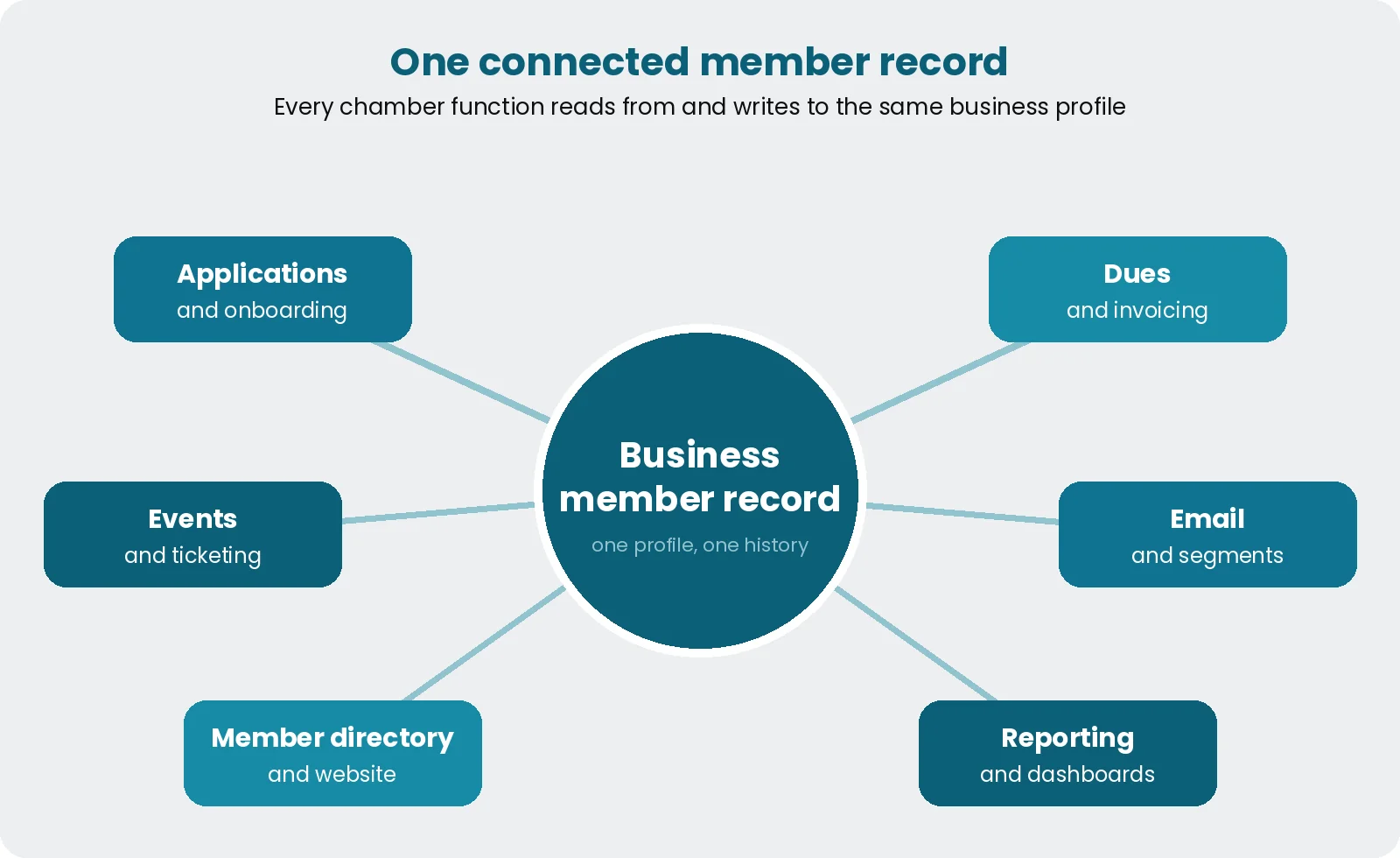
| Business member records | One profile per business, with multiple contacts, status, payments, and event history | Contacts stored as individuals with no link to their company |
| Applications | Custom forms, tiers, approval workflow, payment at signup | Staff re-enter applications by hand |
| Dues and invoicing | Recurring billing, tiered pricing, failed-payment handling, receipts | Reconciliation happens in a spreadsheet |
| Events | Registrations, ticketing, group and table orders, sponsors, check-ins and online events flow into the member record | Attendance exported to CSV after every event |
| Sponsorships | What each sponsor bought and what has been delivered | Sponsor promises tracked in email threads |
| Communications | Email segmented by member type, interest, activity, and renewal status | Every message goes to everyone |
| Directory and website | A member directory that updates when records change | Directory edited separately by hand |
| Reporting | Live dashboards for growth, renewals, revenue, and engagement | Board reports take a day to assemble |
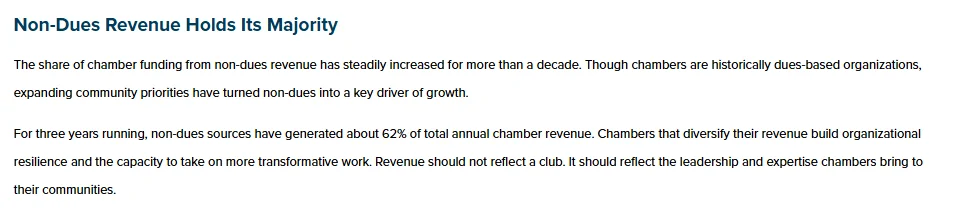
Sponsorship tracking earns its own row because non-dues income now carries most chambers: ACCE’s 2025 operations research found non-dues sources generated about 62% of chamber revenue for three years running.
What are the 4 types of chamber of commerce software?
Most options fall into four types: a stack of general tools, a general-purpose CRM, a self-service AMS, and a managed-service platform. None is wrong in every case. The right one depends on your staff size, your growth plans, and how much change your team can absorb.
1. A stack of general tools
Spreadsheets, a payment processor, an event page, and an email platform. The software cost is low and the staff cost is high. It can work for a very small chamber, but the strain shows as soon as events and renewals multiply.
2. A general-purpose CRM
A CRM is flexible for contact management. It is not built for dues, membership tiers, or event ticketing, so chambers often add plugins and custom work. Our comparison of membership management vs. CRM explains the gap.
3. A self-service AMS
Association management software (AMS) covers membership, events, committees, and finance in one system. It is powerful, but often asks for real staff time to configure, learn, and maintain.
4. A managed-service platform
This is software plus a team. The vendor handles setup, configuration, data migration, and ongoing support, so your staff can spend their time on members. It suits lean teams that want a connected system without taking on a software project.
| Type | Best for | Watch out for |
|---|---|---|
| Stack of general tools | Very small chambers with simple needs | Staff become the integration; reporting is manual |
| General-purpose CRM | Chambers with in-house technical skills | Dues, tiers, and ticketing need add-ons and custom work |
| Self-service AMS | Chambers with staff time for setup and administration | Complex configuration; features go unused |
| Managed-service platform | Lean teams that want a connected system without a software project | Confirm what the vendor handles and what stays with your team |
The 5 best chamber of commerce software platforms
These are five platforms chambers often put on a shortlist, from a system built only for chambers to a low-cost starting point. Prices are public starting prices checked on November 2, 2026, so treat them as a first filter, not a quote.
| Platform | Best for | Starting price |
|---|---|---|
| Melora Connect | Lean chamber teams that want setup and migration done with them | $3,000/yr (Growth, up to 500 members) |
| GrowthZone (ChamberMaster) | Chambers that want a system built only for chambers | Quote-based; listed from about $3,900/yr plus onboarding |
| Glue Up | Chambers that run many events, including abroad | $3,000/yr (Essential); $8,000/yr (Advanced) |
| MemberClicks (MC Trade) | Chambers run like trade associations | From $3,500/yr |
| WildApricot | Very small chambers run by volunteers | $66/mo for 100 contacts |
1. Melora Connect
Best for: Chambers with a small staff that want software plus the team that runs it.
Melora Connect pairs membership software with the team that runs it. Dues, events, the public member directory, email, and reporting share one member record. Events include ticket tiers, group and table orders for luncheons and galas, members-only events, and check-in at the door, and smart segments flag new, at-risk, and lapsed members. Live integrations include Zoom, HubSpot, Slack, and Microsoft Teams alerts, chapters and CE credits are live for chambers that run them, and MeloraPay takes card and ACH payments into your own Stripe account.
Pricing: Growth from $3,000 a year (up to 500 members), Professional from $6,000 (up to 3,000 members), and Enterprise from $15,000 (unlimited). One-time onboarding is $999, $2,499, or $4,999, and staffed onboarding comes with every plan. Details are on our pricing page.
Watch out for: A newer platform, so its integration list is shorter than those of vendors that have been around longer. The member and staff apps, hosted websites, a career center, and two-way QuickBooks sync are coming soon. There is no self-serve trial; you book a tailored demo instead.
2. GrowthZone (ChamberMaster)
Best for: Chambers of commerce that want a system built for chambers.
GrowthZone sells three products: ChamberMaster for chambers, GrowthZone AMS for mid-sized associations, and MemberSuite for enterprise organizations. ChamberMaster has been a common choice in the chamber world for years, with event registration and calendars tied into chamber membership and directories.
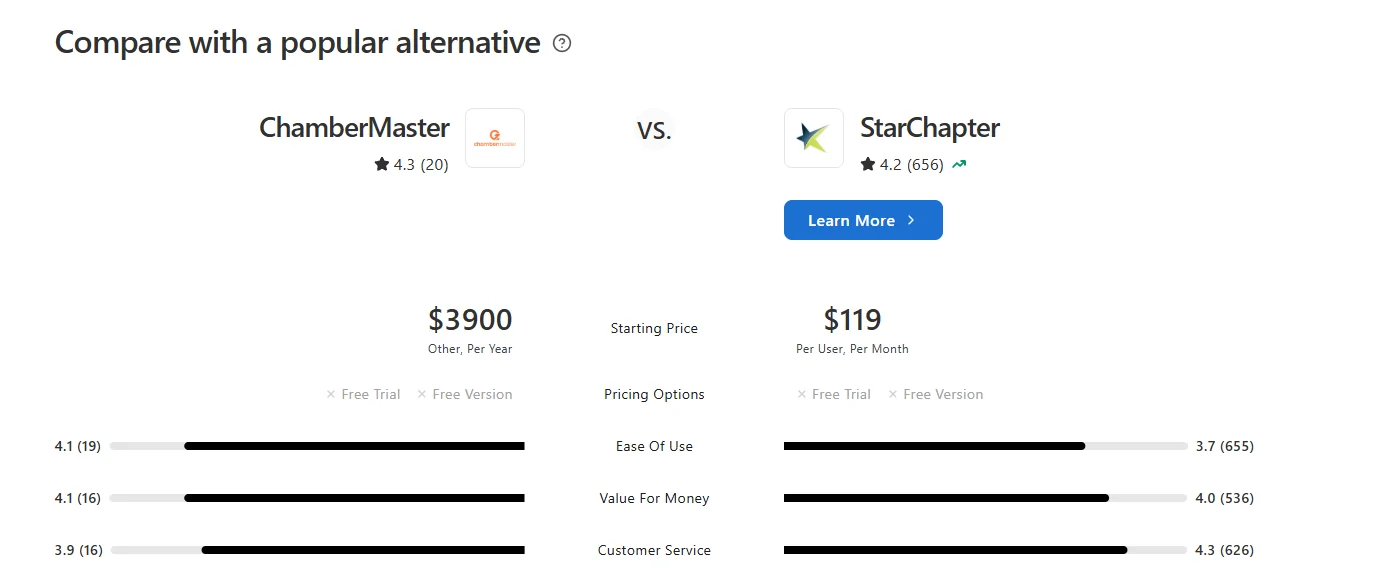
Pricing: Quote-based. Capterra lists ChamberMaster subscriptions from $3,900 a year, with GrowthZone giving custom quotes; onboarding fees apply.
Watch out for: Confirm which product you are being quoted for, what is included versus sold as an add-on, and what pricing looks like in year three.
3. Glue Up
Best for: Chambers that run many events, including those operating internationally.
Glue Up combines membership, events, CRM, and community in one platform used by associations, chambers, and nonprofits. Event tools are a strength: registration, ticketing, mobile check-in, and badges, with mobile apps for staff and members.
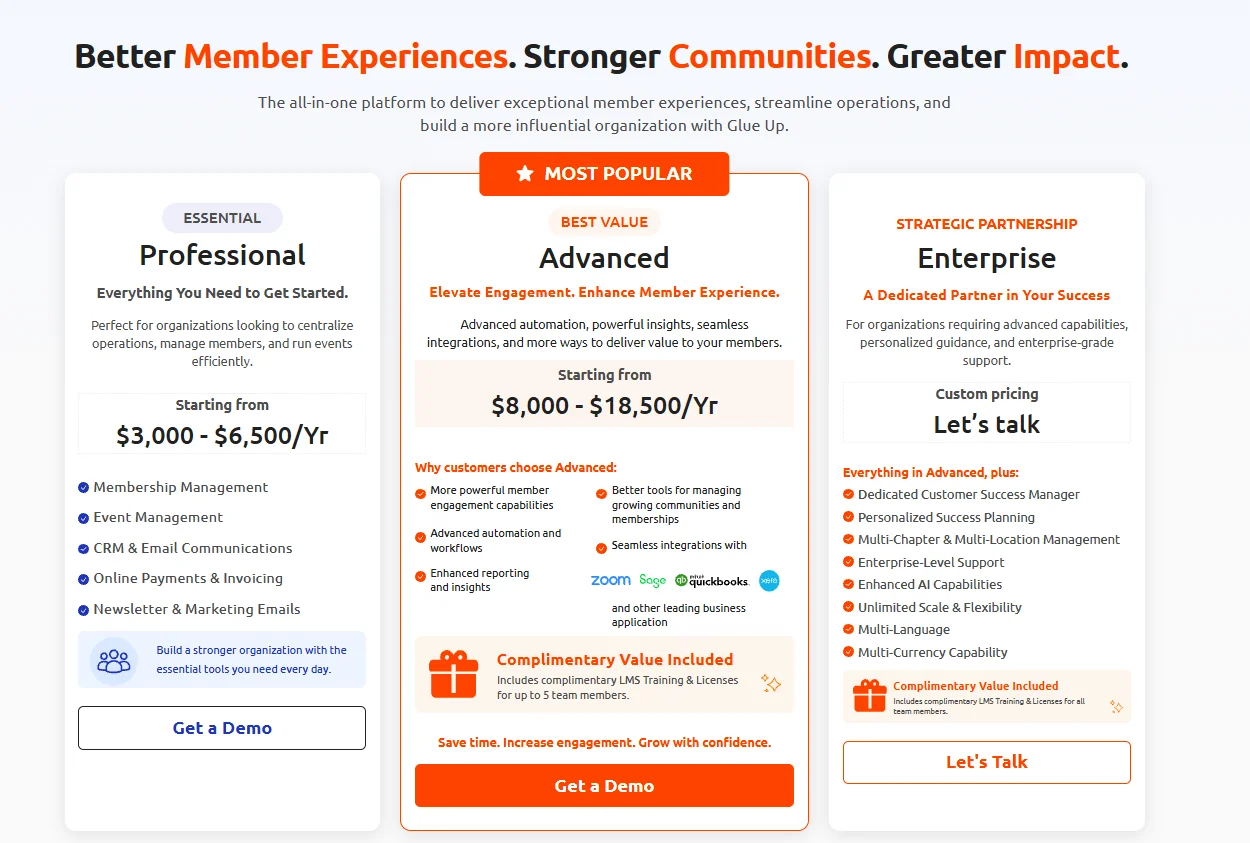
Pricing: Glue Up’s pricing page lists annual plans: Essential from $3,000 a year, Advanced from $8,000 a year, and a custom Enterprise tier.
Watch out for: A broad feature set means a learning curve. Ask for a demo built around your own events, and price the tier you will actually need, not the entry tier.
4. MemberClicks (MC Trade)
Best for: Chambers that run like trade associations, with business members at the center.
MemberClicks offers two editions, and MC Trade is the one built for organizations whose members are businesses, including chambers. It brings membership, events, and communications into one platform, with a dedicated implementation specialist and phased onboarding. It is owned by Momentive Software.
Pricing: MemberClicks’ pricing page lists MC Trade from $3,500 a year, with the final price depending on size and the functionality you need.
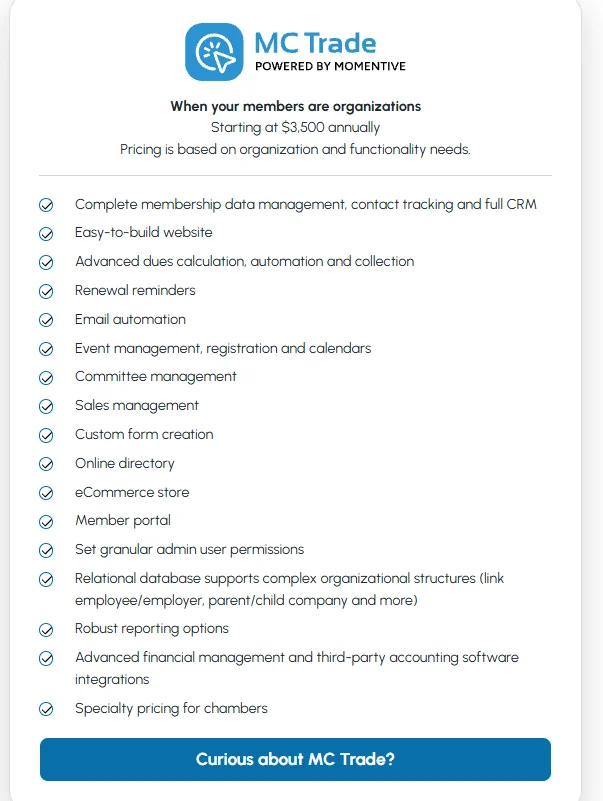
Watch out for: Price depends on modules and services, so get the full three-year cost in writing, including implementation.
5. WildApricot
Best for: Very small chambers run by volunteers that want to start quickly on a small budget.
WildApricot combines a member database, website, events, email, and payments, and every plan includes the same features. It has a built-in website builder, a member mobile app, a free trial, and a large library of self-serve training.
Pricing: Per contact. WildApricot’s own comparison page lists a 2026 starting price of $66 a month for 100 contacts, with no setup fees.
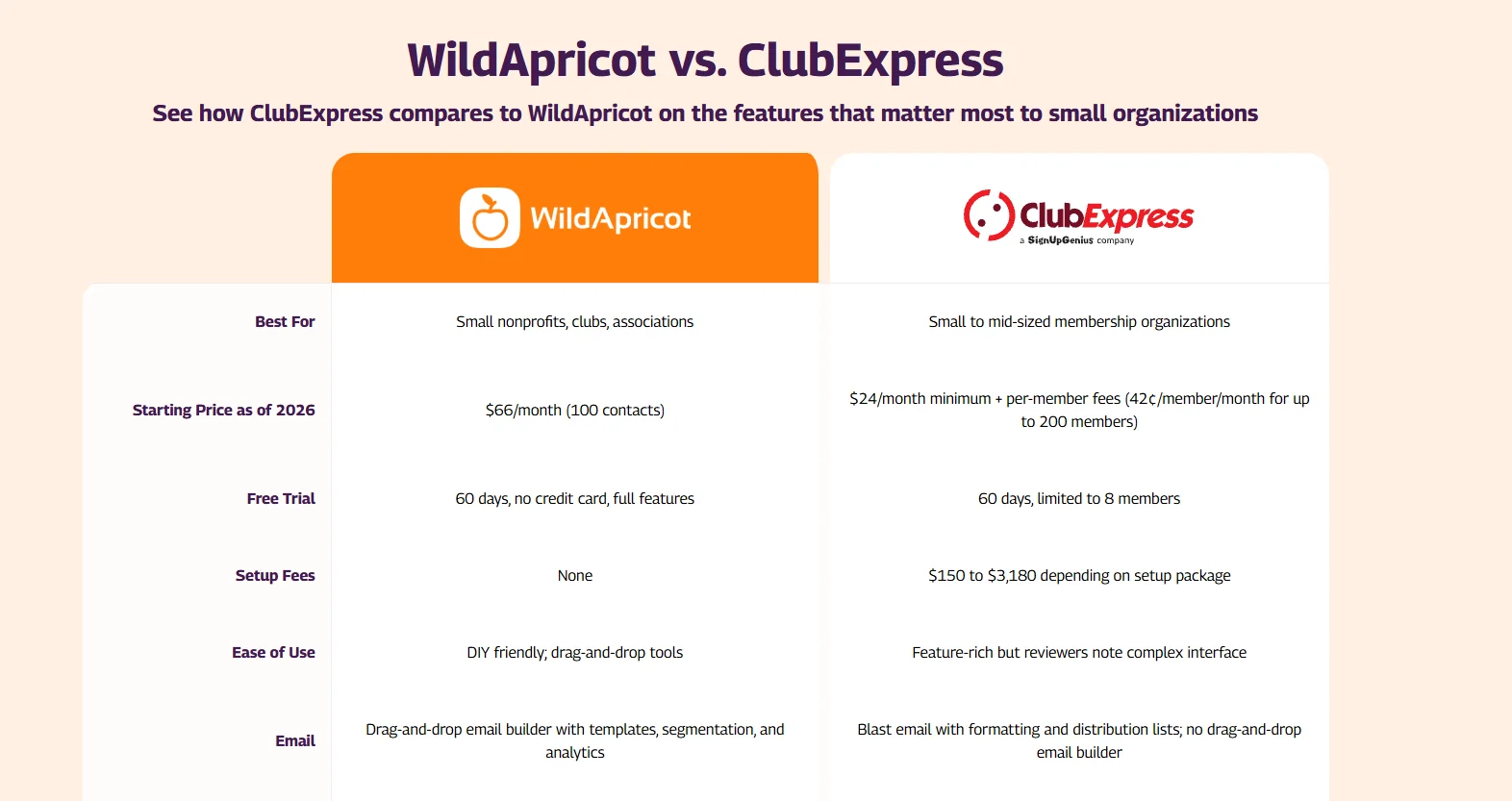
Watch out for: A contact includes event attendees, donors, and newsletter subscribers, not just members. For a chamber with a busy mixer calendar, costs can climb faster than membership. Support and setup are largely self-serve.
Prices are public starting prices checked on November 2, 2026, from vendor pricing pages and Capterra. They change often, so confirm with each vendor.
If you also serve other kinds of associations, our list of the best association management software compares eleven platforms. If events are the main job, see our pick of the best event management software for associations and chambers.
Comparing Melora Connect with your shortlist? Bring the workflow that takes your team the most time today, and we will run it live in Melora Connect. Book a demo
Best chamber of commerce software by stage of growth
The best chamber of commerce software fits where you are going, not only where you are.
| Stage | Typical situation | What to prioritize |
|---|---|---|
| Early | One or two staff, a signature event, spreadsheets still coping | Online joining and payments, a clean member database, simple email segments |
| Growing | More events, sponsors, and committees; the board wants regular reports | Connected events and membership, renewal automation, live dashboards |
| Established | Multiple programs, a larger board, high expectations of data | Early-warning insight, flexible reporting, dependable implementation and support |
How do you run a chamber software evaluation?
Keep the evaluation short and specific: list your workflows, set a three-year budget, shortlist three platforms, run scripted demos, and check references. Our guide on how to choose chamber of commerce management software walks through each step, with a vendor scorecard and the red flags to watch for. Send every vendor the same requirements with the free Membership Software RFP Template.
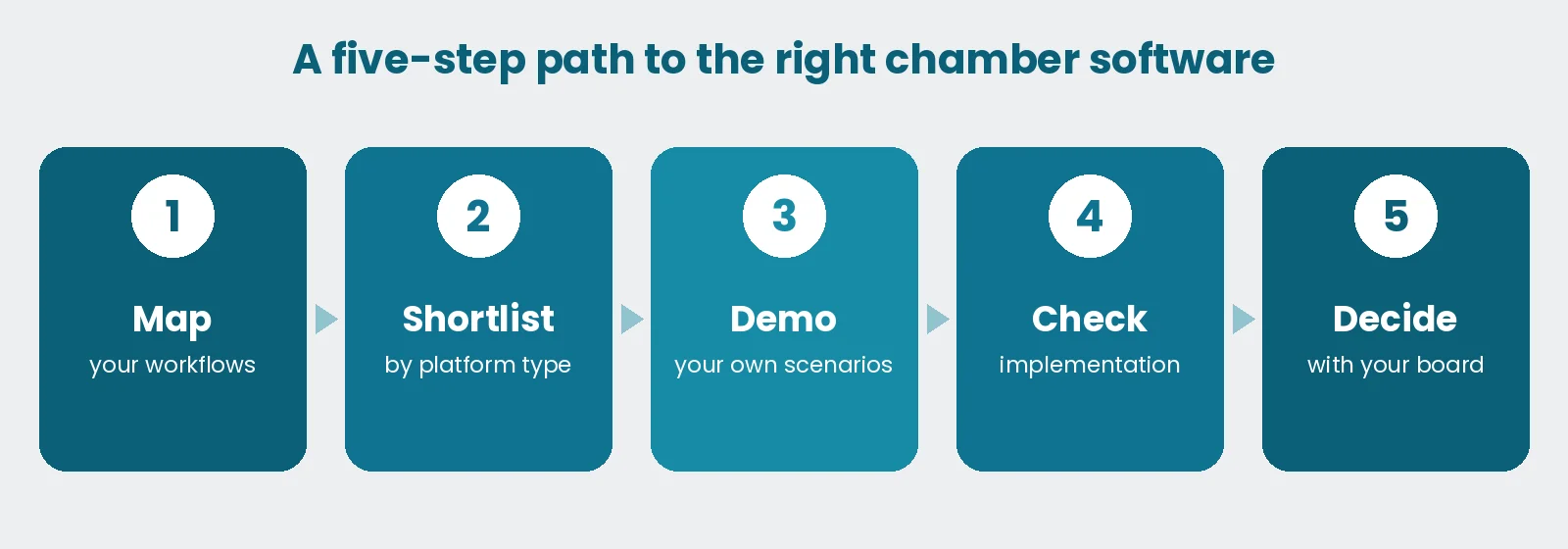
5 questions to ask in every demo
These questions make vendors show their work.
☐ Can I see one business member’s full history, including payments, events, and emails, on a single screen?
☐ What happens to our data on day one, and who migrates it?
☐ How does the system warn us that a member is going quiet?
☐ Can the board report we send today be produced without exporting to a spreadsheet?
☐ What does support look like when something breaks the week of our biggest event?
If a vendor answers four or more of these with a live demonstration rather than a slide, they deserve a closer look. For a full demo script and scoring matrix, see our guide to the AMS selection process.
Example: how Lucia’s chamber narrowed its shortlist
Picture Lucia, the membership director of a regional chamber with a few hundred member businesses, an events coordinator, and a part-time bookkeeper. Her board asked for two finalists within a month.
She started with the stage table above. With a monthly mixer, a luncheon series, and a board that wanted a report every quarter, her chamber was clearly growing, which ruled out a stack of general tools and a general CRM straight away.
Next, she priced each finalist against the chamber’s real calendar. One quote was per contact, and every mixer guest would have counted as a contact, so the cost by year three was far above the headline price. The other was tiered by members, so the price stayed tied to the businesses that actually pay dues.
Finally, she put the five demo questions to both vendors. The answer that decided it was about migration: one vendor would move the data, and the other sent a template. The board approved the finalist whose team would do the setup with her. This is an illustration, not a client case.
Implementation matters as much as features
Many chambers compare features for weeks and ask about implementation for minutes. The most common regret is a project that never ends: data never fully cleaned, forms never finished, staff never trained.
Ask who migrates your data, who builds your membership tiers and event templates, and who handles changes after launch. If the honest answer is “your team,” plan those hours before you sign, not after. Across the industry, small and mid-sized associations typically need 6 to 16 weeks to go live; our guide on how long a migration takes explains why.
How Melora Connect approaches chamber of commerce software
Melora Connect is a managed-service membership platform for chambers of commerce and associations. You get a team, not a login: we set up the platform with you, move your data, and stay with you after launch, so your staff are not left running a software project on top of their day jobs. Melora’s typical timeline is about 30 days from signed agreement to live.
The platform keeps membership, events, payments, communications, and reporting on the same member record. When a business owner checks in at a mixer or joins an online event through Zoom, the record updates. When engagement drops, smart segments show it before the renewal date, and our guide to chamber of commerce member engagement has ideas for what to do next. And because our team comes from event production, events are treated as core engagement data, not an add-on.
If we are on your shortlist, judge us by the same five demo questions as everyone else.
Frequently asked questions about chamber of commerce software
What is the best chamber of commerce software?
It depends on your size and how much of the setup your team can take on. Chambers often shortlist GrowthZone (ChamberMaster) for a system built only for chambers, Glue Up for event-heavy or international chambers, MemberClicks MC Trade for trade-style chambers, WildApricot for very small volunteer-run chambers, and Melora Connect for a managed service.
How much does chamber of commerce software cost?
Publicly listed starting prices on this list, checked November 2, 2026, run from $66 a month for a small per-contact plan to $3,000 to $8,000 a year and more for larger platforms, usually plus onboarding. Compare total cost, including staff time, migration and training. See what membership management software costs.
What is chamber of commerce software?
Chamber of commerce software is a platform that manages a chamber’s member businesses, dues, events, communications, directory and reporting in one place, with one profile per business and several contacts under it. It replaces spreadsheets and separate payment, event and email tools.
What is the difference between chamber software and an AMS?
Chamber software focuses on business members, the directory, sponsorships, events and renewals. An AMS usually adds broader operations such as committees, education and finance for individual-member associations. Many platforms, including several on this list, do both.
What should I ask in a chamber software demo?
Ask to see one business member’s full history on one screen, who migrates your data, how the system flags members going quiet, whether today’s board report can be produced without spreadsheets, and what support looks like during your biggest event week.
How long does it take to switch chamber software?
Industry typical is 6 to 16 weeks for small and mid-sized organizations, longer when data is spread across many tools. Vendors that configure and migrate with you are usually faster; Melora Connect’s typical is about 30 days from signed agreement to live.
The bottom line
There is no single best chamber of commerce software, only the best fit for your stage. Pick the platform that keeps your data connected, shows you who is going quiet while there is still time to act, and does not turn your team into a software department. Use the five demo questions to hold every vendor to the same standard, then choose the system, and the team behind it, that frees your staff to focus on the business community.
Know your number before the first demo. Use the free Chamber Tech Stack Cost Calculator to total what your current tools cost each year, then hold every quote on this list against it. Open the calculator
See it with your own chamber’s workflow. Bring your member list and event calendar, and judge us by the same five demo questions. Book a demo
Sources
-
WildApricot, WildApricot vs. ClubExpress, 2026, checked November 2, 2026.
-
Capterra, ChamberMaster, 2026, checked November 2, 2026.
-
Glue Up, Pricing, checked November 2, 2026.
-
MemberClicks, Membership Software Pricing, checked November 2, 2026.
-
ACCE, Three Trends in Chamber Operations, May 15, 2026.