People · Events · Communities

If your association runs on a spreadsheet, a payment tool, an email platform, and a separate event app, you already know the cost: hours of copying data between systems, renewal reminders that go out late, and board reports nobody fully trusts.
Membership management software is built to fix that. This guide covers what it does, which features actually matter for your size, the benefits you can expect, and what it really costs in 2026, including the fees that do not appear on the pricing page.
What is membership management software?
Membership management software is a platform that centralizes member records, applications, dues and payments, renewals, communications, events, and reporting in one system. It replaces spreadsheets and disconnected tools with a single member record that updates automatically every time a member joins, pays, registers, or engages.
If you are new to the concept itself, start with our guide to membership management. This article focuses on the software and the buying decision.
Who uses membership management software?
Professional and trade associations, chambers of commerce, societies, federations, councils, alumni groups, clubs, and membership-based nonprofits. The size range is wide: from a volunteer-run group of 150 members to a national association with tens of thousands.
Membership management software vs. AMS vs. CRM
The labels overlap a lot. An AMS usually runs the whole association, including committees, chapters, and finance, while a CRM is built to manage sales pipelines. Judge a platform by the workflows it supports, not by what it calls itself. We compare the categories in AMS vs. membership management software and membership management vs. CRM.
Core features of membership management software
Most platforms cover the same eight areas. What separates them is whether each one updates the same member record. In one line each:
-
Member database and profiles: one profile per member with status, tier, payments, events, and notes.
-
Online joining and applications: branded join forms, membership types, approvals, and payment at signup.
-
Dues, payments, and renewals: invoices, recurring billing, renewal reminders, and receipts.
-
Member portal: self-service profile updates, payments, event registration, and directories that work on a phone.
-
Event management: registration, ticketing, member pricing, and check-in that feed the member record.
-
Email and segmentation: built-in email with segments that update as member data changes.
-
Reporting and dashboards: live views of growth, renewals, revenue, and engagement.
-
Integrations: accounting (such as QuickBooks), payments, and video (such as Zoom).
For what good looks like in each area, the exact request to make in a demo, and the red flags, see our full guide to membership management software features.
Must-have vs. nice-to-have features by organization size
Not every association needs every feature on day one. Use this table to avoid paying for modules you will not use.
| Feature | Under 500 members | 500 to 3,000 | 3,000+ |
|---|---|---|---|
| Member database | Must-have | Must-have | Must-have |
| Online joining and dues | Must-have | Must-have | Must-have |
| Automated renewals | Must-have | Must-have | Must-have |
| Member portal | Nice-to-have | Must-have | Must-have |
| Member mobile app | Nice-to-have | Nice-to-have | Must-have |
| Event management | Must-have if you run events | Must-have | Must-have |
| Segmented email | Nice-to-have | Must-have | Must-have |
| Advanced reporting | Nice-to-have | Must-have | Must-have |
| Accounting integration | Nice-to-have | Must-have | Must-have |
| Open API | Rarely needed | Nice-to-have | Must-have |
5 benefits of membership management software
1. Hours back for your team
Here is a simple way to estimate it. Add up the hours your team spends each week on renewal reminders, payment matching, data entry, and report building. Many small teams land somewhere between 5 and 10 hours.
The pattern is not unique to associations. In Atlassian’s State of Teams 2025, a survey of 12,000 knowledge workers and 200 executives, leaders and teams said they lose 25% of their time just searching for answers. In an association, much of that search is for member data spread across disconnected tools.
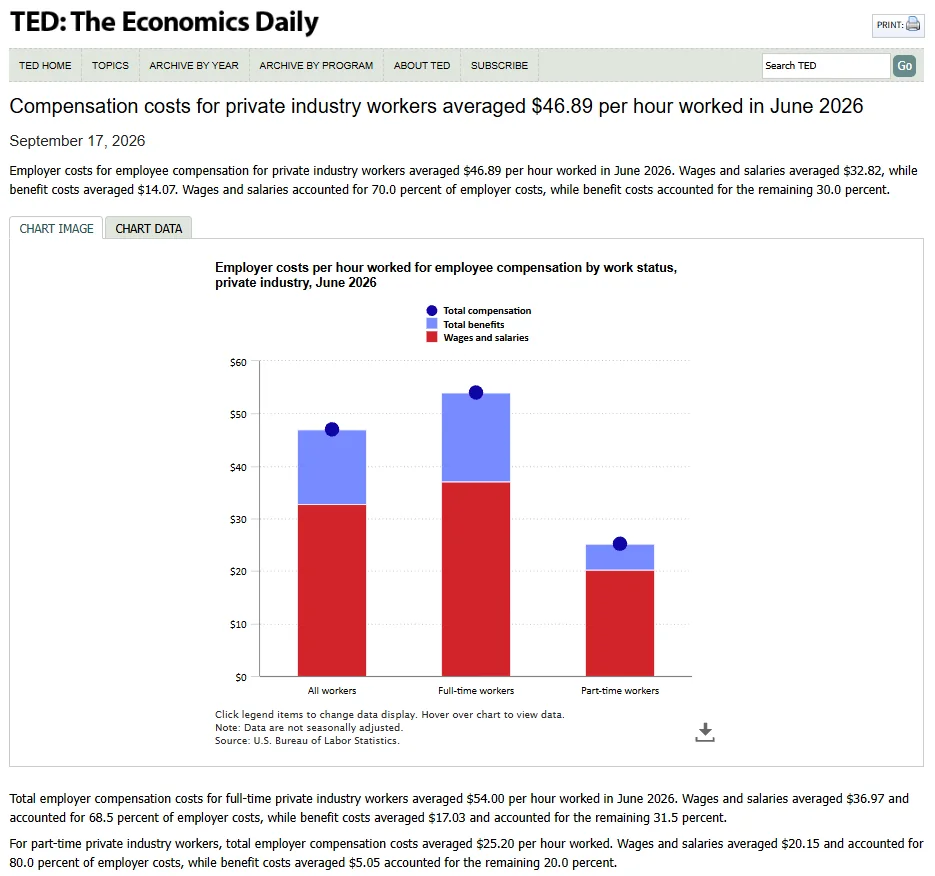
Illustrative math: 6 hours a week × 50 weeks = 300 hours a year. At a loaded staff cost of $35 an hour, that is $10,500 of time spent on work software can do. That hourly figure is deliberately conservative: the U.S. Bureau of Labor Statistics puts average employer compensation costs for private industry workers at $46.89 per hour worked in June 2026, wages and benefits combined. Run the numbers with your own figures before any vendor call.
2. Fewer lapsed members
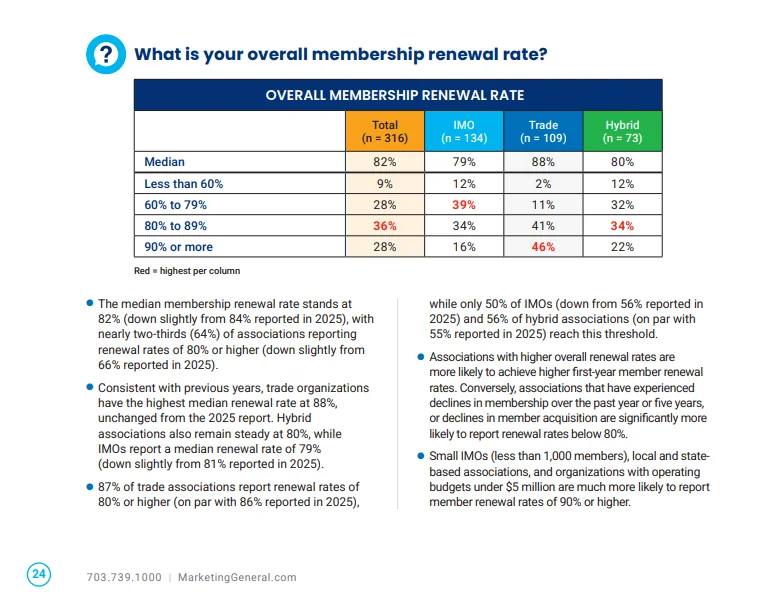
New members are the most likely to leave. In the MGI 2026 Membership Marketing Benchmarking Report, the median renewal rate for first-year members was 72%, against 82% for all members. Software that tracks engagement shows you which members are going quiet months before their renewal date, while there is still time to act. Our guide to member engagement metrics shows which numbers to watch.
The report comes from Marketing General Incorporated and is based on input from nearly 500 association professionals; you can download the full 2026 benchmarking report from MGI and compare your own renewal rates by association type.
3. Faster, more predictable revenue
Online payments, recurring billing, and automatic retries for failed cards mean dues arrive on time instead of trickling in after the third reminder. Cash flow becomes something you can forecast. Our guide on how to automate membership renewals covers the reminders and payment recovery step by step.
4. A better member experience
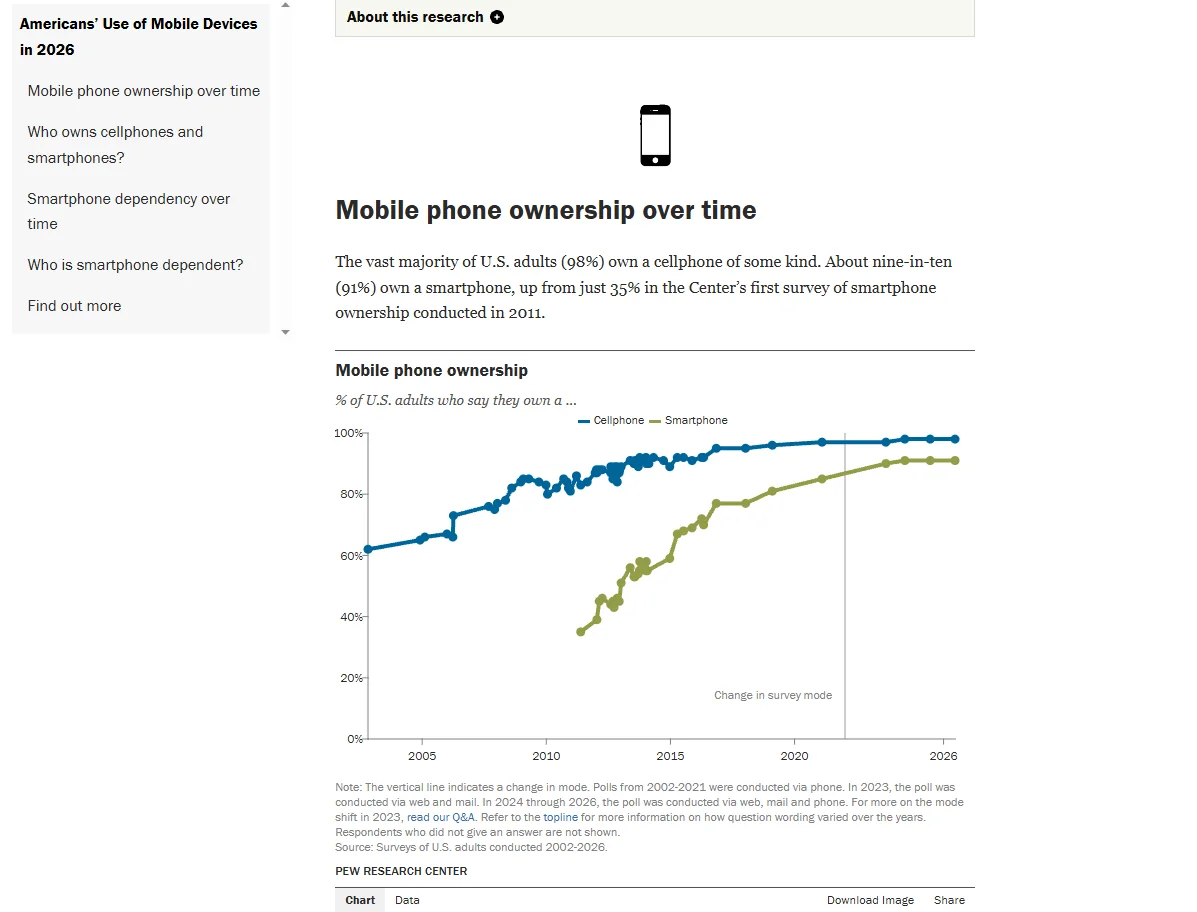
Members expect to join, pay, register, and update their details the way they do everything else: on their phone, in a few taps. That is not a niche expectation: about nine in ten U.S. adults (91%) now own a smartphone, according to the Pew Research Center Mobile Fact Sheet. Every request they do not have to email to staff is a small reason to stay.
5. Numbers the board can trust
When every payment, registration, and email lives in one system, the renewal rate on the dashboard is the real renewal rate. Decisions stop depending on whose spreadsheet is the latest version, which matters more than it sounds: a 2024 review of spreadsheet research by Pak-Lok Poon and colleagues, published in Frontiers of Computer Science, reports that 94% of spreadsheets used in business decision-making contain errors.
Want to see your own numbers? Book a walkthrough built around your workflow, and we will estimate the staff hours your current setup costs and show what changes in Melora Connect. Book a demo
How much does membership management software cost?
Membership management software typically costs from about $50 a month for small, self-serve tools to $1,500 a month or more for enterprise association platforms, plus one-time implementation fees. The sticker price is only part of the picture, so read past the first table.
Typical price ranges in 2026
| Tier | Typical price | Best fit |
|---|---|---|
| Small and self-serve | About $50 to $300 per month | Volunteer-run groups and small associations with simple needs |
| Mid-market | About $300 to $1,500 per month | Staffed associations and chambers with events, portals, and reporting needs |
| Enterprise | $1,500+ per month or custom quote | Large or complex associations with chapters, education, and custom integrations |
For reference points, two well-known association platforms list starting prices of about $3,500 and $4,500 a year, and another has listed starting prices around $4,000 a year plus onboarding fees. Many vendors only quote after a sales call.
The 3 pricing models
Per member or per contact. The price rises as your database grows. It looks cheap at the start, but it quietly penalizes you for growing, and some tools count every contact, not just paying members.
Tiered plans. A fixed annual price for a band of members, admin users, and features. Predictable, as long as you know what happens when you cross into the next tier.
Quote-based. Custom pricing after a demo. Common in mid-market and enterprise AMS. Flexible, but hard to compare, so always ask for a three-year quote in writing.
Hidden costs to ask about
These are the costs that turn a $4,000 subscription into a $12,000 first year:
-
Implementation and setup fees. In this category, setup can be as large as the first year of subscription.
-
Data migration. Moving years of member history out of spreadsheets or an old system. Ask who does the work: you or them.
-
Transaction fees. Some platforms add their own percentage on top of the card processor’s rate. On $200,000 of dues and event revenue, every extra 1% is $2,000 a year.
-
Add-on modules. Events, email, mobile apps, or websites sold separately.
-
Support tiers. Phone support or a named contact may cost extra.
-
Training and staff time. Software your team never fully learns is the most expensive line of all.
Payment processing fees: know the baseline
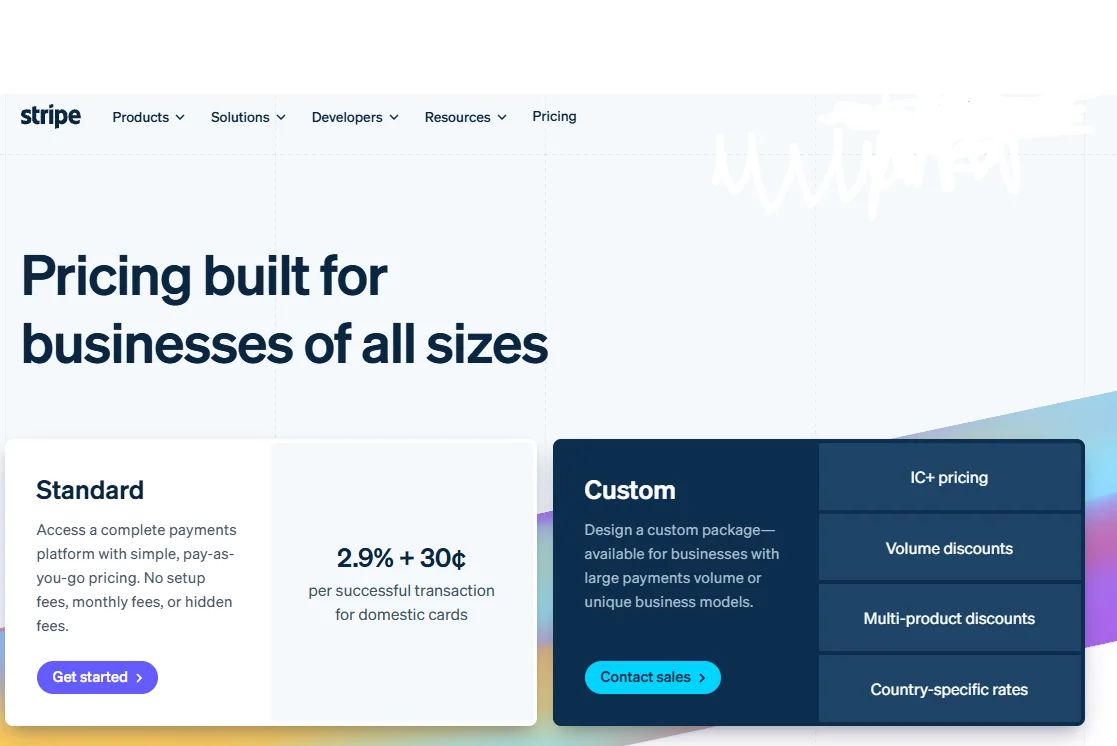
Every platform that takes card payments runs them through a payment processor, and the processor’s published rate is the baseline to compare quotes against. Stripe’s published U.S. pricing, for example, is 2.9% + 30¢ per successful domestic card charge and 0.8% (capped at $5) for ACH Direct Debit.
On a $300 annual dues payment, that is about $9.00 by card and $2.40 by ACH. If a vendor’s rate is higher than the processor’s published rate, the difference is the platform’s own fee. That gap is the number to ask about, and often the one to negotiate.
Example: 3-year total cost of ownership
Compare vendors on three-year cost, not monthly price. The figures below are illustrative only; replace them with real quotes.
| Cost line | Option A: per-contact tool | Option B: quote-based AMS |
|---|---|---|
| Subscription (3 years, growing database) | $9,000 | $13,500 |
| Implementation and setup | $0 | $4,000 |
| Data migration (your staff time) | $2,100 (60 hrs) | $700 (20 hrs) |
| Platform transaction fees (1% on $100k/yr) | $3,000 | $0 |
| Add-on modules | $1,800 | $1,500 |
| 3-year total | $15,900 | $19,700 |
The cheaper monthly price is not always the cheaper platform. In this example the gap is smaller than it looks, and Option B came with migration help.
How to choose membership management software
Start by writing down your five most painful workflows today, for example renewals or event check-in. Then shortlist three vendors and ask each one to demo those workflows, not their standard script.
5 cost questions to ask every vendor
- What will we pay in total over three years, including setup, migration, and add-ons?
- Is pricing based on paying members, total contacts, or admin users?
- What happens to our price when we cross the next member tier?
- Do you charge transaction fees on top of the payment processor’s rate?
- Can we export all of our data, at any time, at no cost?
Watch how vendors answer the first question. A clear number is a good sign. “It depends” with no follow-up is not. For the rest of the evaluation, including the demo script, scorecard, and RFP, see our guide to the AMS selection process.
Melora Connect pricing: what is included
We believe pricing should be on the page, so here is ours. Plans are billed annually and priced by tier, not per contact.
| Plan | Price | Built for |
|---|---|---|
| Growth | From $3,000 / year | Up to 500 members |
| Professional | From $6,000 / year | Up to 3,000 members |
| Enterprise | From $15,000 / year | Unlimited members |
One-time onboarding packages are Essentials ($999), Professional ($2,499), and Premier ($4,999), and on every plan our team does the setup work with you. Support after go-live is included at no extra cost. Our typical timeline is about 30 days from signed agreement to live, against a rough industry estimate of 6 to 16 weeks for small and mid-sized associations. Our guide to how long it takes to migrate membership software explains the difference.
The bigger difference is how it works. Melora Connect is a managed service: we configure the platform around how your organization actually runs, migrate your data, and keep it running with you. You get a team, not a login. Every plan also includes MeloraPay for card and ACH payments straight into your own Stripe account. The platform runs automated renewals and invoice runs, event pages and check-in, and a member portal, with integrations for HubSpot, Slack alerts, and Microsoft Teams alerts, plus QuickBooks export. Online events carry their own join link (Zoom, Teams, or Google Meet), sent with each confirmation. The Melora Connect Go member app and HQ staff app are coming soon.
See full pricing and plan limits. Compare plans side by side on our pricing page, or book a demo and get a written three-year quote.
Frequently asked questions about membership management software
How much does membership management software cost?
Most platforms cost between about $50 and $1,500 a month depending on size and features, plus one-time setup fees. Compare vendors on three-year total cost, not monthly price.
Is there free membership management software?
Some tools offer free plans for very small groups, usually with tight limits on contacts and features, and they often earn money through transaction fees. They can work for a club of a few dozen members but rarely scale with a growing association.
Are there costs after the first year?
Yes. The subscription renews each year, sometimes at a higher price if you cross into the next member tier, and transaction fees and add-on modules continue too. Ask every vendor what years two and three will cost before you sign.
Is membership management software worth it for a small association?
Usually yes once you pass about 150 to 200 members or have paid staff. The time saved on renewals and payments alone often covers the subscription.
The bottom line
The right membership management software pays for itself in staff hours and retained members. The wrong one costs more than the subscription through migration headaches, transaction fees, and tools nobody uses.
Start with your workflows, insist on a three-year quote, and ask who does the work after you sign. The best platform is not the one with the longest feature list. It is the one your team will actually use every day.
Free download: membership software RFP template. Put the cost questions above and your must-have features in front of every vendor in the same format. Get the template