People · Events · Communities

Quick answer: To automate membership renewals, choose a renewal model, start reminders about 90 days before expiry, send short personal renewal emails, retry failed payments and ask for card updates, segment members by engagement, add a grace period and win-back sequence, and track renewal rates monthly. Keep personal calls for inactive and long-standing members.
Key takeaways
-
Forgotten reminders and failed cards are the most fixable causes of lapses, and automation handles both.
-
Start renewal outreach 120 days out with an engagement review, and send a value recap before any invoice.
-
First-year members renew at the lowest rate, so give them their own track.
-
Automate the repetitive work so staff have time for the calls that change outcomes.
The fastest way to automate membership renewals is to replace “someone remembers” with a fixed workflow: scheduled reminders, online payment, automatic retries for failed cards, and status updates at expiry, with staff time saved for the members who need a personal touch.
Renewal season at many associations looks the same every year. Someone exports a list of expiring members, sends a reminder, waits, sends another, then starts phoning the people who still have not paid. Some members renew. Some forget. Some were never really engaged and quietly drift away.
Renewal automation fixes the first two problems and gives you time for the third. This guide walks through the full process: choosing a renewal model, building a 120-day workflow, writing emails members actually read, recovering failed payments, and measuring the results. Renewals are only one stage of membership management, so if you want the wider plan first, start with how to improve membership management.
Why do members not renew?
Members rarely leave because of one bad experience. Most lapses come from a handful of patterns:
-
They forgot. The reminder went to an old email address, landed in spam, or arrived on a busy week.
-
Their card failed. It expired or was replaced, and nobody followed up.
-
They did not see the value. They never attended an event, used a benefit, or connected with anyone.
-
Their situation changed. A new job, a budget cut, or a career shift.
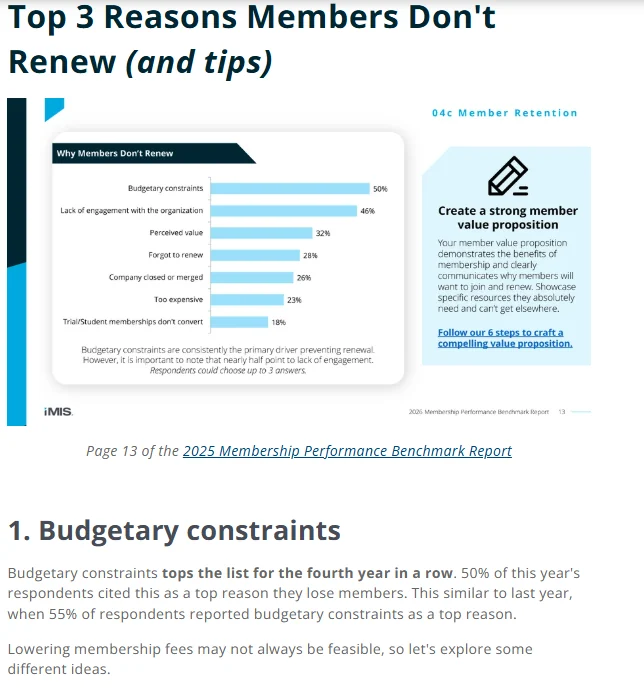
The 2026 benchmark data points the same way. In the 2026 Membership Performance Benchmark Report (via iMIS), 50% of respondents cited budget constraints as a top reason they lose members, and almost half (46%) reported “lack of engagement” as a top reason members do not renew. Perceived value came third.
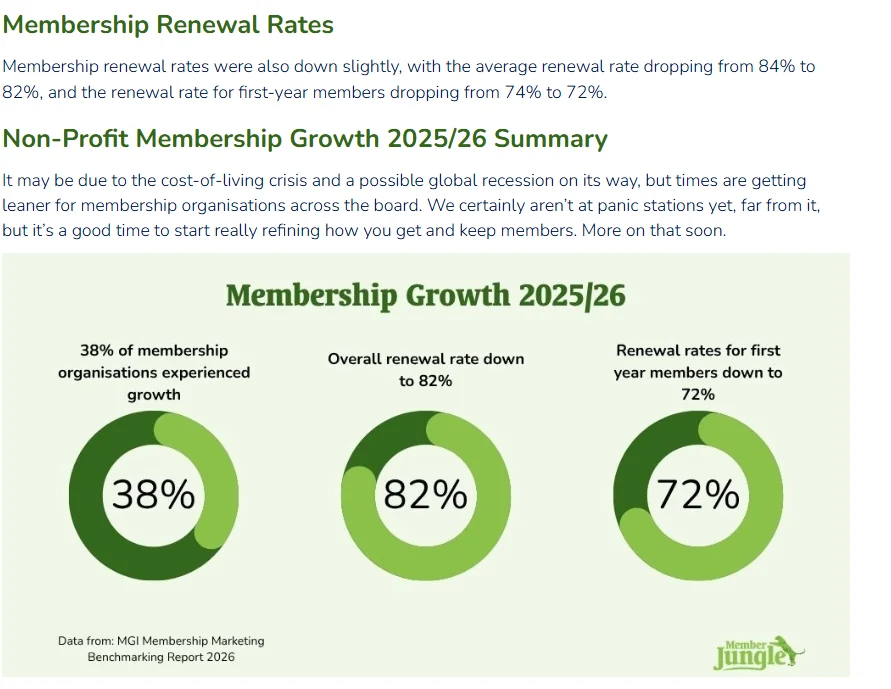
The first two patterns on the list are pure process problems, and automation solves them almost completely. Value and engagement are harder, and they show up most in year one: in the MGI 2026 Membership Marketing Benchmarking Report, the median renewal rate for first-year members was 72%, against 82% overall.
How much does membership churn cost?
Illustrative example. Replace the numbers with your own.
| Item | Amount |
|---|---|
| Members up for renewal this year | 500 |
| Average annual dues | $300 |
| Current renewal rate | 80% (100 members lapse) |
| Dues lost to churn | $30,000 |
| If renewal rate rises 5 points to 85% | 25 more members renew: +$7,500 a year |
| Over three years, as those members keep renewing | Well over $20,000, before event and sponsorship revenue |
Five points is roughly the difference between “we send reminders” and a structured, automated renewal process. And keeping a member you already have usually takes far less effort than recruiting a new one.
What should renewal automation do, and what should stay human?
| Automate | Keep human |
|---|---|
| Reminder emails on a schedule | Calls to long-standing members who have not renewed |
| Invoices and receipts | Conversations with members who say the value is not there |
| Failed-payment retries and card-update requests | Outreach to inactive members before renewal |
| Segmenting members by engagement | Deciding what to offer someone facing a budget cut |
| Updating membership status at expiry | Thank-you notes to your most engaged members |
The goal is not to remove people from renewals. It is to remove the repetitive work so your team has time for the conversations that actually change outcomes.
How to automate membership renewals in 7 steps
-
Choose your renewal model: auto-renew, manual, or both, on anniversary or calendar-year dates.
-
Build a 120-day renewal workflow that mixes automated emails with human outreach.
-
Write four renewal emails: value recap, easy renewal, final reminder, and win-back.
-
Recover failed payments with card-update requests, retries, and a personal note.
-
Segment renewals by engagement so inactive and first-year members get a different track.
-
Add a grace period and a win-back sequence instead of cutting access on expiry day.
-
Measure renewal, first-year renewal, and churn rates every month.
Step 1: Choose your renewal model
Auto-renew vs. manual renewal
Auto-renew charges the member’s saved payment method at the end of each term unless they cancel. It usually produces higher renewal rates because forgetting no longer causes lapses. Manual renewal asks members to take action each year, which creates a natural moment to restate value but relies on them acting in time.
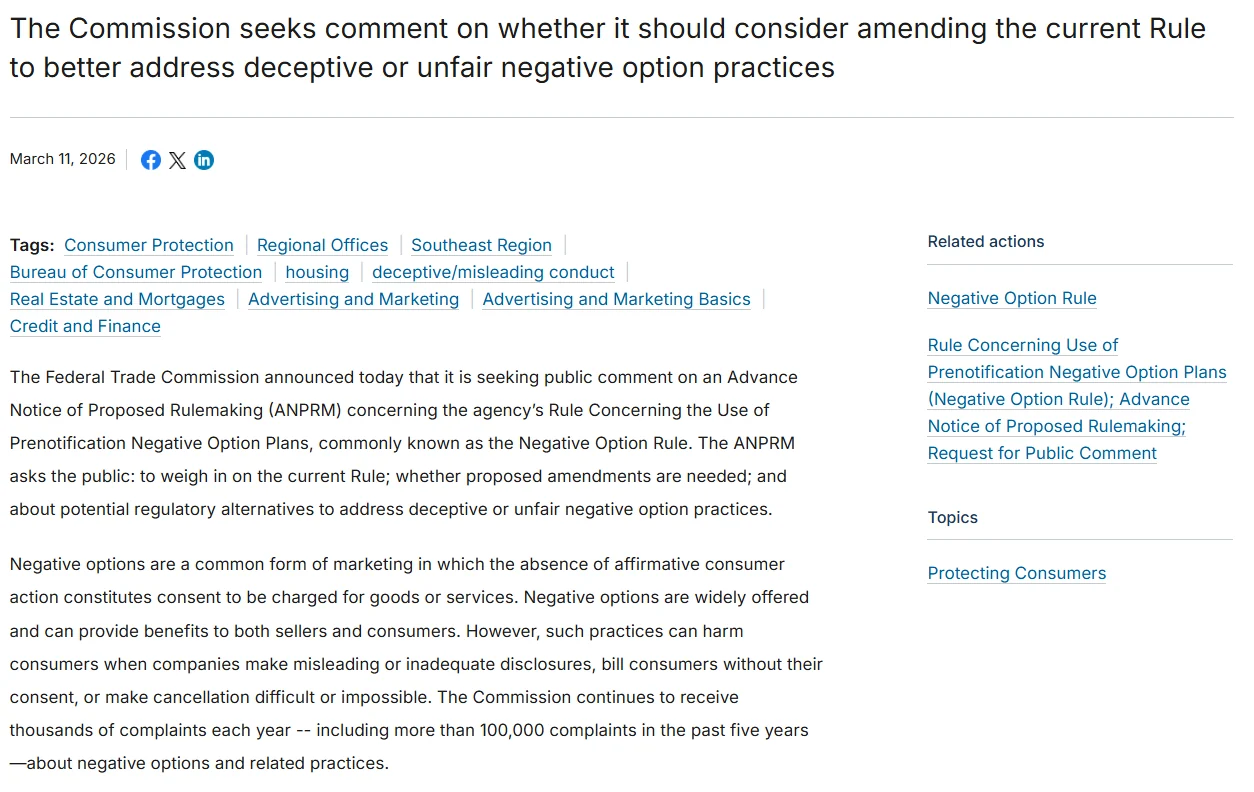
Many associations offer auto-renew as an option at joining and renewal, with manual renewal still available. If you use auto-renew, be transparent: explain the terms clearly at signup, send a reminder before each charge, and make cancelling as easy as joining. Regulators are watching this area. In March 2026 the U.S. Federal Trade Commission restarted rulemaking on negative option (auto-renewal) practices, noting it has received more than 100,000 complaints about them in the past five years. Its earlier 2024 click-to-cancel rule was vacated by a federal appeals court in July 2025, so check which federal and state rules apply to you. This is not legal advice.
Anniversary vs. calendar-year renewals
Anniversary renewals (each member renews on the date they joined) spread workload across the year and suit automation well. Calendar-year renewals (everyone renews at once) are simpler to explain but create one heavy season. If your team dreads renewal season, anniversary renewals plus automation is often the fix.
Step 2: Build a 120-day renewal workflow
Here is a complete workflow you can adapt. Automated steps run on their own; human steps go on a task list.
| When | Action | Type |
|---|---|---|
| 120 days before | Review the member’s engagement and tag them high, occasional, or inactive | Automated |
| 90 days before | Email 1: value recap (“your year with us”) | Automated |
| 75 days before | Inactive members: personal email or call from staff | Human |
| 60 days before | Invitation to an upcoming event or a benefit they have not used | Automated |
| 30 days before | Email 2: easy renewal with one-click link and invoice | Automated |
| 14 days before | Reminder to anyone not yet renewed; card-update request if the card expires soon | Automated |
| 7 days before | Long-standing members not yet renewed: personal call | Human |
| Expiry day | Email 3: final reminder; grace period begins | Automated |
| 15 days after | Grace-period reminder | Automated |
| 30 days after | Email 4: win-back; status changes to lapsed | Automated |
| 60 days after | Short “why did you leave?” survey | Automated |
Step 3: Write renewal emails members actually read
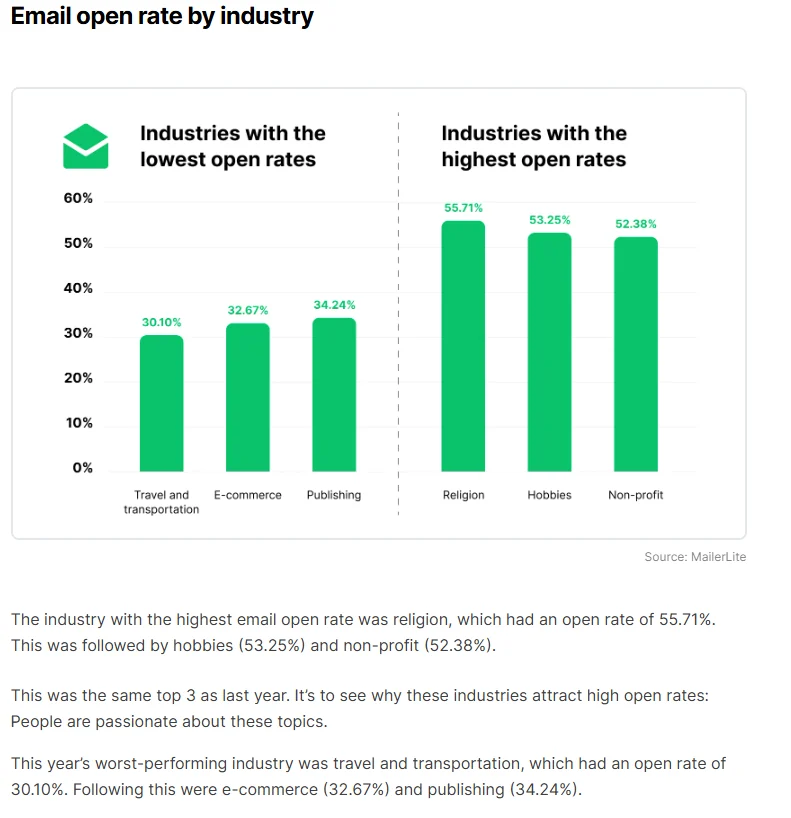
Renewal emails work best when they are short, personal, and about the member, not about the invoice. Members of mission-driven organizations do open email: MailerLite’s email benchmarks for 2026, published in December 2025, put the benchmark open rate for nonprofits at 52.38% and the click rate at 2.90%. Treat those as a rough nonprofit yardstick, not an association benchmark. The gap between opens and clicks is the point: a good subject line gets the open, and a single clear renewal link gets the click.
Here are four templates to adapt. They are illustrative starting points. Personalization fields are shown in [brackets].
Email 1: The value recap (90 days out)
Subject: [First name], here is your year with [Association]
Hi [First name], before your membership renews on [date], here is a quick look at your year: [number] events attended, [number] resources used, and [savings] saved on member pricing. Coming up next: [upcoming event]. Thanks for being part of this community. [Signature]
Email 2: The easy renewal (30 days out)
Subject: Renew in one click, [First name]
Hi [First name], your [membership type] membership renews on [date]. You can renew in under a minute here: [Renew now]. Your dues are [amount], and your invoice is attached if you need it for your records. Questions? Just reply to this email. [Signature]
Email 3: The final reminder (expiry day)
Subject: Your membership expires today
Hi [First name], your membership expires today. We have kept your access open for [grace period] days so nothing changes while you renew: [Renew now]. If something is not working for you, reply and tell us. We read every answer. [Signature]
Email 4: The win-back (30 days after)
Subject: We miss you at [Association]
Hi [First name], your membership lapsed last month, and we would love to have you back. Here is what is coming up: [event or benefit]. You can rejoin anytime here: [Rejoin]. And if membership was not right for you, could you tell us why in one click? [Short survey] [Signature]
Tips: send from a real person, not “noreply”; keep the renewal link near the top; and test every email on a phone.
Step 4: Recover failed payments automatically
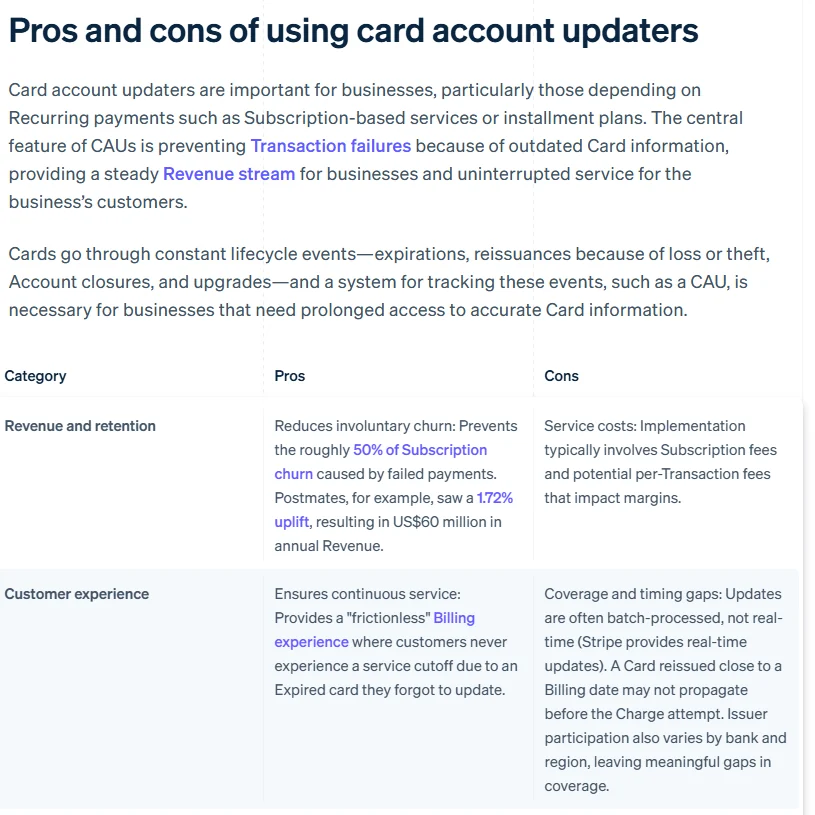
For organizations that use recurring billing, failed cards are one of the most common and most fixable causes of lapsed memberships. The member meant to renew; their card just did not go through. Across subscription businesses the problem is large. Stripe’s 2026 guide to card account updaters, citing a PYMNTS study, says these tools help prevent the roughly 50% of subscription churn caused by failed payments.
A simple recovery sequence:
-
Before it fails: email members whose card expires before their renewal date and ask them to update it. Ask your payment processor whether automatic card updating is available.
-
When it fails: retry the charge automatically over several days, and send a friendly “your payment did not go through” email with an update link.
-
If it keeps failing: a short personal note from staff, then move the member into the grace period rather than cancelling straight away.
Step 5: Segment renewals by engagement
Sending every member the same renewal sequence ignores the most useful thing you know about them: how engaged they have been. With lack of engagement named by nearly half of respondents in the 2026 benchmark as a top reason members leave, this is where the human part of renewals pays off. Our guides on how to identify members at risk of churning and on the member engagement score show how to set the segments.
| Segment | Signals | Renewal approach |
|---|---|---|
| Highly engaged | Attended events, used benefits, opened emails | Make it effortless: one-click renewal, a thank-you, maybe early renewal |
| Occasionally engaged | Some activity, but not recently | Remind them of value: an unused benefit, an upcoming event that fits |
| Inactive | No events, few opens, no benefit use | Human outreach first, well before the renewal email |
| First-year members | In their first renewal cycle | Extra attention: they renew at the lowest rate |
Find at-risk members before renewal season. Score your members on the signals above with our free Member Risk Scoring Sheet. Get the scoring sheet
Step 6: Add a grace period and a win-back sequence
A grace period (often 15 to 30 days) keeps members’ access open while they renew, which avoids the frustration of being locked out over a few days’ delay. After the grace period, move members to “lapsed” rather than deleting them, and keep them in a win-back sequence for a few months: an invitation to a relevant event, a reminder of what is new, and a simple way to rejoin.
Always ask why they left. Even a one-question survey gives you the most honest feedback you will get all year. Our guide on how to reduce membership churn covers what to do with the answers.
Step 7: Measure what matters
The number that matters most here is your renewal rate, tracked separately for first-year members, since good automation should lift both. For context, the same MGI 2026 report found a median of 82% for all members and 72% for first-year members. Compare yourself with your own history first, and use our guide to member engagement metrics for the formulas and the rest of the set.
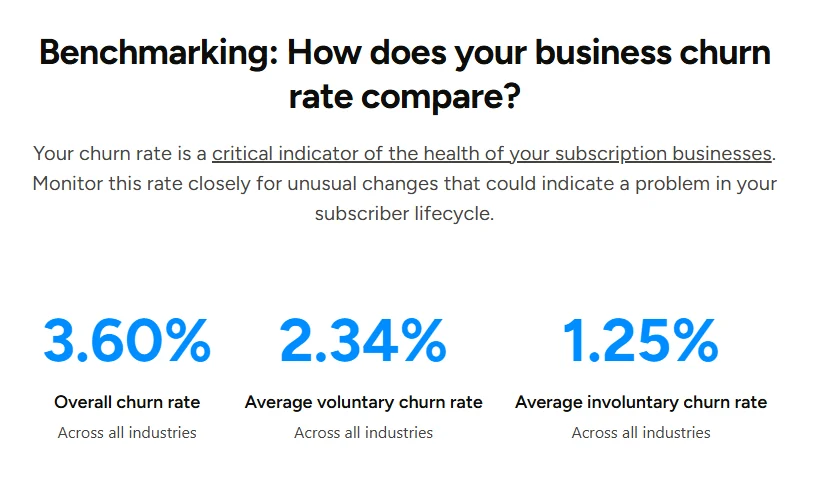
It also helps to split churn into two kinds: voluntary (the member chose to leave) and involuntary (a payment failed). They need different fixes. Recurly’s churn rate benchmarks, updated with July 2026 data, show an average voluntary churn rate of 2.34% and an average involuntary churn rate of 1.25%. Those figures cover subscription businesses across industries, not associations, but they show that involuntary churn is a meaningful part of the total.
| Metric | How to calculate it | How often |
|---|---|---|
| Renewal rate | Members who renewed ÷ members up for renewal | Monthly |
| First-year renewal rate | First-year members who renewed ÷ first-year members up for renewal | Monthly |
| Involuntary churn | Lapses caused by failed payments ÷ members up for renewal | Monthly |
| Win-back rate | Lapsed members who rejoined ÷ lapsed members | Quarterly |
Share these numbers with your board in the same format every time. Our free Board Report Template has a ready section for renewals.
Renewal automation checklist
- We have chosen auto-renew, manual, or both, and explain it clearly to members.
- Renewal outreach starts at least 90 days before expiry.
- Members are segmented by engagement before renewal begins.
- Inactive and long-standing members get human outreach, not just emails.
- Renewal emails are short, personal, and work on a phone.
- Failed payments trigger retries and a card-update email.
- There is a grace period before access ends.
- Lapsed members enter a win-back sequence and get a short survey.
- We track renewal, first-year renewal, and churn rates every month.
If several of these depend on manual exports today, your system is the bottleneck. Our guide to membership management software features covers what to look for.
How Melora Connect helps with renewals
In Melora Connect, renewals, payments, events, and communications share one member record, so you can see a member’s whole year before their renewal comes up, not just their expiry date.
Renewals, reminders, and invoice runs happen on their own, with saved card autopay and MeloraPay card and ACH payments landing in your own Stripe account. Members renew and pay from the member portal. Smart segments flag new, at-risk, and lapsed members, engagement scoring and event attendance land on each profile, and segmented emails pull merge fields from the live record, which is exactly what your renewal segments and value-recap emails need. The Melora Connect Go member app is coming soon.
Our pricing is published, and staffed onboarding is included on every plan. Because you get a team, not a login, we help you set up your renewal timing and messages around how your organization works.
Want to see your renewal workflow in Melora Connect? Bring your current renewal process and we will map it into a 120-day workflow with you. Book a demo
Frequently asked questions about membership renewals
How do you automate membership renewals?
To automate membership renewals, schedule reminder emails starting about 90 days before expiry, collect payments online with automatic invoices and receipts, retry failed payments and request card updates, and update membership status at expiry. Segment members by engagement, and keep personal outreach for inactive and long-standing members.
When should membership renewal reminders start?
Membership renewal reminders should start around 90 days before expiry, with a value recap rather than an invoice. Review engagement at 120 days, send the direct renewal request about 30 days before, follow up at 14 days, and send a final reminder on expiry day.
What is a good membership renewal rate?
In MGI’s 2026 Membership Marketing Benchmarking Report, the median renewal rate was 82% for all members and 72% for first-year members. Use those as context, but compare yourself mainly with your own history, and track your first-year renewal rate separately because it is usually the weak spot.
Should memberships auto-renew?
Auto-renew usually reduces lapses caused by forgetting or payment issues. If you offer it, explain the terms clearly at signup, remind members before each charge, and make cancelling easy. The FTC restarted rulemaking on auto-renewal practices in 2026, so check the rules where you operate. This is not legal advice.
How do you recover failed membership payments?
Email members whose card will expire before renewal, retry failed charges automatically over several days, and send a friendly update-your-card email with a direct link. If the payment keeps failing, send a personal note from staff and move the member into a grace period instead of cancelling right away.
How long should a membership grace period be?
A membership grace period of 15 to 30 days is common. It keeps access open while members renew, so a short delay does not lock anyone out. After the grace period, change the status to lapsed rather than deleting the record, and move the member into a win-back sequence.
What should a membership renewal email say?
A membership renewal email should be short, personal, and about the member. Recap the value they received, state the renewal date and amount, and give one clear renewal link near the top. Send it from a real person, invite replies, and test it on a phone before it goes out.
The bottom line
Most churn is not a decision. It is a forgotten email, an expired card, or a member who never quite found their place. Automation handles the first two reliably and frees your team to handle the third personally.
Start with the 120-day workflow and the four emails, add failed-payment recovery and a grace period, and measure every month. A few points of renewal rate is real money, and it compounds every year.
Ready to stop chasing renewals by hand? See how reminders, autopay, and invoice runs work on one member record in Melora Connect. Book a Melora Connect demo