

A board report template for associations is a ready-made slide deck that turns membership, engagement, and financial data into a short update a board can act on. This free PowerPoint template has eight slides with editable charts, speaker notes that explain each metric, and an appendix of KPI definitions with formulas.
What’s on each slide
1. Title
Period, organization name, who prepared it, and the date.
2. At a glance
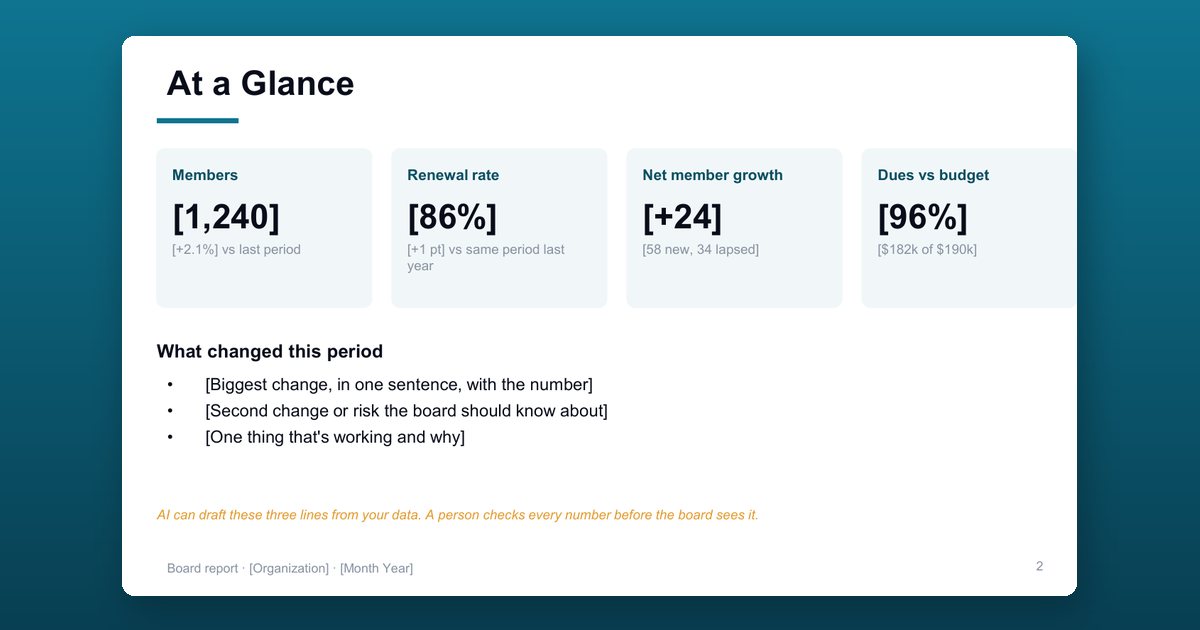
Four headline numbers (members, renewal rate, net member growth, and dues against budget) with their change, plus the three things that changed this period and why they matter.
3. Membership
A 12-month member chart with new members, lapsed members, renewal rate, and first-year renewal rate.
4. Engagement
Event attendance by month, with engagement rate, events per member, email click rate, and portal activation.
5. Retention: members at risk
High, Medium, and Low risk tiers, how many in each renew within 90 days, outreach status, and the support you need from the board.
6. Revenue
Actual against budget for dues, events, and sponsorship, with total revenue to date, open invoices, and the year-end forecast.
7. Decisions and asks for the board
Up to three decisions or asks, each with options, a recommendation, and a deadline.
8. Appendix: KPI definitions
Every metric’s formula, source, and owner, so the numbers mean the same thing every period.
KPI definitions included
| KPI | Formula |
|---|---|
| Renewal rate | Renewed ÷ eligible to renew × 100 |
| First-year renewal rate | First-year members renewed ÷ first-year members due × 100 |
| Net member growth | New members − lapsed members |
| Engagement rate | Members with 1+ engagement action ÷ active members × 100 |
| Events per member | Event check-ins ÷ active members |
| Dues against budget | Dues collected to date ÷ dues budget to date × 100 |
Tips for a board report that leads to decisions
Lead with change, not with every number. Report actions next to counts, such as “12 of 18 high-risk members contacted”, not only how many are at risk. Keep definitions stable: automating a report only helps once everyone agrees what each number means.
Who this template is for
Executive directors, CEOs, and membership or finance staff at associations, chambers of commerce, professional societies, and nonprofits who present to a board of directors monthly or quarterly.
How to use the board report template
Replace every bracket
Fill in each [bracket] with your period, organization name, and numbers. Speaker notes on every slide explain what goes there and how to calculate it.
Paste your data into the charts
The charts hold sample data. Right-click a chart and choose Edit Data to paste your own monthly members, event attendance, and revenue against budget.
Write the three changes first
On the At a glance slide, lead with the three things that changed this period, each with its number, before the board sees any detail.
Match finance's cut-off date
Use the same cut-off date as your finance report so revenue figures agree, and explain any variance over 5 percent in one sentence.
Keep the KPI definitions stable
Use the appendix slide to agree each KPI's formula, source, and owner once, then report it the same way every period.
Frequently asked questions
What should an association board report include?
A one-slide summary of what changed, membership numbers and renewal rates, engagement, members at risk and what staff are doing about them, revenue against budget, the decisions you need from the board, and definitions for each KPI so the numbers mean the same thing every time.
How do you calculate member renewal rate?
Renewal rate equals members who renewed divided by members who were eligible to renew in the period, times 100. Report first-year renewal separately: first-year members renewed divided by first-year members due, times 100.
Why report first-year renewal rate separately?
First-year members usually renew at a lower rate than long-time members, and their rate shows the board whether onboarding works. Blending the two hides the problem.
How do you measure member engagement for a board report?
Engagement rate equals members with at least one engagement action in the period, such as an event, group, volunteer role, or portal login, divided by active members, times 100. Agree which actions count and keep the list fixed.
How long should a board report be?
Eight slides is plenty: one summary, four data slides, one for decisions, and an appendix of definitions. Keep the decisions slide to three items, and use any spare slot for a clear ask of board members.
Can I use AI to write the board report?
AI can draft the three summary lines from your numbers. Paste only aggregated figures, never member names, and have a person check every number against the source report before the board sees it.
Does the template work in Google Slides or Keynote?
The template is built for PowerPoint, where the charts stay editable with Edit Data. It also opens in Google Slides and Keynote, though charts may need to be rebuilt there to change their data.