

A member risk scoring sheet is a spreadsheet that gives every member a score for how likely they are not to renew, so a membership team knows who to contact first. This free Excel sheet scores each member from 0 to 100 using nine signals from a simple export, sorts them into High, Medium, or Low risk, and suggests the next action.
How the risk score works
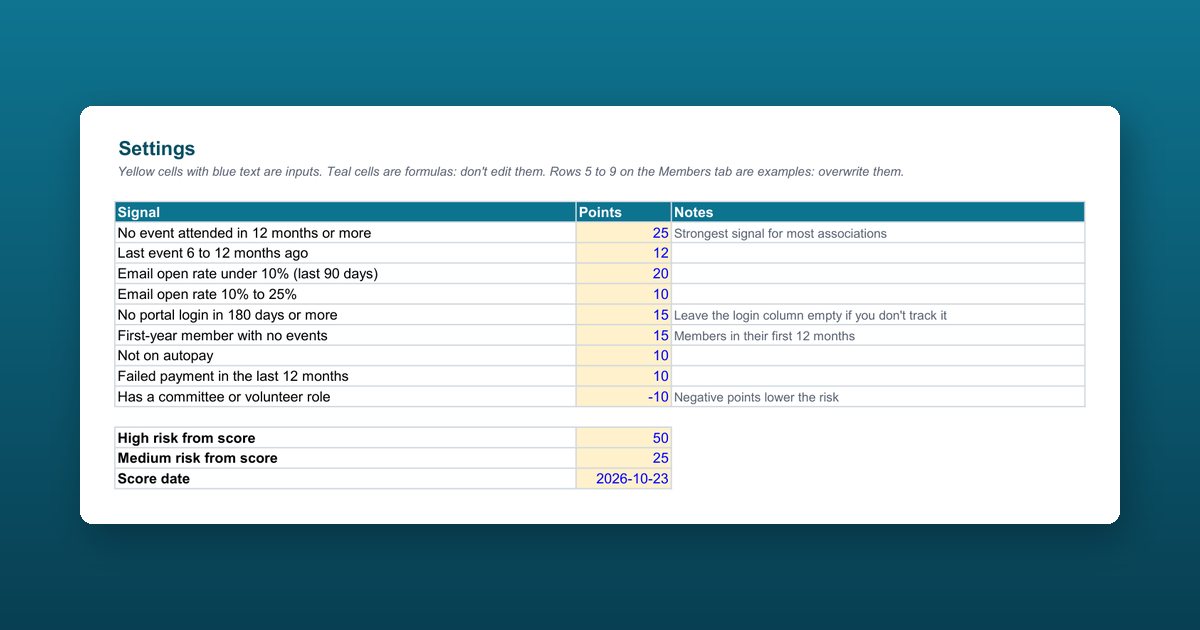
Each signal adds points. The total is capped between 0 and 100, then compared with two thresholds: 50 points or more is High risk, 25 or more is Medium, and anything lower is Low. These are the default points, all editable on the Settings tab:
| Signal | Default points |
|---|---|
| No event attended in 12 months or more | 25 |
| Last event 6 to 12 months ago | 12 |
| Email open rate under 10% (last 90 days) | 20 |
| Email open rate 10% to 25% | 10 |
| No portal login in 180 days or more | 15 |
| First-year member with no events | 15 |
| Not on autopay | 10 |
| Failed payment in the last 12 months | 10 |
| Has a committee or volunteer role | -10 |
If you don’t track portal logins or email opens, leave those columns empty and they add no points.
Suggested actions by tier
| Tier | Suggested action |
|---|---|
| High, renewing within 90 days | Call this week: renewal is close |
| High | Personal call or meeting |
| Medium | Targeted invitation and one unused benefit |
| Low | Regular communications |
What’s inside the workbook
Four tabs: How to use, Settings (signals, points, and thresholds), Members (300 rows with five worked examples), and Summary (members per tier and high-risk members renewing in the next 90 days). Teal cells are formulas; yellow cells are yours to fill.
A starting point, not a validated model
The signals and points reflect what usually predicts non-renewal in associations, but every membership behaves differently. Test the weights against your own lapsed members before you rely on them, and use the scores to offer help, never to penalize anyone.
Who this sheet is for
Membership managers, retention and engagement staff, and executive directors at associations, chambers of commerce, and professional societies who want a renewal-risk list before the renewal season starts.
How to use the member risk scoring sheet
Check the settings
On the Settings tab, keep the default points for each signal and the tier thresholds, or adjust them to fit how your members behave.
Paste your member export
On the Members tab, paste one row per member into the yellow columns: name, type, join and renewal dates, last event, email open rate, last portal login, autopay, failed payments, and committee or volunteer role.
Read the score, tier, and action
Each row calculates tenure, days to renewal, a risk score from 0 to 100, a tier (High, Medium, or Low), and a suggested action. Rows 5 to 9 are examples to overwrite.
Start with high-risk members renewing soon
The Summary tab counts members in each tier and how many high-risk members renew in the next 90 days. Call those first.
Test the weights against last year
Score last year's members and check that the ones who lapsed scored high. Adjust the points until they do.
Frequently asked questions
What is a member risk score?
A member risk score is a number that estimates how likely a member is not to renew, built from signals such as event attendance, email engagement, portal logins, and payment history. It helps a small team decide who to call first, before renewal time instead of after a member lapses.
Which signals predict that a member won't renew?
For most associations, the strongest signal is no event attended in 12 months or more. Low email open rates, no portal login in six months, a first-year member who hasn't attended anything, no autopay, and a recent failed payment add risk. A committee or volunteer role lowers it.
Do I need AI to predict member churn?
No. Start with rules like the ones in this sheet: they're transparent and easy to explain to your board. Add AI scoring later, once you have a few years of history to train and test it on.
How do I know if the points are right for my organization?
Back-test them. Score last year's members as they looked a few months before renewal, then check whether the members who lapsed landed in High or Medium. If they didn't, raise the points for the signals they shared and test again.
What should we do with high-risk members?
Offer help, never penalties. The sheet suggests a call this week for high-risk members renewing within 90 days, a personal call or meeting for other high-risk members, a targeted invitation and one unused benefit for medium risk, and regular communications for low risk.
Is it safe to put member data in this spreadsheet?
Keep the file on your organization's systems, share it only with staff who need it, and delete copies you no longer use. The sheet contains no macros and sends nothing anywhere.
How many members can the sheet score?
Three hundred rows are ready to use. For more members, copy the formulas in the teal columns down, or score each membership type in its own copy.