People · Events · Communities

Most renewal campaigns end in the same place: your website.
The reminder email goes out, the member clicks, and for the next two minutes your website decides whether that renewal happens. If the link lands on the homepage, the login fails, or the payment form asks for details you already have, the member closes the tab and tells themselves they will do it later. Often, later never comes.
This guide covers the association website best practices that matter most for renewals: a renewal path with no dead ends, reasons for members to visit between renewal dates, and the one metric that shows whether your site helps or hurts retention. It is written for associations, chambers of commerce, professional societies, and any organization that depends on members coming back each year.
Quick answer: The association website best practices that boost renewals are: link every reminder straight to a prefilled renewal page, keep renewal under two minutes, offer autopay, put “Renew” and “Member login” in the header, give members a self-service portal, show the value they received, keep events current, sync the directory, design for phones, and meet Core Web Vitals and WCAG 2.2.
How does your website affect membership renewals?
Your website is where a renewal decision turns into a payment, and where members see the value they pay for. Yet association websites are usually planned around one audience: prospects. The homepage sells the mission, the membership page lists the tiers, and the “Join” button gets the best spot. Current members, the people who fund most of the budget, get a login link in the footer.
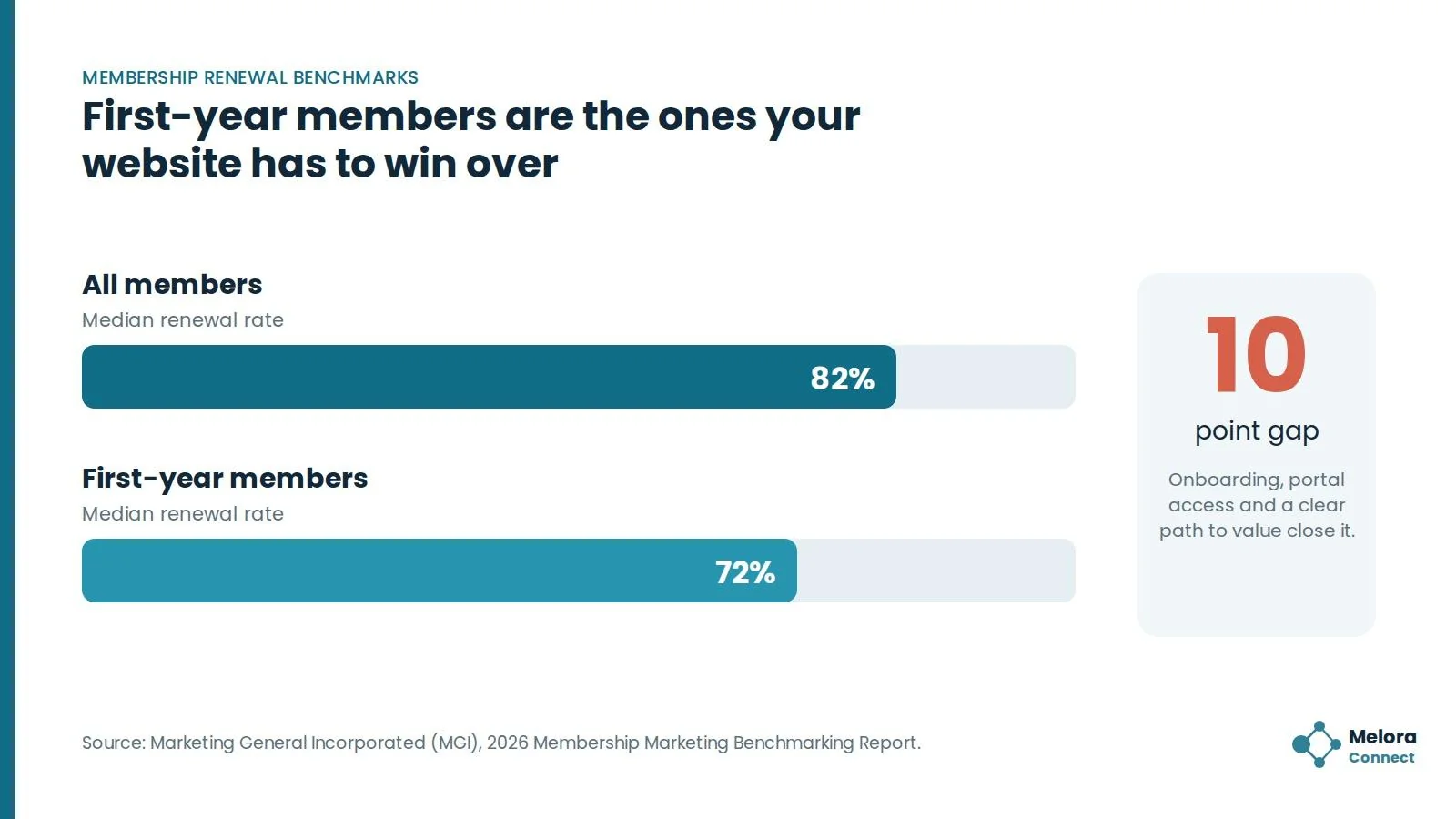
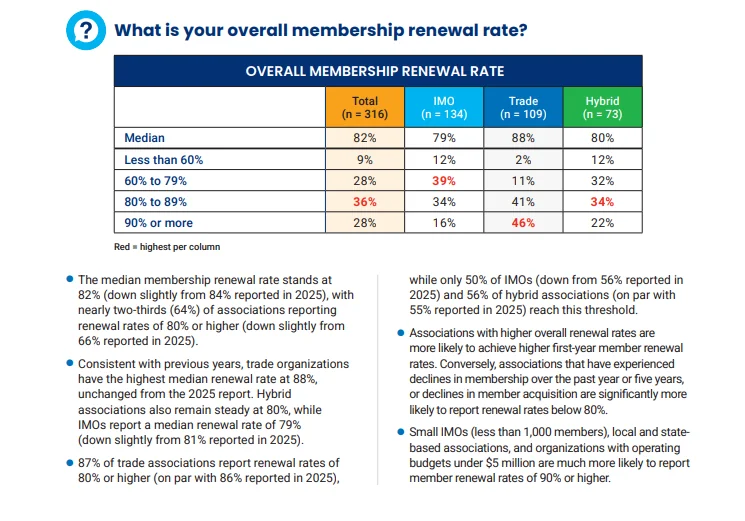
That is backwards for retention. In the MGI 2026 Membership Marketing Benchmarking Report, based on input from nearly 500 association professionals, the median renewal rate was 82%, and first-year members renewed at a lower median of 72%.
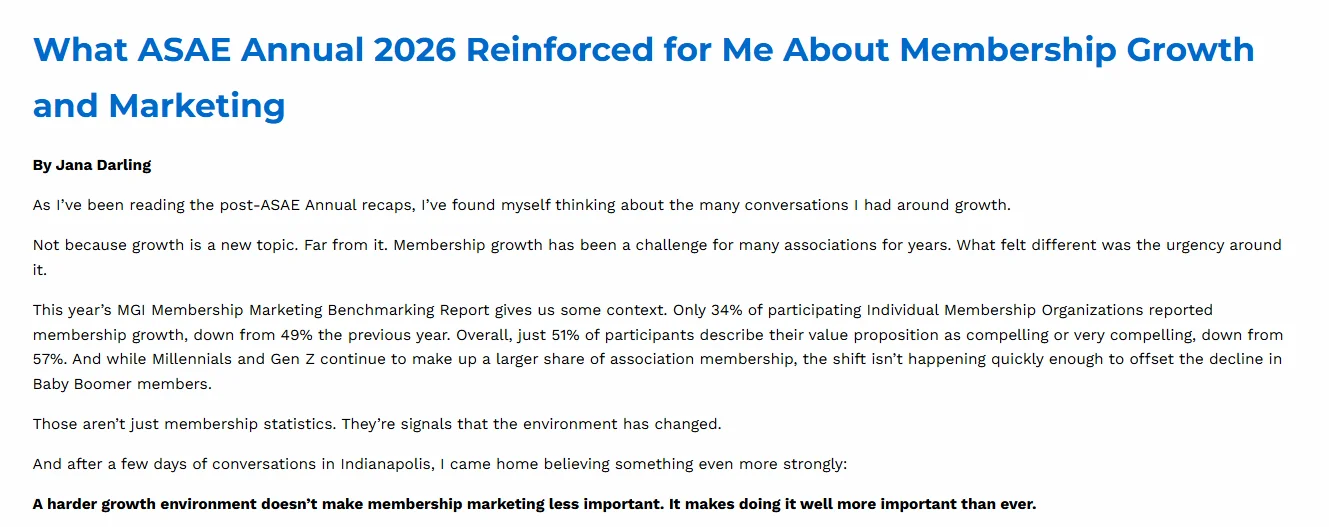
The value problem shows up too. Writing about the same 2026 report, MGI’s president noted that just 51% of participants describe their value proposition as compelling or very compelling, down from 57% the year before.
Your website is where that value shows up or does not. Every visit between renewals, whether to register for an event, look up a contact, or read an update, is a small reminder of what membership is worth. And when renewal comes, the website is where the decision turns into a payment.
10 association website best practices that support renewals
These practices follow the order a member experiences them: first the renewal path, then the reasons to keep visiting all year, then the technical foundations underneath. For a wider view of how renewal fits into the member lifecycle, see our guide to membership management.
1. Link renewal reminders straight to the renewal page
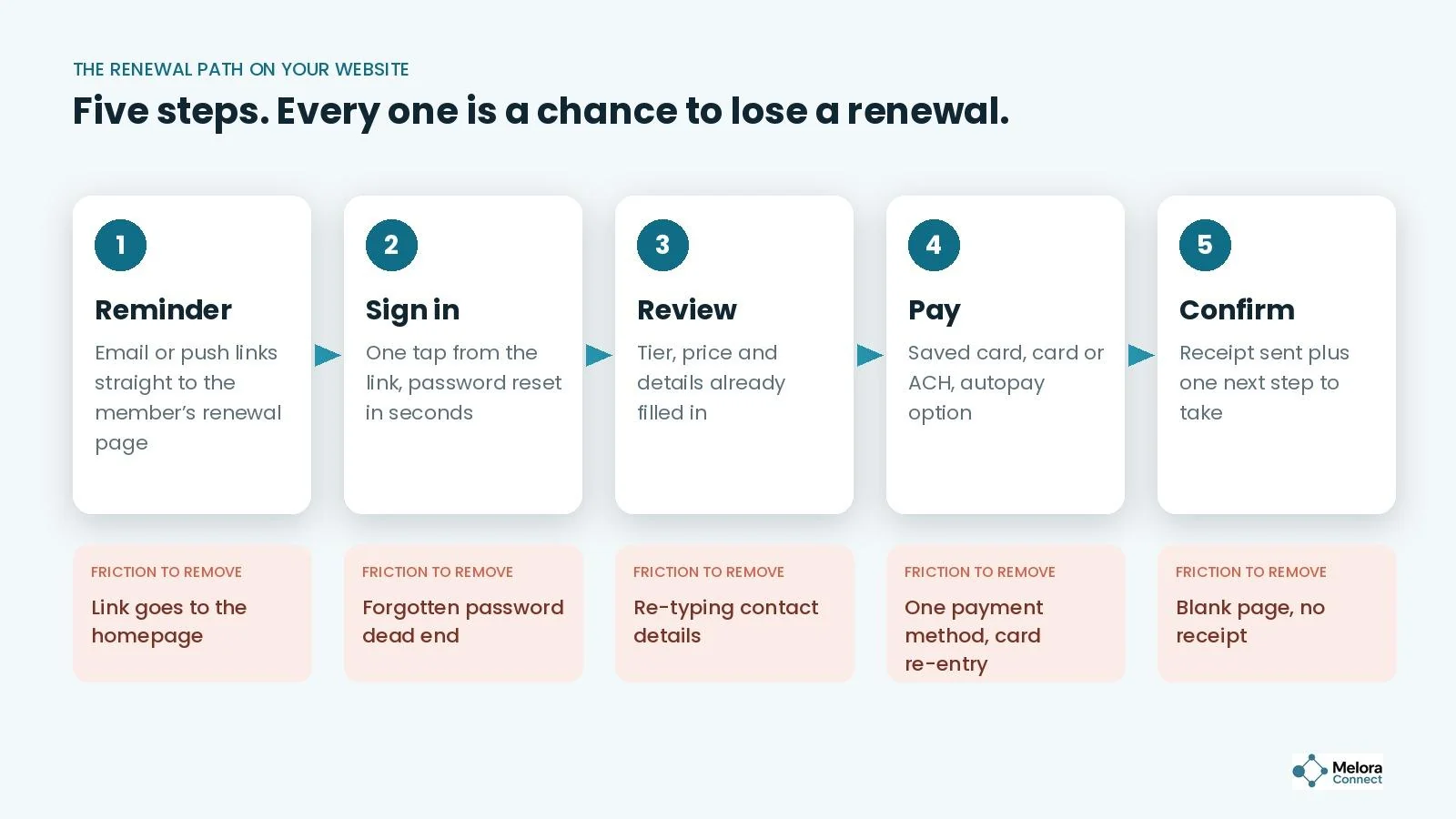
A renewal email that links to the homepage asks the member to find the renewal page on their own, and every extra click is a chance to get distracted. Each reminder should open the member’s own renewal page with their membership type and amount due already showing. Our guide on how to automate membership renewals covers what each reminder should say and when, and our free AI Prompt Library for Associations helps you draft the reminder copy faster, in your own voice.
2. Make renewal a two-minute task
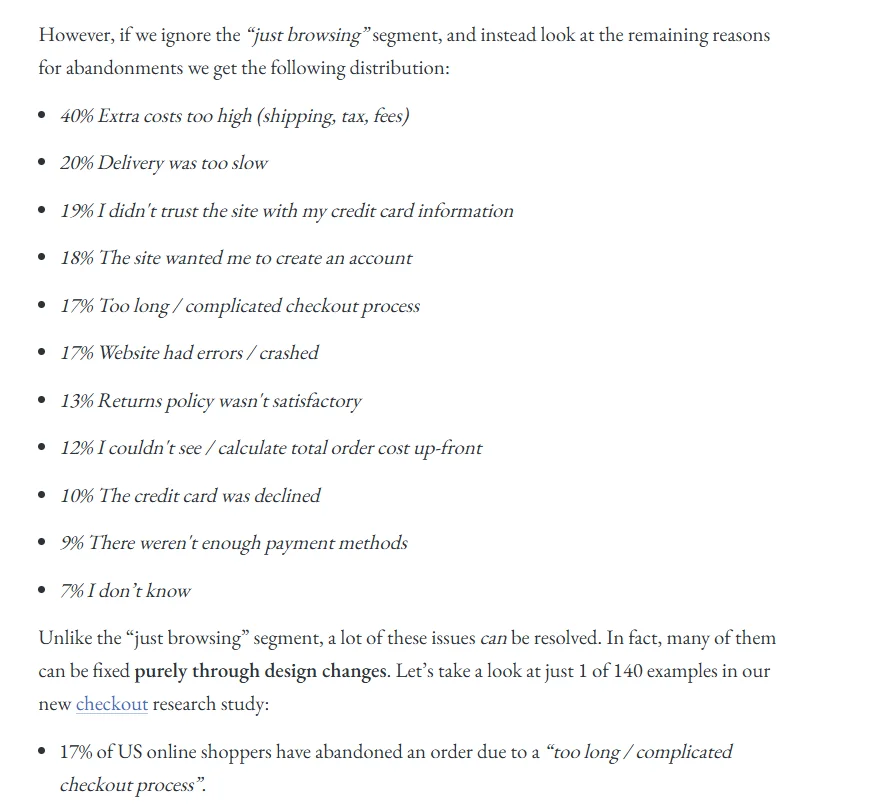
Count the fields in your renewal form. Anything you already know (name, organization, address, membership type) should be prefilled and editable, not blank. Retail research shows what extra effort costs: in Baymard Institute’s cart abandonment research, updated in September 2025, 17% of US online shoppers who abandoned an order said the checkout was too long or complicated, and 12% could not see the total cost up front. Members paying dues are no more patient than shoppers.
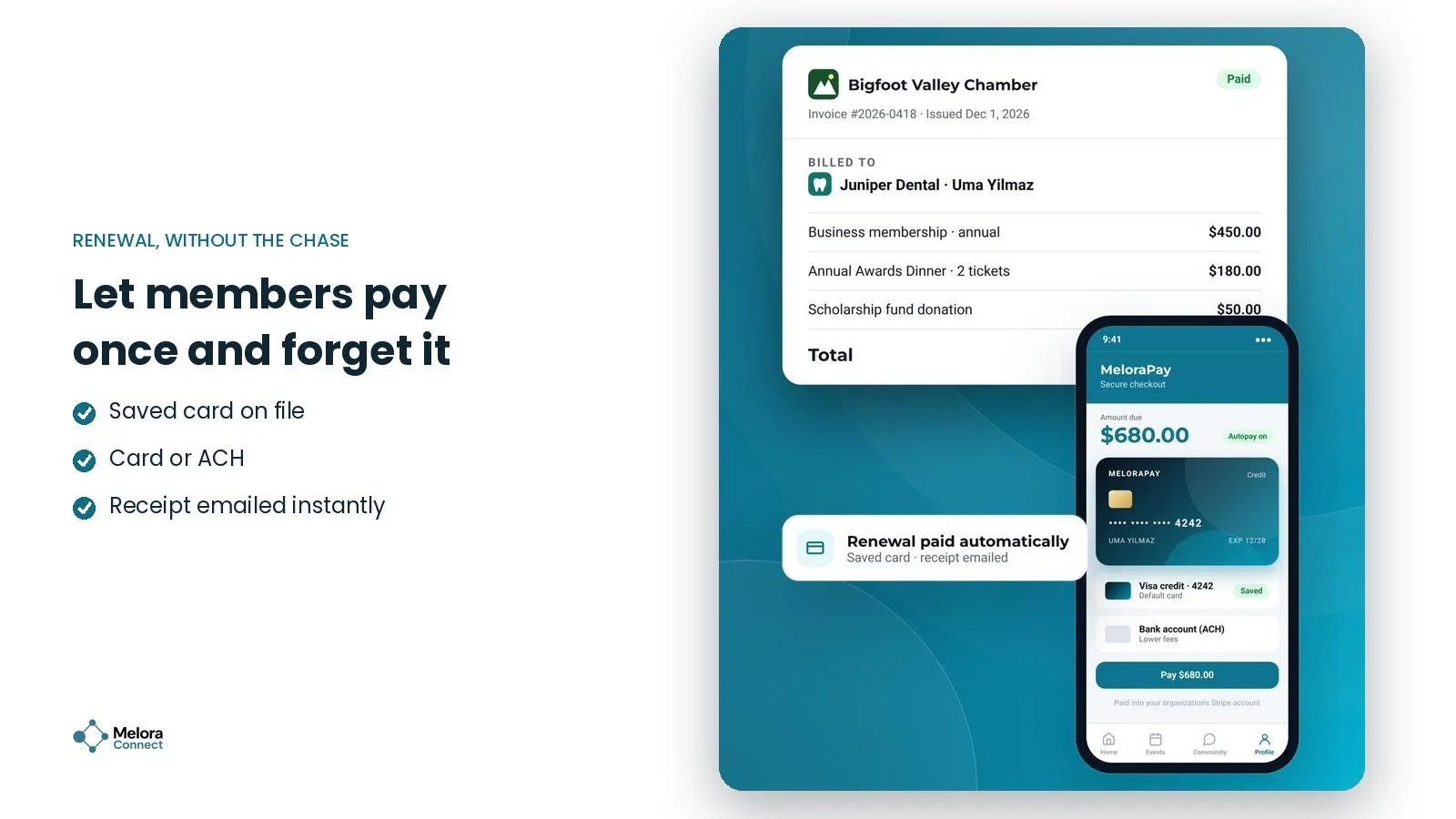
The fixes are simple: prefill everything, show the total before the payment step, and offer more than one way to pay. Card plus ACH covers most members and businesses.
3. Offer autopay, and say so clearly
The easiest renewal is the one a member does not have to think about. Make saved-card autopay visible at joining and at renewal, explain exactly when the card will be charged, and send a heads-up before each charge so nobody is surprised. Autopay removes the lapses that happen simply because someone meant to renew and forgot.
4. Put “Renew” and “Member login” where members look first
Place a “Member login” or “My account” link in the main navigation, not the footer. For logged-in members with a renewal coming up, show a clear “Renew” prompt on the pages they already visit. A paying member should not have to scroll past three “Join now” buttons to find the way in.
5. Give members a self-service portal
Members should be able to update contact details, download receipts, see their renewal date, and register for events without emailing staff. Every request that goes through your inbox is friction for the member and time for your team. Self-service also keeps your data current, which means renewal reminders actually reach the right inbox.
6. Show members the value they have already received
Most renewal pages show one thing: the price. Add the member’s year in a few lines, such as events attended, resources downloaded, credits earned, or committees joined. A short “your year with us” summary answers the question every member asks before paying: was it worth it? With only about half of associations confident their value proposition is compelling, this is the cheapest place to make it visible. Strategy 7 in our guide on how to improve membership management shows a simple version you can send by email too.
7. Keep events and news current
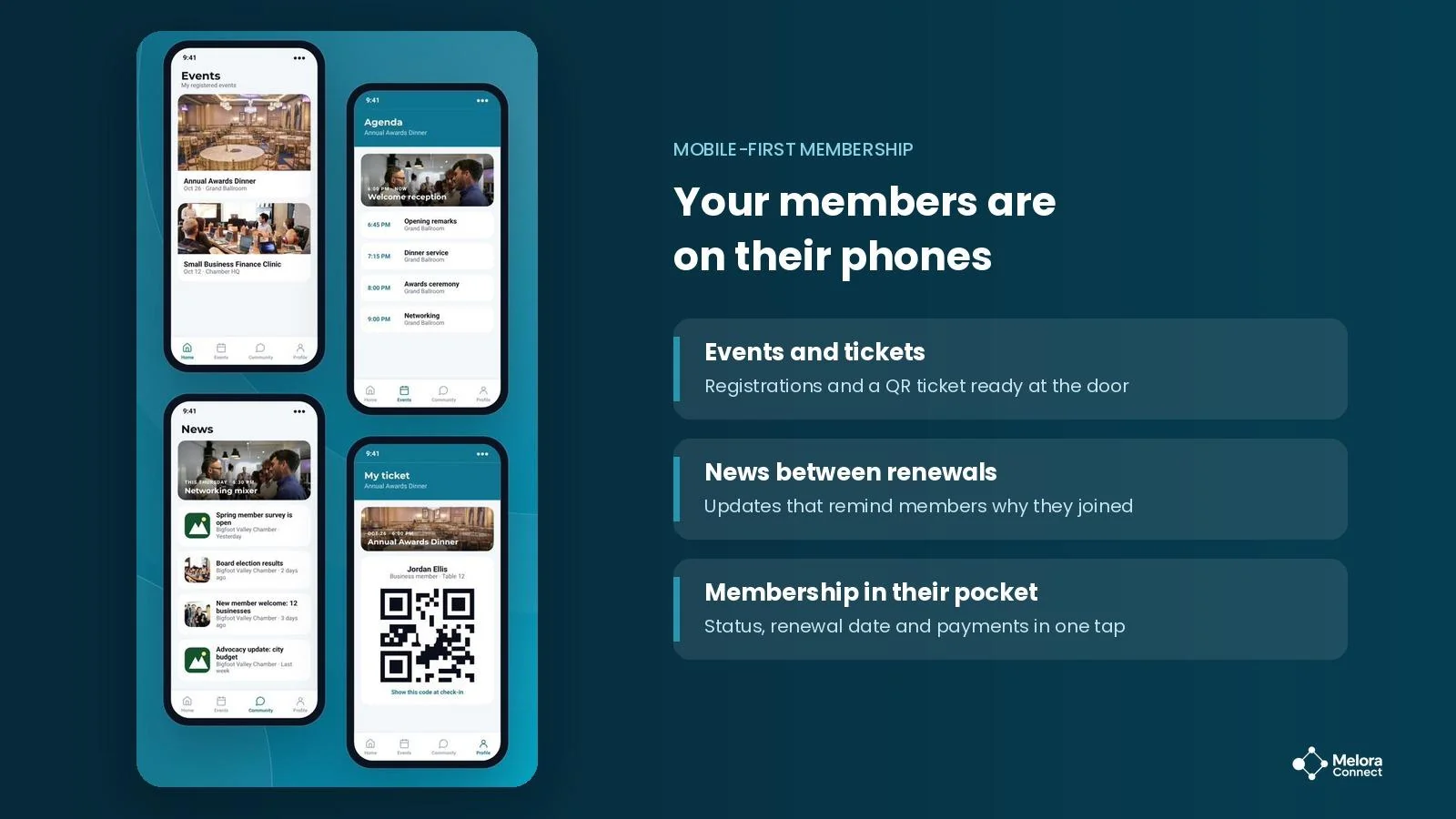
Nothing says “nobody’s home” like an events calendar whose next event happened last spring. Members use these pages to judge whether the organization is active. Keep at least the next 60 to 90 days of events published, including online sessions, and post short, regular updates: new members, advocacy wins, board decisions, and event recaps.
8. Make the member directory worth visiting
For chambers and trade associations, the directory is a core benefit. It is how members find each other and how the public finds members. A searchable directory that stays in sync with member records gives members a reason to keep their profiles current and a concrete benefit to point to at renewal.
9. Design for phones first
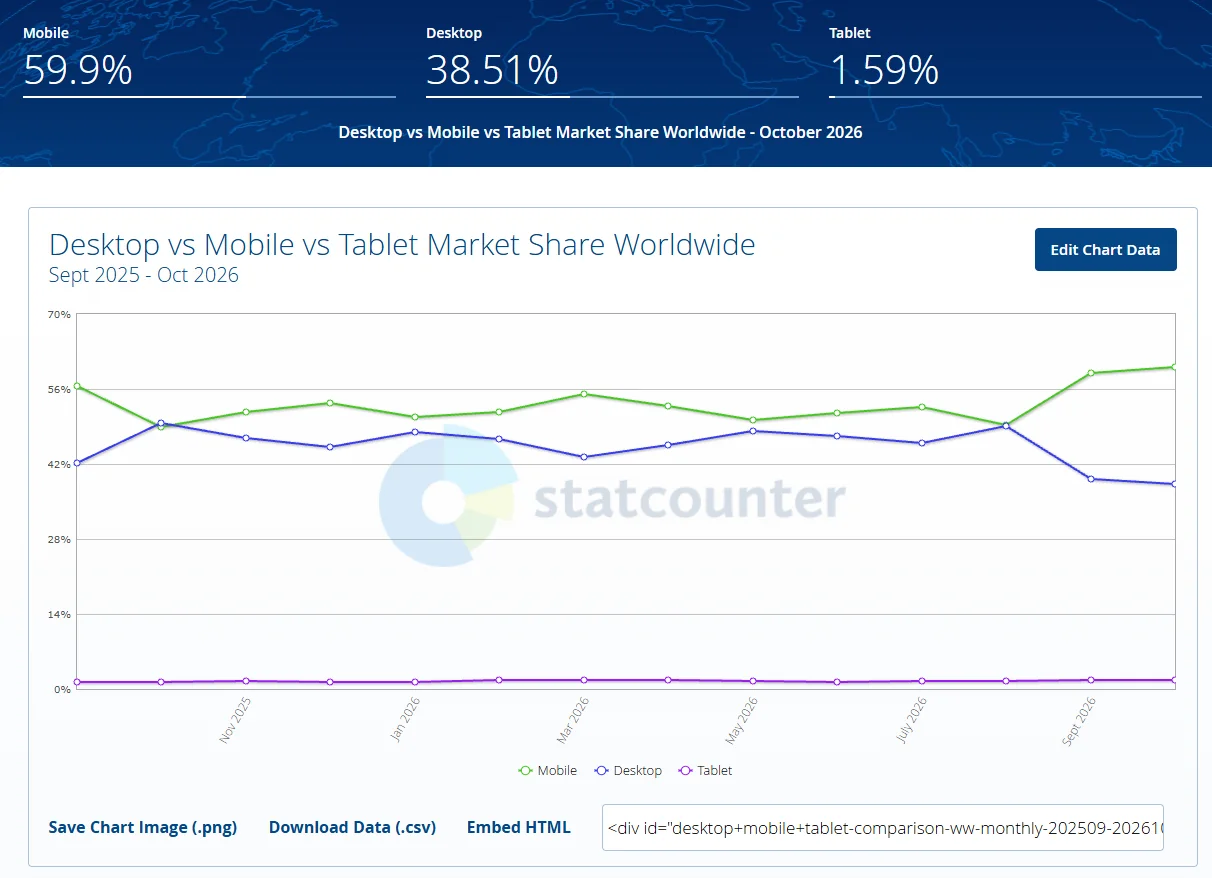
In StatCounter’s 2026 data, phones account for about half or more of worldwide web traffic, reaching 59% in September 2026, and members often open renewal reminders between meetings. Test your renewal path on a phone: can someone read the amount due, tap pay, and finish without zooming or turning the screen?
10. Build for speed and accessibility
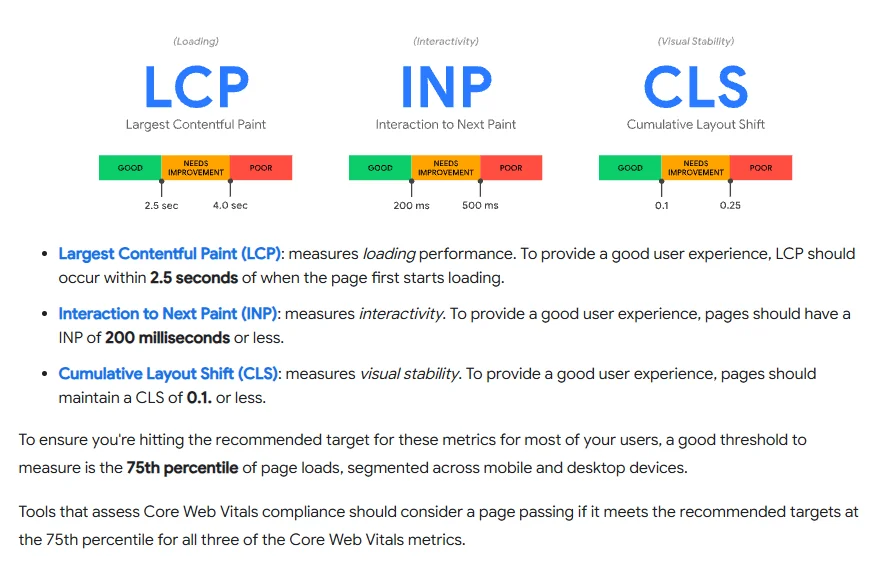
Slow or hard-to-use pages lose people before they reach the renewal button. Google’s Web Vitals guidance gives practical targets: main content visible within 2.5 seconds, responses to taps within 200 milliseconds, and a layout shift score of 0.1 or less, measured across at least 75% of visits. For accessibility, use the W3C’s WCAG 2.2 as your standard: readable contrast, labeled form fields, keyboard navigation, and alt text on images. Members with disabilities need it, and it makes the site easier for everyone else too.
Association website best practices at a glance
Use this table to audit your own site, or to pressure-test any website platform you are evaluating.
| Area | What good looks like | Red flag |
|---|---|---|
| Renewal links | Every reminder opens the member’s own renewal page | Reminder links to the homepage |
| Renewal form | Details prefilled, total shown up front | Members retype information you already have |
| Payments | Saved card, card and ACH, autopay option | One payment method, card entered every year |
| Navigation | Member login and Renew visible in the header | Login link buried in the footer |
| Member portal | Self-service updates, receipts, registrations | Members email staff to change an address |
| Proof of value | The member’s year summarized at renewal | Renewal page shows only the price |
| Events and news | Next 60 to 90 days published, regular updates | Calendar still shows last year’s events |
| Directory | Searchable and synced to member records | A PDF updated once a year |
| Mobile | Renewal finishes on a phone without zooming | Payment form breaks on small screens |
| Speed and accessibility | Meets Core Web Vitals and WCAG 2.2 | Slow pages, unlabeled form fields |
Example: two ways the same renewal can go
Illustrative example. Picture a professional association with 1,200 members. Marcus, an accountant, joined last year and attended two webinars. His renewal reminder arrives on a Tuesday morning, and he opens it on his phone between client meetings.
In a disconnected setup, the website fights him. The link opens the homepage. He taps “Members,” hits a login screen, and cannot remember his password. The reset email takes ten minutes, and by then he is in a meeting. That evening he finds the renewal form, which asks for his firm’s address again, so he closes it to finish at his desk. Three weeks later, he is on the lapsed list.
With a connected website, the same renewal takes two minutes. The link opens his renewal page directly. His details are already filled in, next to a short summary of his year: two webinars and two continuing-education credits. He taps “Pay with saved card,” turns on autopay for next year, and has a receipt before his next meeting starts.
Same member, same dues, same value. The only difference was how much effort the website asked of him.
How do you test your renewal path in five minutes?
Walk the path yourself, on a phone, the way a member would:
-
Send yourself a real renewal reminder and open it on your phone, away from your desk.
-
Count the taps from the email to the receipt. Every tap you can remove is worth removing.
-
Note every field you had to type that the association already knew.
-
Try the password reset and time how long the email takes to arrive.
-
Check the receipt: does it arrive at once, and does it show the amount and the new renewal date?
-
Repeat the test on a desktop and note anything that only works on one of the two.
Whatever slowed you down is what slows your members down. Start with practices 1 and 2, then run the test again before each renewal season.
Found friction? Book a demo and see what your renewal path would look like in Melora Connect. Book a Melora Connect demo
Which website metric predicts renewals?
Website analytics usually track traffic. For renewals, one number tells you more: your renewal page conversion rate, the share of members who reach the renewal page and finish paying. Renewal page conversion rate = members who paid ÷ members who reached the renewal page × 100. A low rate means members arrive ready to renew and leave without paying, so look at the form and the payment step, and compare phones with desktop. For the full set of membership metrics and formulas, see our guide to member engagement metrics. To share the number with your board each quarter, use our free Board Report Template.
How Melora Connect approaches association websites
Most association websites are built and run separately from the membership system. The site says one thing, the database says another, and staff copy updates between them by hand. Directories go stale, the events calendar falls behind, and renewal links point somewhere generic because the website does not know who the member is.
Melora also builds and hosts your organization’s website as a separate package, and a self-serve website builder is coming soon. Today, Melora Connect powers the parts of your site that decide renewals: a member portal where members renew, pay, register, and update their profiles, and a public member directory that stays in sync with member records. Renewals run on the same member record: automated reminders and invoice runs, saved-card autopay, and card or ACH payments through MeloraPay, with every payment landing in your own Stripe account.
Events feed the same record. For an online event, Melora creates the Zoom meeting and checks in the people who joined, so attendance shows up on each member’s profile without a spreadsheet in between. Chapters and CE credits are live too, so the value a member received sits on the same record as their renewal. The Melora Connect Go member app, with tickets and news in members’ pockets, is coming soon.
And because you get a team, not a login, our team helps you set up renewal timing, reminder copy and the member portal around how your organization actually works.
See your renewal path in Melora Connect. Book a demo and we will walk through your current renewal process, from the first reminder to the receipt. Book a Melora Connect demo
Frequently asked questions about association websites
What are the most important association website best practices for renewals?
Link every renewal reminder directly to a prefilled renewal page, offer saved-card autopay and more than one payment method, give members a self-service portal, and make sure the whole path works on a phone.
How can an association website improve member retention?
By delivering value between renewal dates: current events, regular news, a useful directory, and a portal where members can see what they have used. Members who get value from the site all year have a clear reason to renew.
What should a membership renewal page include?
The member’s membership type and amount due, prefilled contact details, a short summary of benefits used, saved payment options, an autopay choice, and an instant receipt.
Does an association website need a member portal?
If members need to update their details, pay dues, or register for events, yes. A portal cuts staff requests and keeps member data accurate, which makes every renewal reminder more effective.
How fast should an association website load?
Aim for Google’s “good” Core Web Vitals: main content visible within 2.5 seconds, a response to taps within 200 milliseconds, and a layout shift score of 0.1 or less for at least 75% of visits.
How often should an association update its website?
Update events and news at least monthly, and always keep the next 60 to 90 days of events published. Review and test the full renewal path, including on a phone, before each main renewal season.
The bottom line
Your website is where renewal decisions turn into payments. The associations that renew best do not necessarily have the most impressive sites. They have sites that take effort away from members who already want to stay.
Start with the renewal path: link reminders straight to it, prefill it, and test it on a phone. Then give members reasons to visit all year, and let your website show them the value they have already received. For the members who still go quiet, here is how to identify members at risk of churning before renewal season.
Free tool: Member Risk Scoring Sheet. Before your next renewal season, flag the members most likely to lapse so your renewal page is not your only chance to keep them. Open the Member Risk Scoring Sheet
Sources
-
Marketing General Incorporated, 2026 Membership Marketing Benchmarking Report, 2026.
-
Marketing General Incorporated blog, What ASAE Annual 2026 Reinforced for Me About Membership Growth and Marketing, August 27, 2026.
-
Baymard Institute, 50 Cart Abandonment Rate Statistics, updated September 22, 2025.
-
StatCounter Global Stats, Desktop vs Mobile vs Tablet Market Share Worldwide, 2026.
-
web.dev (Google), Web Vitals.
-
W3C, Web Content Accessibility Guidelines (WCAG) 2.2, W3C Recommendation, updated December 2024.