People · Events · Communities

Quick answer: Membership management vs. CRM comes down to purpose. A CRM is built to move prospects through a sales pipeline to a closed deal. Membership management software is built to keep members through a yearly loop of joining, paying dues, engaging, and renewing, with dues, events, a member portal, and engagement data on one member record.
Key takeaways
-
A CRM is a line that ends at the sale. Membership is a loop that starts again at every renewal.
-
A CRM can run membership only after someone builds dues, renewals, member pricing, a portal, and a directory on top of it, and then maintains them.
-
If you collect dues, make membership software the system of record. If you keep a CRM, let it hold the sponsor pipeline.
-
Decide which system owns each piece of data before you connect the two.
When associations and chambers of commerce outgrow spreadsheets, one of the first questions is: “Should we just use a CRM?” It is a fair question, and the membership management vs. CRM decision shapes your staff’s work for years. Both tools store contacts, track interactions, and send email.
But a CRM is built to win a sale, and membership management software is built to keep a member. That difference shapes everything else. This guide compares the two side by side, shows where they overlap, what it costs to run membership on a CRM, how to split the work if you run both, and how to decide which one your organization needs.
What is the difference between membership management and a CRM?
The difference between membership management and a CRM is that a CRM is built to move a prospect to a sale, while membership management software is built to keep a member renewing, with dues, events, and member self-service running on one member record.
Both store people and their history. A CRM asks “what is the next step to close this deal?” Membership software asks “is this member getting value, and will they renew?”
What is a CRM?
A CRM (customer relationship management system) is software that helps businesses track prospects and customers, manage sales pipelines, and follow up on deals. Its core record is a contact or account, and its main job is moving people through stages, from lead to opportunity to closed sale.
CRMs are excellent at sales: tracking calls, forecasting revenue, assigning follow-ups, and reporting on which deals are likely to close. They are flexible by design, which is why they can be bent toward membership.
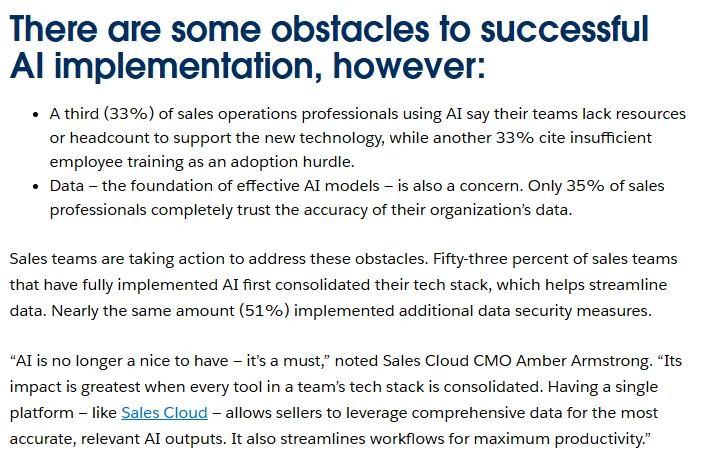
Even in the sales teams they were built for, a CRM does not keep itself clean. In Salesforce’s State of Sales research, a survey of 5,500 sales professionals published in July 2024, reps reported spending 70% of their time on non-selling tasks, and only 35% of sales professionals completely trust the accuracy of their organization’s data. Those are sales-team figures, not association benchmarks, but they show how much work sits around the record.
What is membership management software?
Membership management software is a platform that centralizes member records, applications, dues, renewals, events, communication, and reporting for organizations that run on membership. Its core record is the member, and its main job is keeping that member engaged and renewing, year after year. For the full member lifecycle, see our guide to membership management.
It handles what a membership organization does every day: membership tiers, dues and payments with automated renewals, member pricing for events, a member directory, committees, and engagement tracking. Our guide to membership management software covers the features and costs.
Membership management vs. CRM: key differences
Use this table to see where the two categories part ways.
| What to compare | CRM | Membership management software |
|---|---|---|
| Built for | Sales teams | Membership organizations |
| Core record | Contact or account | Member, with status, tier, and history |
| Relationship model | Linear: lead to sale | Cyclical: join, engage, renew |
| Revenue model | One-time or contract deals | Recurring dues, events, sponsorships, and donations |
| Renewals | Usually custom-built | Automated reminders, invoices, and autopay |
| Pricing logic | Price lists and quotes | Member and non-member pricing from membership status |
| Events | Usually a separate tool | Registration, member pricing, and check-in built in |
| Member self-service | Rarely included | Member portal, profile updates, and directory |
| Reporting | Pipeline, forecast, and win rate | Retention, lapsed members, engagement, and renewal risk |
| Success metric | Deals won | Members kept and engaged |
If you are building a requirements list from this table, our guide to membership management software features makes a good checklist.
Why is a CRM a line and membership a loop?
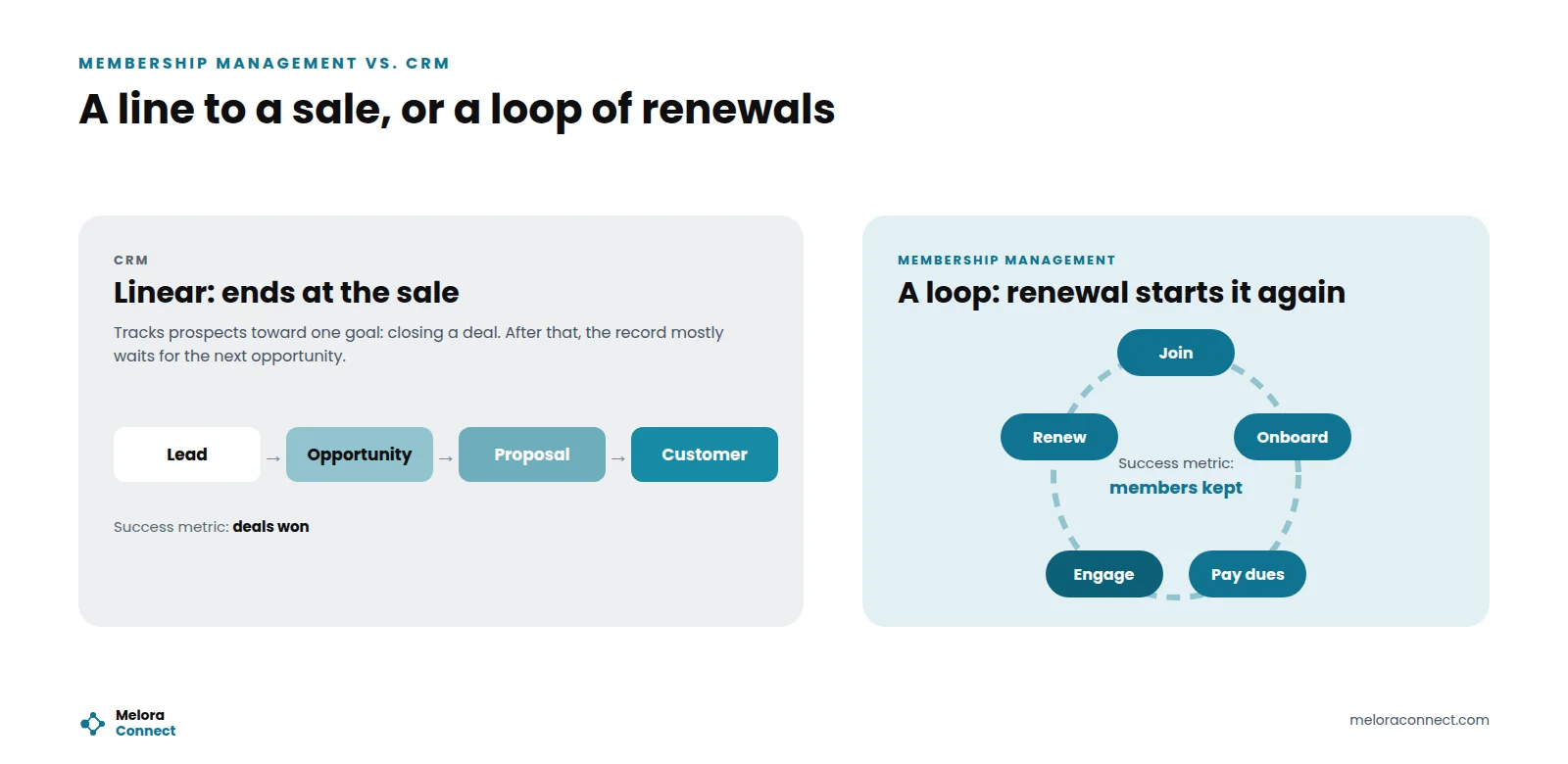
The clearest way to see membership management vs. CRM is the shape of the relationship. A CRM is a line: prospects move toward a sale, and once the deal closes, the record mostly waits for the next opportunity. Membership is a loop: a member joins, gets onboarded, pays dues, engages, and renews, and the cycle starts again.
Software built for a loop has to deliver value in every month of it, and notice when a member stops showing up. The same idea explains why retention and engagement are different jobs, as our guide to member retention vs. member engagement shows.
Where do membership management and a CRM overlap?
The two do share ground: contact records, interaction history, email to segments of your list, and reports. That overlap is why a CRM can look like a reasonable shortcut. The difference shows up in what happens around the contact record: dues, renewals, events, member benefits, and engagement. If your team is coming from spreadsheets, our guide on how to replace membership spreadsheets covers what to move first, whichever system you choose.
Can a CRM work as membership management software?
It can, with enough customization, but it usually costs more than it seems. To run membership in a CRM, organizations typically need to build or add:
-
Dues and renewal logic, including tiers, grace periods, and automated reminders.
-
Member pricing for events, tied to membership status.
-
A member portal for profile updates, payments, and registrations.
-
A member directory that members can search and edit.
-
Event registration and check-in connected to the member record.
-
Engagement tracking across events, committees, and email.
Each piece adds setup, maintenance, and dependence on whoever built it. Renewals alone have many moving parts, as our guide on how to automate membership renewals shows. For most membership organizations, the workarounds become the work.
What does the CRM workaround really cost?
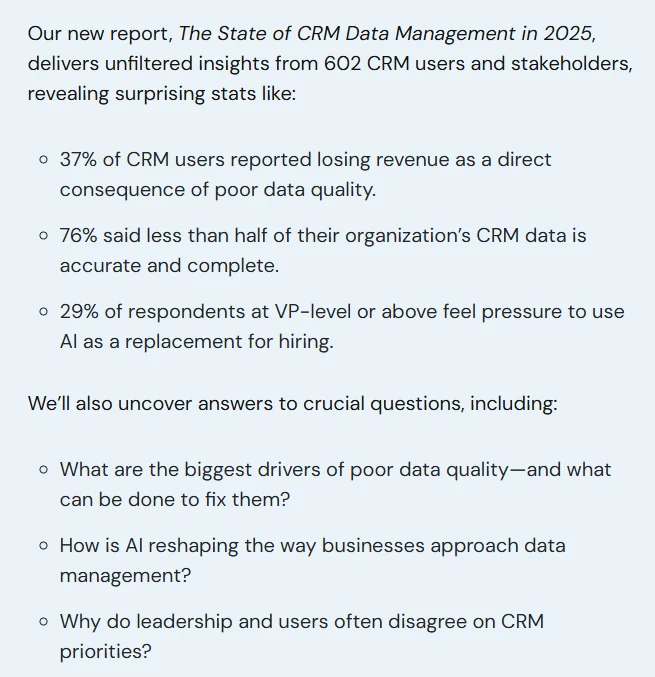
The license is the visible cost. The bigger costs are data quality and staff time. In Validity’s State of CRM Data Management in 2025 report, a survey of 602 CRM users and stakeholders, 76% said less than half of their organization’s CRM data is accurate and complete, and 37% reported losing revenue as a direct consequence of poor data quality. Those respondents are mostly commercial CRM users, not associations, but a custom membership build adds more fields and more rules that can drift.
Here is where the cost of running membership on a CRM tends to show up:
| Workaround | Where the cost shows up |
|---|---|
| Renewals built as recurring “deals” | Staff chase renewals by hand when an automation breaks; lapsed members slip through |
| Member pricing through discount codes | Members email for codes, pay the wrong price, and ask for refunds |
| A separate event registration tool | Attendee lists exported and matched to member records after every event |
| A directory updated by staff | Outdated listings, and members who cannot fix their own details |
| Custom fields for membership status and tier | Reports that disagree, because status lives in more than one place |
| One person who understands the setup | When that person leaves, nobody can change the system safely |
Add up what your current stack really costs. List every tool, license, and hour of upkeep, and compare it with one membership platform, in our free Chamber Tech Stack Cost Calculator. Open the calculator
Which one does your organization need?
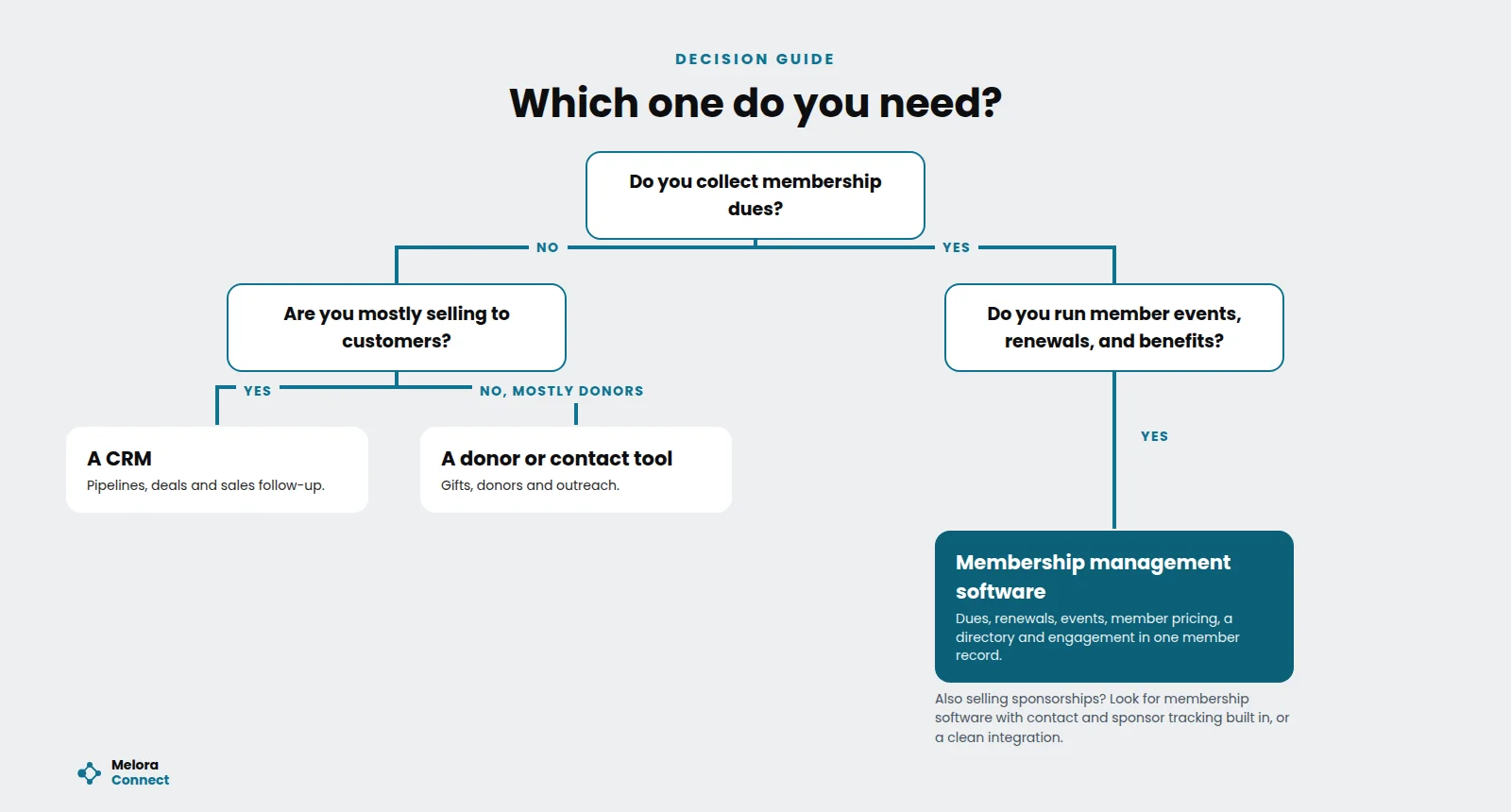
Start with one question: do you collect membership dues? If yes, and you run member events, renewals, and benefits, you need membership management software. If no, a CRM or a donor and contact tool is usually the better fit.
| If your main goal is | You likely need |
|---|---|
| Selling products or services to customers | A CRM |
| Collecting dues and managing renewals | Membership management software |
| Running member events with member pricing | Membership management software |
| Giving members a portal and a searchable directory | Membership management software |
| Tracking sponsorship or partnership sales | A membership platform with contact tracking, or a CRM alongside it |
| Seeing engagement and renewal risk for each member | Membership management software |
Some larger associations use both: membership management software as the system of record for members, and a CRM for a dedicated sponsorship or marketing team. If you go that route, make sure the member record stays the single source of truth.
Example: the chamber that ran membership on a sales CRM
This example is illustrative, and the numbers are not customer data. Picture a chamber of commerce with 600 member businesses that chose a popular sales CRM because a board member used one at work. The CRM tracked contacts well, but everything else needed a workaround. Renewals were managed as recurring “deals,” event registration ran in a separate tool, member pricing depended on discount codes, and the online directory was updated by hand.
Every month, the membership coordinator spent about two days matching event sign-ups and payments to member records. At renewal time, about 40 members still showed as “active” after their dues had lapsed. Only one staff member understood the custom setup, and when she left, nobody could fix it.
After moving to membership management software, renewals and invoices ran automatically, status updated when payment arrived, events used the same member records, members updated their own directory listings, and new staff learned the system in a week. The chamber kept only its sponsor pipeline in the CRM.
That change did not take a bigger team. It took software built for membership. For the wider picture of running a chamber, see our chamber of commerce management guide.
Running both? How to split the work between a CRM and membership software
Running two systems works when each one has a clear job. It fails when the same detail lives in both.
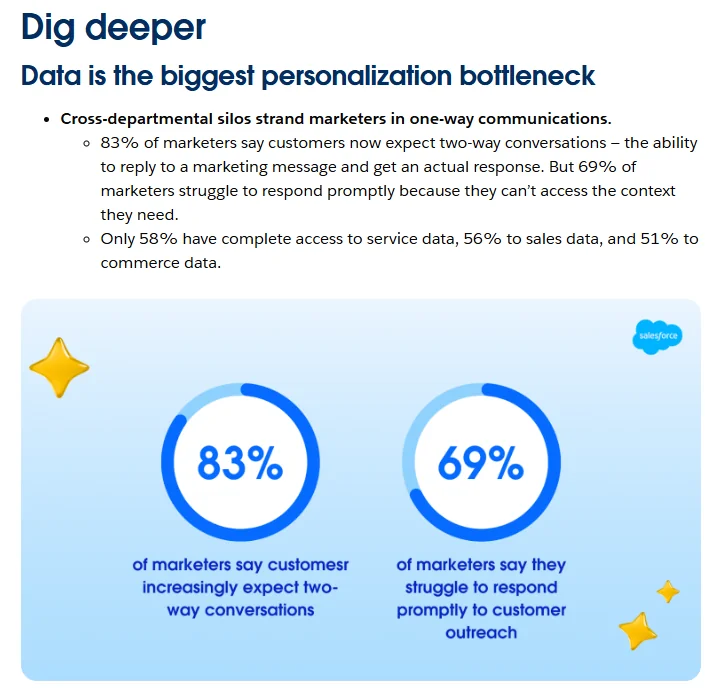
Disconnected data is a problem well beyond associations. In Salesforce’s State of Marketing report (10th edition), based on a survey of 4,450 marketing decision makers and published in February 2026, only 58% have complete access to service data, 56% to sales data, and 51% to commerce data, and 98% of marketers hit barriers to personalization, with data issues the most common culprits.
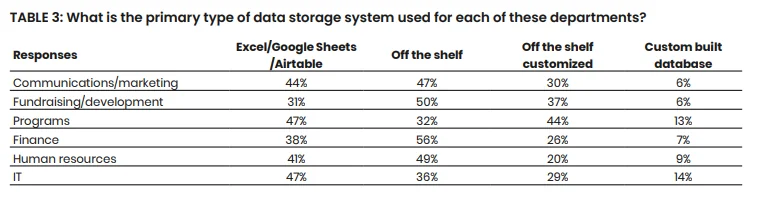
Mission-driven organizations see the same pattern. In NTEN’s 2025 Data Empowerment Report, a survey of 220 nonprofits, respondents named silos across departments among the most impactful data challenges, and 47% of program teams and 44% of communications teams store data in spreadsheet tools such as Excel, Google Sheets, or Airtable. Over 79% listed individual staff time as a challenge for data collection.
Who owns which data?
Decide up front which system owns what, so nobody updates the same detail in two places.
| Data | System of record | The other system gets |
|---|---|---|
| Member record, status, and tier | Membership software, always | A read-only copy |
| Dues, renewals, and invoices | Membership software | Status only, if the sales team needs it |
| Event registration, member pricing, and check-in | Membership software | Attendance summary |
| Sponsor and partner prospects, deals, and pipeline | The CRM | Nothing, unless a sponsor is also a member |
| Contact details | Edited in one system only | A synced copy |
| Engagement and renewal risk | Membership software | Shared with the sales team when they need it |
A simple rule helps: if it affects someone’s membership, it lives in the membership system. The CRM gets a copy, not the original. Before you connect the two, check these:
- Each field has one owner, written down.
- The sync runs one way for member status, from membership software to the CRM.
- Duplicate contacts are merged before the first sync, not after.
- Someone on staff reviews sync errors every week.
- Members can still update their own details in the member portal.
What should you ask before you choose?
Ask these questions of every option, CRM or membership software:
- How does a member’s status change when their payment arrives, or fails?
- Can members see their own price for events without a discount code?
- Can members renew, pay, and update their profile without calling staff?
- Which reports show lapsed and at-risk members, and who builds them?
- Who maintains the setup if the person who configured it leaves?
- Can we export all our data, anytime, in a standard format?
- Who migrates our data, and how long does it take to go live?
For the full buying process, from requirements to reference calls, see our guide to the AMS selection process.
Put these questions in writing. Send vendors the same requirements and score their answers side by side with our free Membership Software RFP Template. Download the RFP template
How Melora Connect fits in
Melora Connect is an all-in-one membership operating system, built around one complete record per member. It includes the contact management and segmented email you would expect from a CRM, plus the parts a CRM does not have out of the box: membership tiers, automated renewals and reminders, invoice runs, MeloraPay card and ACH payments into your own Stripe account with saved-card autopay, smart segments for new, at-risk, and lapsed members, engagement scoring, and a Monday morning briefing that sums up the week for staff.
Event registrations with member pricing and check-ins at the door feed the same record. Members renew, pay, register, join committees, and update their profiles in the member portal. You can import your data and export it to CSV anytime.
If your marketing or sponsorship team already works in HubSpot, Melora Connect connects to it, so HubSpot keeps the pipeline and campaigns while the member record in Melora stays the source of truth. Slack and Microsoft Teams alerts reach staff where they already work.
You get a team, not a login. Every plan includes staffed onboarding: our team configures your membership types and renewals, migrates your data, and stays on for ongoing managed service. Most organizations go live about 30 days after signing. A CRM helps you close the sale. We built Melora Connect for everything that happens after someone says yes.
Running membership on a CRM today? Bring your current renewal process, and we will show you the same members on one record, with renewals, events, and engagement in place. Book a demo
Frequently asked questions about membership management vs. CRM
What is the difference between membership management and a CRM?
A CRM is built to manage sales pipelines and move prospects to a closed deal. Membership management software is built to keep members through a recurring cycle of joining, paying dues, engaging, and renewing. It adds dues, automated renewals, member pricing for events, a member portal, a directory, and engagement tracking on one member record.
Can a CRM replace membership management software?
A CRM can replace membership management software only with significant customization: dues and renewal logic, member pricing, a member portal, a directory, and event registration tied to the record. Someone has to build and maintain each piece. For most associations and chambers, purpose-built membership software is simpler to run and cheaper to keep accurate.
Do associations need a CRM?
Most associations need membership management software first, because dues, renewals, events, and member self-service are their daily work. A separate CRM can make sense for a large sponsorship, partnership, or marketing team with its own pipeline. In that case, keep the member record in the membership system and give the CRM a synced copy.
Is association management software the same as a CRM?
No. Association management software often includes CRM-style contact management, but adds membership, dues, events, finance, and engagement features a CRM does not include by default. A CRM tracks deals, while an AMS runs the member relationship. Our comparison of AMS vs. membership management software explains how those two overlap.
Can you use HubSpot alongside membership management software?
Yes. Many associations keep HubSpot for marketing or sponsor sales and use membership management software as the system of record for members. The key is deciding which system owns each field, syncing member status one way, and merging duplicates first. Melora Connect has a live HubSpot integration that supports this split.
Which system should be the system of record for members?
If your organization collects dues, membership management software should be the system of record for members. It is where status, tier, renewals, payments, and event history change, so it holds the original. Any CRM you keep gets a synced copy for sales or marketing, and nobody edits membership details there.
The bottom line
When comparing membership management vs. CRM, start with the shape of your relationships. If you sell once and move on, a CRM fits. If your organization lives on dues, renewals, events, and year-round value, you need software built for the loop, and a CRM, if you keep one, works best as a helper with a clear, narrow job. The right system does not just remember your members. It helps you keep them.
See software built for membership. See dues, renewals, events, and engagement on one member record in Melora Connect. Book a demo
Sources
- Salesforce, Salesforce Report: Sales Teams Using AI 1.3x More Likely to See Revenue Increase (State of Sales, 6th edition), Jul 25, 2024.
- Validity, The State of CRM Data Management in 2025, Jul 10, 2025.
- Salesforce, 75% of Marketers Have Adopted AI, Yet Still Use It to Send Generic Campaigns (State of Marketing, 10th edition), Feb 19, 2026.
- NTEN, 2025 Data Empowerment Report, Jul 2025.