

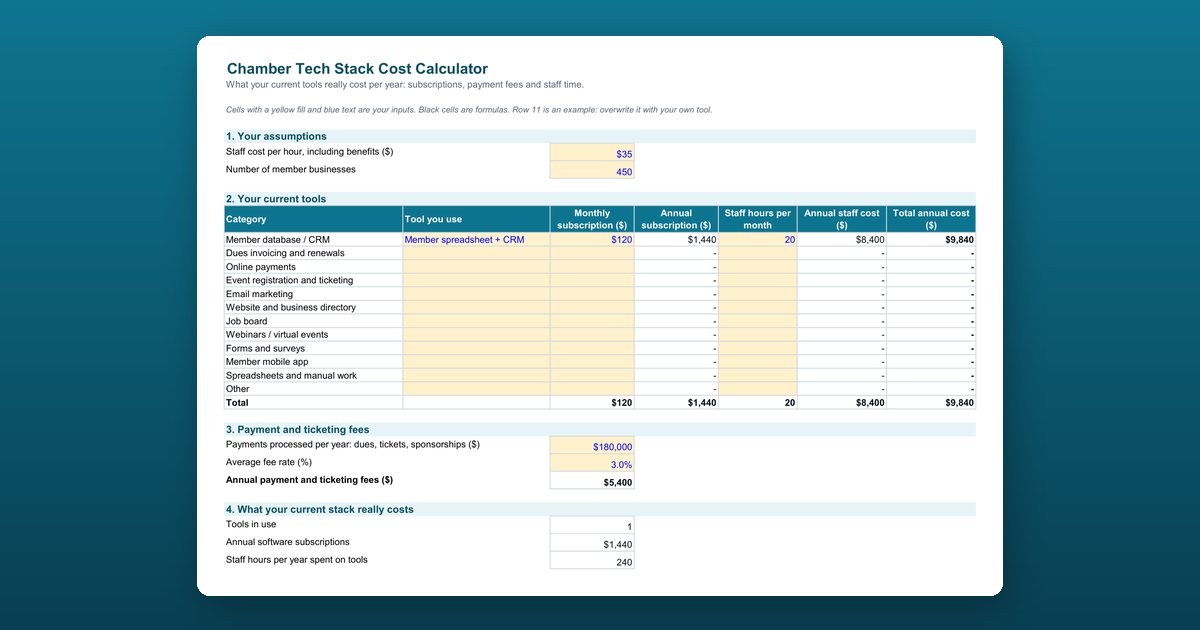
A chamber of commerce tech stack cost calculator adds up what a chamber really spends each year to run its tools: software subscriptions, payment and ticketing fees, and the staff time spent working between them. This free Excel calculator turns those three numbers into a total annual cost and a cost per member business, then compares them with any all-in-one platform quote.
What the calculator adds up
1. Your assumptions
Your staff cost per hour, including benefits, and your number of member businesses. These turn hours into dollars and the total into a cost per member.
2. Your current tools
Twelve categories with the tool you use, its monthly subscription, and the staff hours it takes each month. The sheet calculates the annual subscription, annual staff cost, and total for each row.
3. Payment and ticketing fees
The total you process per year in dues, tickets, and sponsorships, multiplied by your average fee rate.
4. What your current stack really costs
Tools in use, annual subscriptions, staff hours per year, annual staff cost, payment fees, the total annual cost, and the cost per member business.
5. Optional: compare with an all-in-one quote
Year 1 and ongoing cost with a new platform, and the difference against today. A positive number is a saving.
The 12 tool categories
- Member database or CRM
- Dues invoicing and renewals
- Online payments
- Event registration and ticketing
- Email marketing
- Website and business directory
- Job board
- Webinars and virtual events
- Forms and surveys
- Member mobile app
- Spreadsheets and manual work
- Other
Why staff time is usually the biggest line
Subscriptions are easy to see on a card statement. The hours aren’t: re-entering a new member in three systems, chasing renewals by hand, merging event registration lists with the member database, and rebuilding the same board report every month. Put an honest number on those hours and the real cost of a stack of separate tools becomes clear.
Who this calculator is for
Chamber presidents and CEOs, operations and membership directors, and finance committees deciding whether to keep their current tools or move to one platform. It works just as well for associations and other membership organizations.
How to use the chamber tech stack cost calculator
Enter your assumptions
In section 1, enter your staff cost per hour including benefits and the number of member businesses. Yellow cells with blue text are inputs; black cells are formulas.
List the tools you use today
In section 2, for each of the 12 categories, enter the tool, its monthly subscription, and the staff hours it takes each month, including time spent copying data between tools. Overwrite the example in row 11.
Add your payment and ticketing fees
In section 3, enter the total you process per year in dues, tickets, and sponsorships, and your average fee rate. The sheet calculates the annual fees.
Read what your stack really costs
Section 4 shows the number of tools in use, annual subscriptions, staff hours and staff cost per year, payment fees, the total annual cost, and the cost per member business.
Compare with an all-in-one quote
When you have a quote, fill in section 5: subscription, fee rate, one-time onboarding fee, tools you would keep, and staff hours after switching. It shows the year 1 and ongoing difference, where a positive number is a saving.
Frequently asked questions
How much does a chamber of commerce tech stack really cost?
More than the subscriptions suggest. A full count adds three things: every subscription, the fees on every payment you process, and the staff hours spent re-entering data, chasing renewals by hand, merging event lists, and building board reports. Staff time is usually the biggest line, which is why the calculator puts a dollar value on it.
What software does a chamber of commerce use?
Most chambers run some mix of a member database or CRM, dues invoicing and renewals, online payments, event registration and ticketing, email marketing, a website and business directory, a job board, webinars, forms and surveys, a member mobile app, and spreadsheets. The calculator has a row for each, plus one for anything else.
How do I calculate the cost of staff time spent on software?
Multiply the hours each tool takes per month by 12, then by your hourly staff cost including benefits. Count the hidden work too: copying data between tools, fixing duplicates, reconciling payments, and preparing reports by hand.
How do I compare my current tools with an all-in-one platform?
Enter the platform's annual subscription, payment fee rate, one-time onboarding fee, any tools you would keep, and your estimate of monthly staff hours after switching. The calculator shows the year 1 difference, which includes the onboarding fee, and the ongoing annual difference from year 2.
What is a good tech cost per member business?
There's no universal benchmark, and the example values in the sheet are placeholders, not benchmarks. Track your own cost per member business each year and compare it with your average dues, so you know what share of each membership goes to running tools.
Does the calculator work in Google Sheets?
Yes. It uses simple sums and multiplications, so it works in Google Sheets, LibreOffice Calc, and Numbers as well as Excel.
Is the calculator specific to Melora Connect?
No. It's vendor-neutral: use it with a quote from any membership platform, or just to see what your current tools cost.