People · Events · Communities

Every AMS demo now has an AI moment. A button writes the renewal email, a chat box answers questions about your members, a dashboard promises to predict who will lapse.
Some of it is genuinely useful. Some of it is a feature that looks great in a demo and gets switched off a month later. And some of it raises questions about member data that nobody in the room has thought to ask. The difference usually comes down to what the AI is built on, and how much control you have over it.
This guide explains what AI association management software is, what AI can and cannot do for an association, the nine features worth looking for, the questions to ask every vendor, and when it makes sense to connect your own AI assistant instead. If you are new to AMS platforms in general, start with what an association management system is. If you are still deciding where AI could help, our guide to AI for associations walks through ten practical use cases.
Quick answer: Good AI association management software runs on one connected member record, drafts with your data but waits for staff approval, shows the records behind every answer, explains every alert, and lets you switch each feature on or off with an audit log. Ask every vendor what data the AI sees and whether it trains models.
What is AI association management software?
AI association management software is an association management system (AMS) that uses artificial intelligence to help staff and members with tasks such as drafting communications, finding information, spotting at-risk members, suggesting segments, and answering common questions. The AI works on top of the AMS’s member records, payments, events, and engagement data.
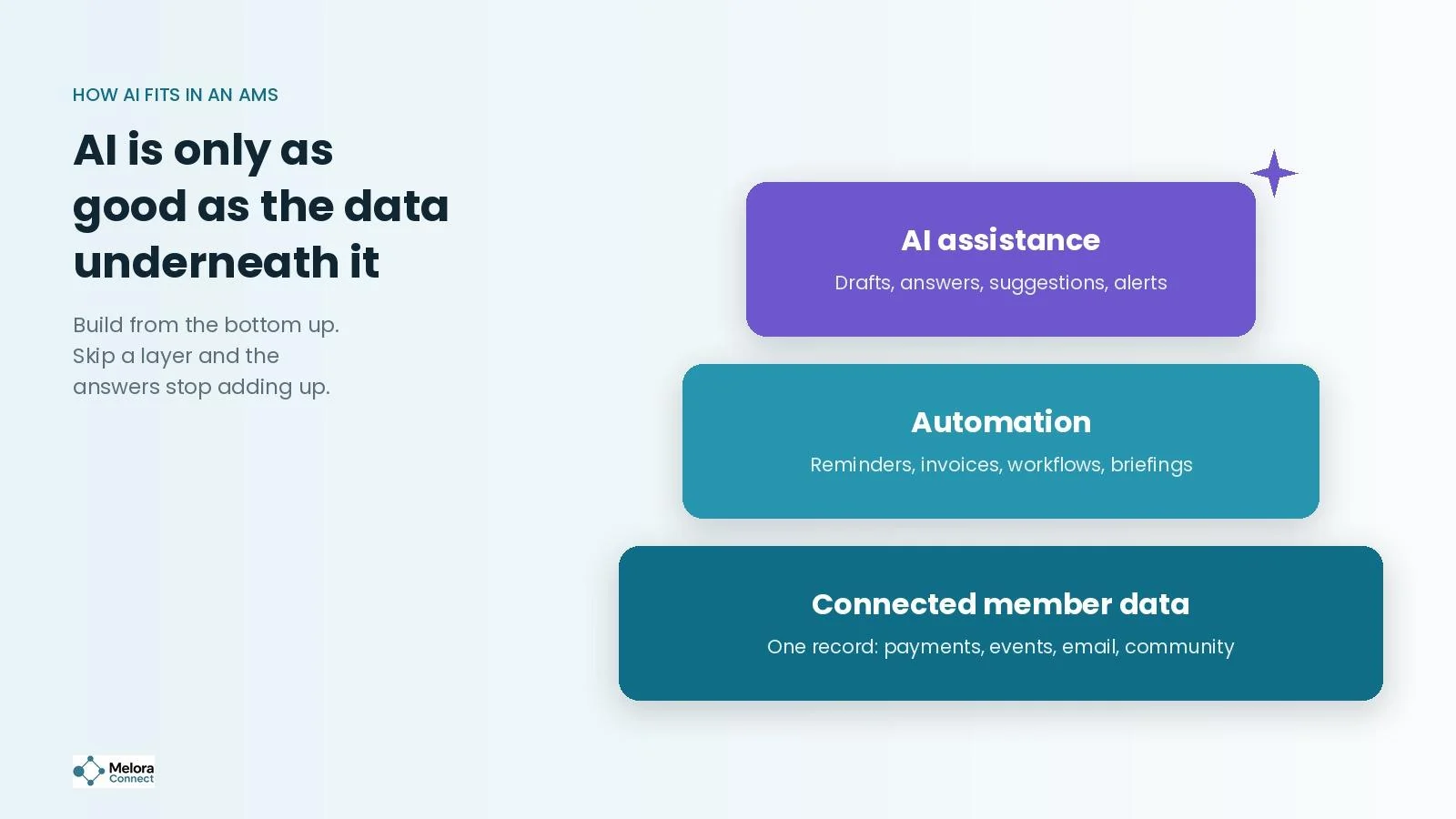
That last point matters most. An AI feature can only be as accurate as the data it can see. If your member data is split across tools, the AI will be confidently wrong in ways that are hard to spot.
How are associations using AI in 2026?
Fast, and more often than a year ago. In the Naylor 2026 Association Benchmarking Report, based on 665 association professionals, the share of associations using AI-powered communication tools frequently or daily nearly tripled, from 12.5% in 2025 to 33.5% in 2026. The share using no AI at all fell by half, from 42.3% to 21.0%.
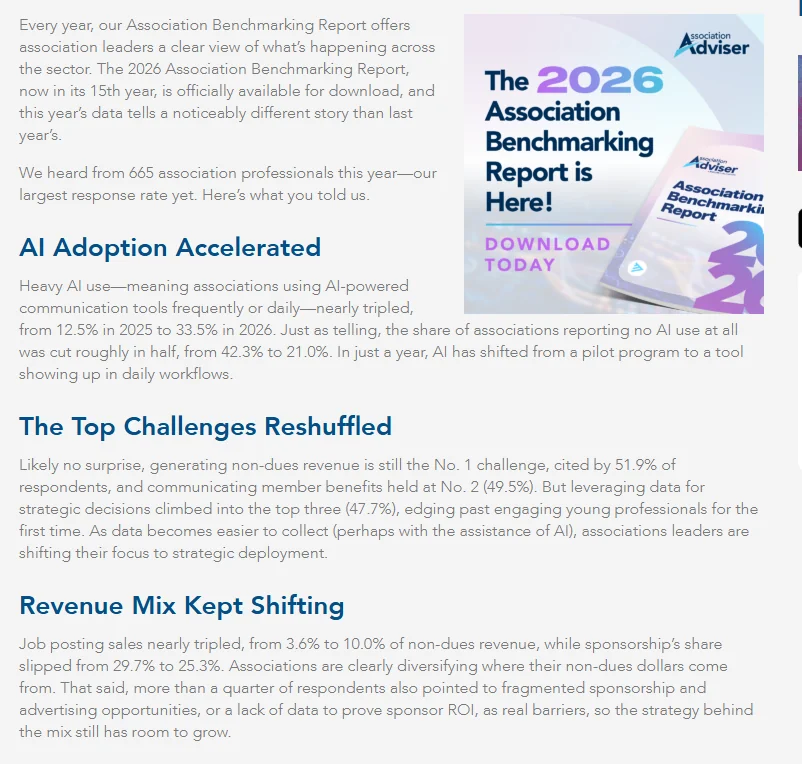
The barriers have not gone away. In MGI’s 2025 Membership Marketing Benchmarking Report, as reported by Associations Now, nearly half (47%) of associations said a lack of staff expertise or bandwidth had limited their use of AI, 30% pointed to privacy and security concerns, and 20% cited ethical concerns. Those are exactly the problems good AI association management software should help with, not create.
What can AI do in an AMS, and what can it not?
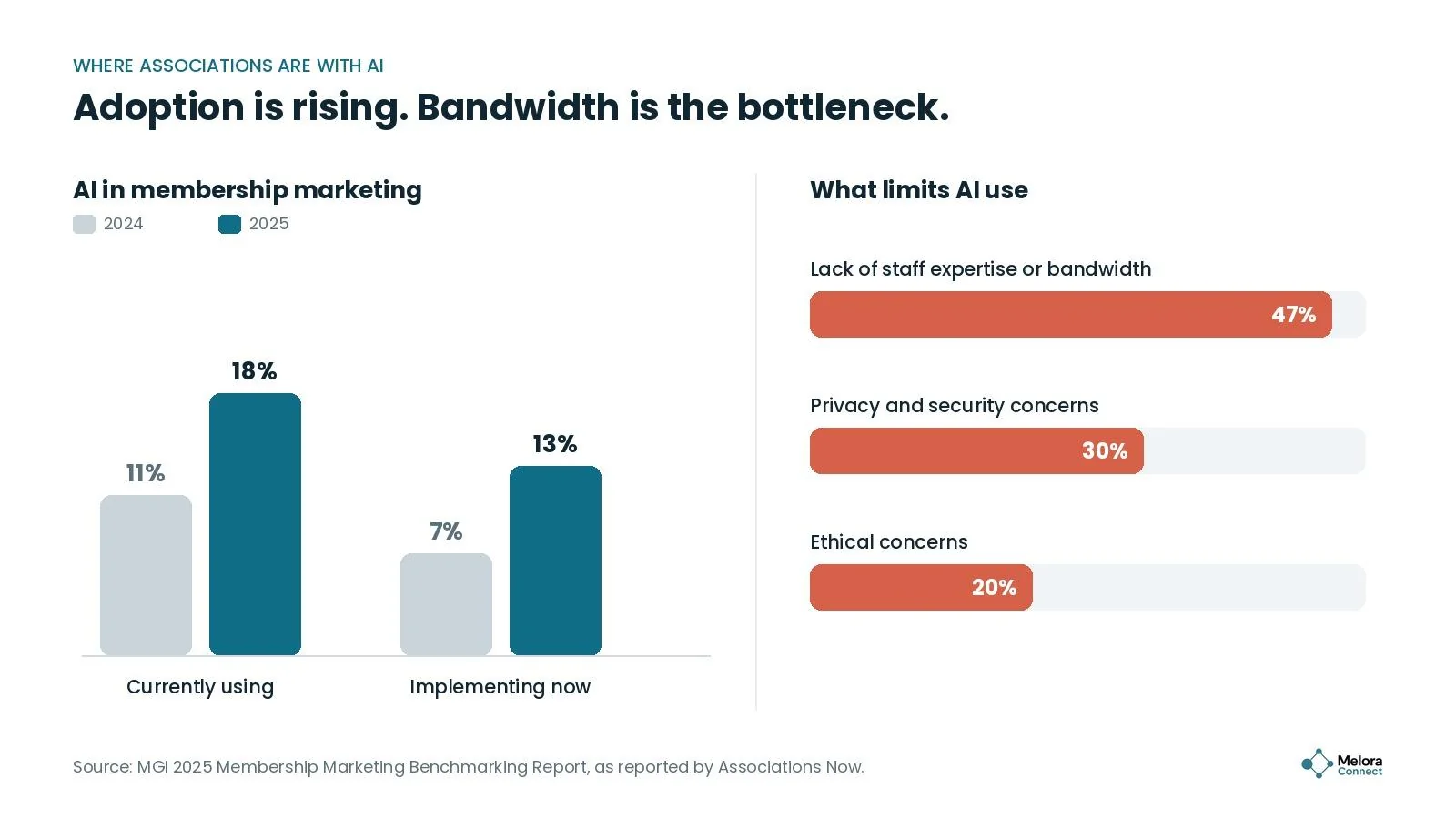
AI is good at first drafts, summaries, pattern-spotting, and repetitive questions. It is not good at judgment calls about individual members, relationships, or fixing data you never collected. The best AI features make your team faster at work they already do, while keeping a person in charge of every decision that affects a member.
9 features to look for in AI association management software
1. A connected member record underneath
This is not an AI feature, but it is the one that decides whether every other AI feature works. Look for one record per member that payments, events, email, community, and the website all update. If an AI tool has to piece together answers from separate modules, expect gaps.
2. Writing help that uses your data
AI writing help is the most common feature and the easiest to test. The useful version drafts renewal emails, event descriptions, and announcements using your member data and your tone, then waits for a person to approve. Be wary of tools that write generic copy or can send without review.
3. Plain-language search and reporting
Instead of building a report, a staff member asks a question in plain language, such as “which business members renew next quarter and have not attended an event this year?”, and gets an answer with the list behind it. The key test: can you click through to see exactly which records produced the answer? Our guide to AI association reporting covers the reporting side in more depth.
4. Engagement alerts you can explain
Some platforms use AI to flag members whose engagement is dropping. That can be valuable, but only if staff can see why a member was flagged, such as no event check-ins in six months or no email clicks since spring. A score with no explanation is hard to trust and harder to act on. Our guide to predictive analytics for member retention explains how to build a simple version yourself.
5. Smart segment suggestions
AI can suggest audiences for a campaign based on behavior, such as members who attended last year’s conference but have not registered this year. Look for suggestions you can review and edit before saving, not segments that change on their own.
6. A member help assistant grounded in your content
A help assistant on your website or member portal can answer common questions, like how to update a payment method or when the next event is. It should answer only from your own content and member data, say when it does not know, and hand off to a person easily.
7. Data cleanup
AI can spot duplicate records, missing fields, and inconsistent formatting faster than any person. This is one of the least flashy features and often one of the most valuable, because cleaner data makes every other feature more accurate.
8. Event and content recommendations
Recommending the next event, committee, or resource to each member based on their interests and history can raise engagement, especially for first-year members still finding their way. Ask how recommendations are generated and whether staff can adjust them. Our guide to AI for member engagement shows where recommendations fit among other engagement uses.
9. Admin controls, permissions, and audit logs
You should be able to turn each AI feature on or off, control which staff can use it, limit what member data it can see, and review a log of what it did. Without these controls, AI becomes a risk rather than a tool.
AI features at a glance
Use this table to pressure-test any AI feature you see in a demo.
| Feature | What good looks like | Red flag |
|---|---|---|
| Connected data | One member record every module updates | AI pulls from separate module databases |
| Writing help | Drafts with your data and tone, approved by staff | Generic copy, or sends without review |
| Search and reporting | Plain-language answers you can click through | Answers with no way to see the source |
| Engagement alerts | Flags with clear reasons | A risk score with no explanation |
| Segment suggestions | Suggested audiences staff can edit | Segments that change on their own |
| Member help assistant | Answers only from your content, hands off to staff | Makes up answers or traps members in a loop |
| Data cleanup | Finds duplicates and gaps for staff to confirm | Merges records automatically |
| Recommendations | Explainable and adjustable by staff | A black box nobody can tune |
| Admin controls | On/off per feature, permissions, audit log | All-or-nothing AI with no log |
5 questions to ask every vendor about AI
Add these to your demo script. If you are running a formal evaluation, our AMS selection process guide shows how to fold them into a weighted scorecard.
-
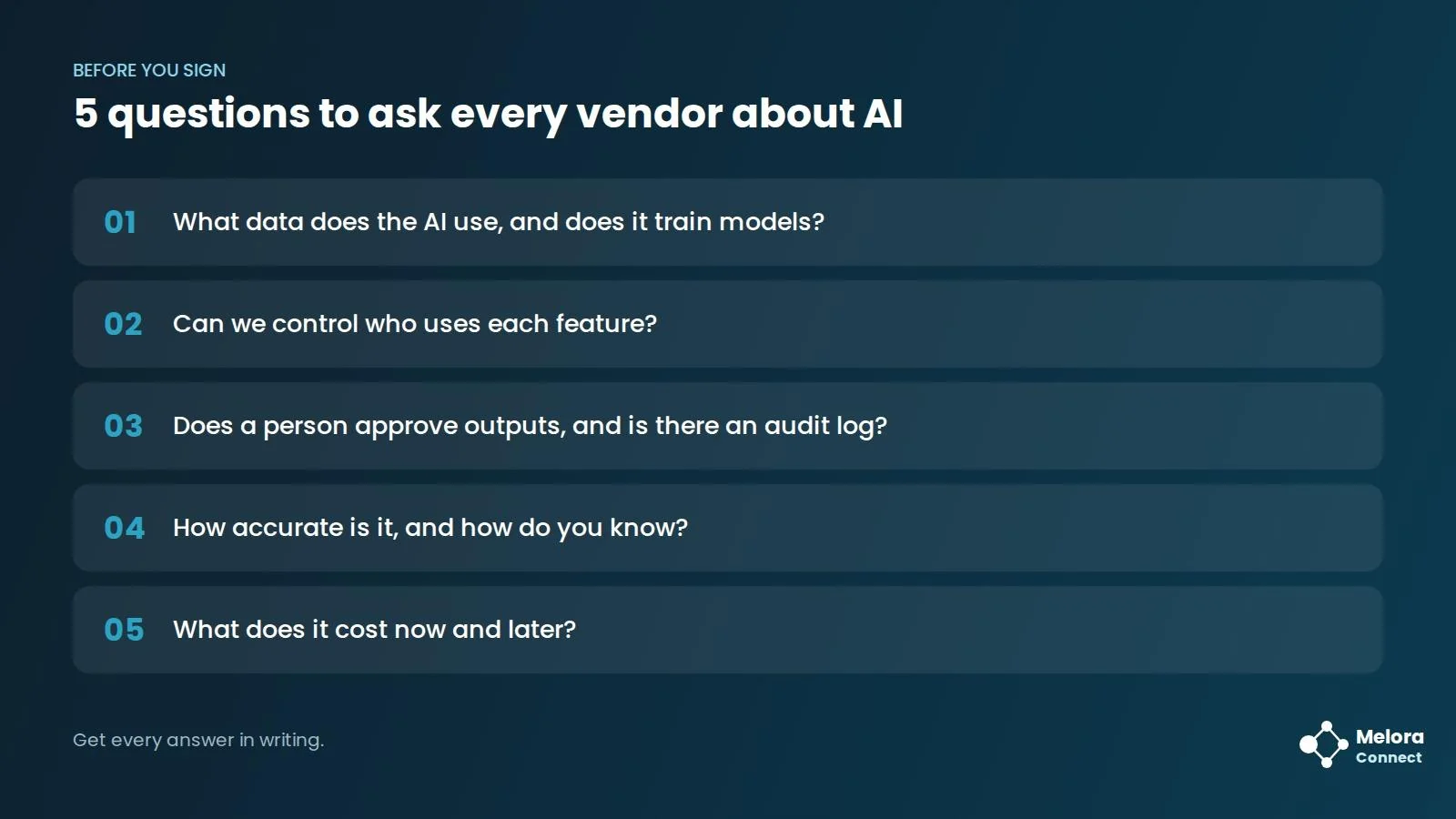
What data does the AI use, and does it train models? Ask exactly which member fields and records each feature can access, which AI provider processes the data, and get a clear, written answer about whether your member data trains the vendor’s or a third party’s models.
-
Can we control who uses each feature? You should be able to turn AI on or off feature by feature, and AI should respect the same access rules as your staff.
-
Does a person approve outputs, and is there an audit log? Anything that reaches a member should be reviewed first, and you should be able to see what the AI did, when, and for whom.
-
How accurate is it, and how do you know? Ask how the vendor tests accuracy, and try it on your own scenarios during the demo.
-
What does it cost now and later? Some AI features are included at launch and priced separately later. Get pricing in writing.
Built-in AI or your own AI assistant?
There are two ways to bring AI into your AMS. Built-in AI is designed by the vendor and sits inside the product. The other way is to connect an AI assistant your team already uses, such as Claude or ChatGPT, to your AMS with an API key from your own account.
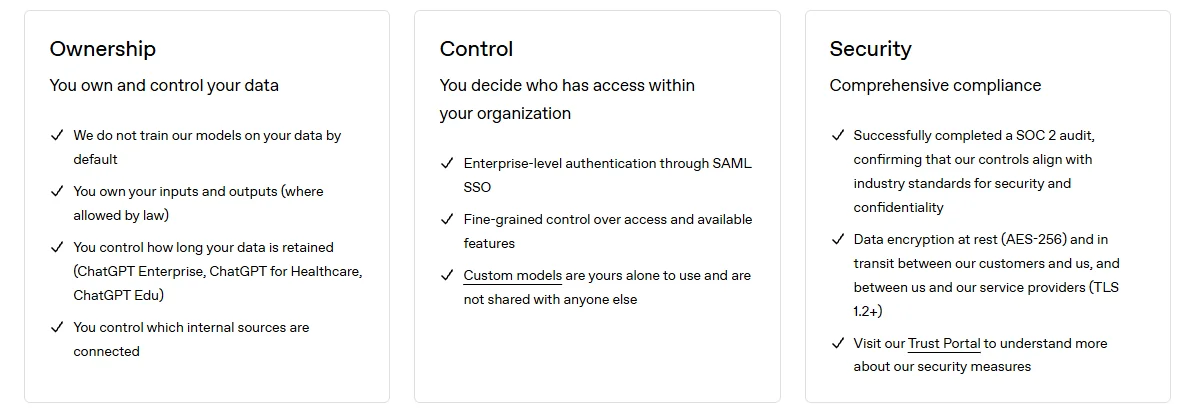
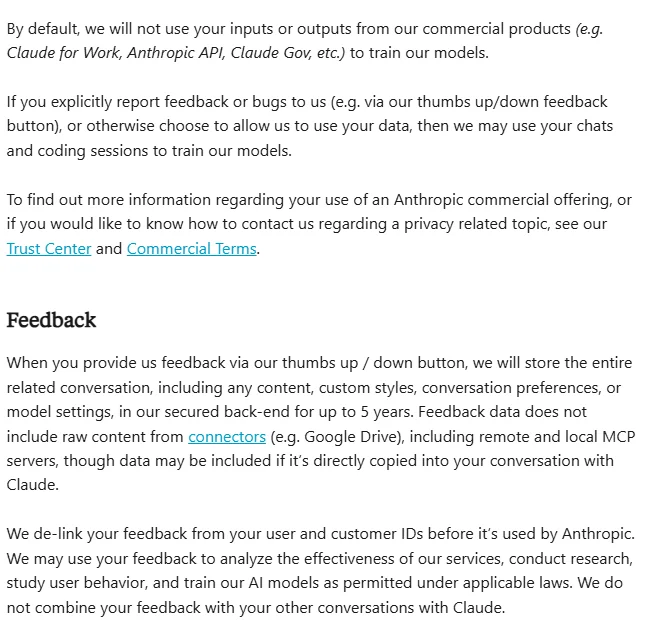
Connecting your own assistant has two practical advantages. Your team works with a tool it already knows, and your data use is governed by the business terms of the AI provider you chose. OpenAI states that it does not train its models on business data, including data sent through its API, by default, and Anthropic states that by default it does not use inputs or outputs from its commercial products, such as the Anthropic API, to train its models. Consumer chat apps follow different rules, so use an organization account and an API key, not a personal login.
Either way, the same five vendor questions apply: what the AI can see, who can use it, and whether a person approves what it produces.
Example: the same question, two systems
Illustrative example. Picture a professional association with 1,800 members. Its membership director asks the AI assistant a simple question two weeks before a renewal campaign: which members renew next quarter and have not attended anything this year?
On disconnected data, the answer looks right but is not. The AI sees the member database but not the event registration tool, so it cannot tell who attended. It returns 340 members, including dozens who were at last month’s conference. The campaign tells engaged members they have been missing out, and several reply, confused.
On a connected member record, the answer holds up. Attendance, payments, and email activity all live on the same profile, so the list is accurate: 112 members. The director clicks through to check a few records, asks the AI to draft a personal invitation to the next regional meetup, edits the tone, and sends it to the right people.
Same question, same AI. The difference was the data underneath it.
How to roll out AI in your association in 5 steps
-
Write a short AI policy. One page is enough: what staff may use AI for, what member data it can touch, which AI accounts are approved, and what always needs human review. The NIST Generative AI Profile (NIST AI 600-1, July 2024) is a free, voluntary reference for the risks to cover.
-
Start with one use case. Pick something low-risk and repetitive, such as drafting event descriptions or summarizing survey comments. Our free AI Prompt Library for Associations gives your team tested prompts to begin with.
-
Keep a person in the loop. Review every output that reaches a member, at least until you trust the results.
-
Train your team. Since staff bandwidth and expertise are the biggest barriers, short, practical training on your own workflows goes further than a general AI course.
-
Measure, then expand. Track time saved and quality, using the metrics below, before adding the next use case.
Test it in the demo: 4 scenarios to run on your own data
A scripted demo shows AI at its best. Before you sign, ask each vendor to run these four scenarios on a sample of your own member data, and note how each one goes:
| Scenario | What to ask for | What a good result looks like |
|---|---|---|
| A question you can check | Which members renew next quarter and have not attended an event this year? | The right list, with a click through to every record behind it |
| A draft for a real segment | A renewal reminder for your first-year members | Uses your data and tone, and waits for staff approval |
| A flag you can question | Why was this member flagged as at risk? | Clear reasons, such as no event check-ins in six months |
| The off switch | Turn one AI feature off and show the log | Control per feature and an audit log entry |
If a vendor cannot run a scenario on your data, write that down too. It tells you how much of the demo you can rely on.
Not sure where your data stands? Book a demo and we will look at how your member data could come together in Melora Connect. Book a Melora Connect demo
3 metrics that show AI is paying off
For the full set of engagement metrics and formulas, see our member engagement metrics guide.
Staff hours saved
Hours saved per month = (time per task before AI − time per task with AI) × number of tasks per month. Measure a few tasks before you start, so you have a real baseline rather than a guess.
Edit rate
Edit rate = AI outputs that needed major edits ÷ total AI outputs reviewed × 100. A high edit rate means the AI is not saving much time. Watch for it to fall as staff learn how to prompt it.
Member outcomes
Compare click-through, registration, or renewal rates for AI-assisted campaigns with your usual results. Time saved only matters if the work is at least as good.
How Melora Connect approaches AI
AI is only as useful as the data it can see, so we start with the part most associations are missing: a single, connected member record. In Melora Connect, membership, dues, email, events, committees, chapters, CE credits, and surveys all read from and write to the same profile. For online events, Melora creates the Zoom meeting and checks in the people who joined, so even virtual attendance lands on that record. That is the foundation any AI feature needs to give answers you can trust.
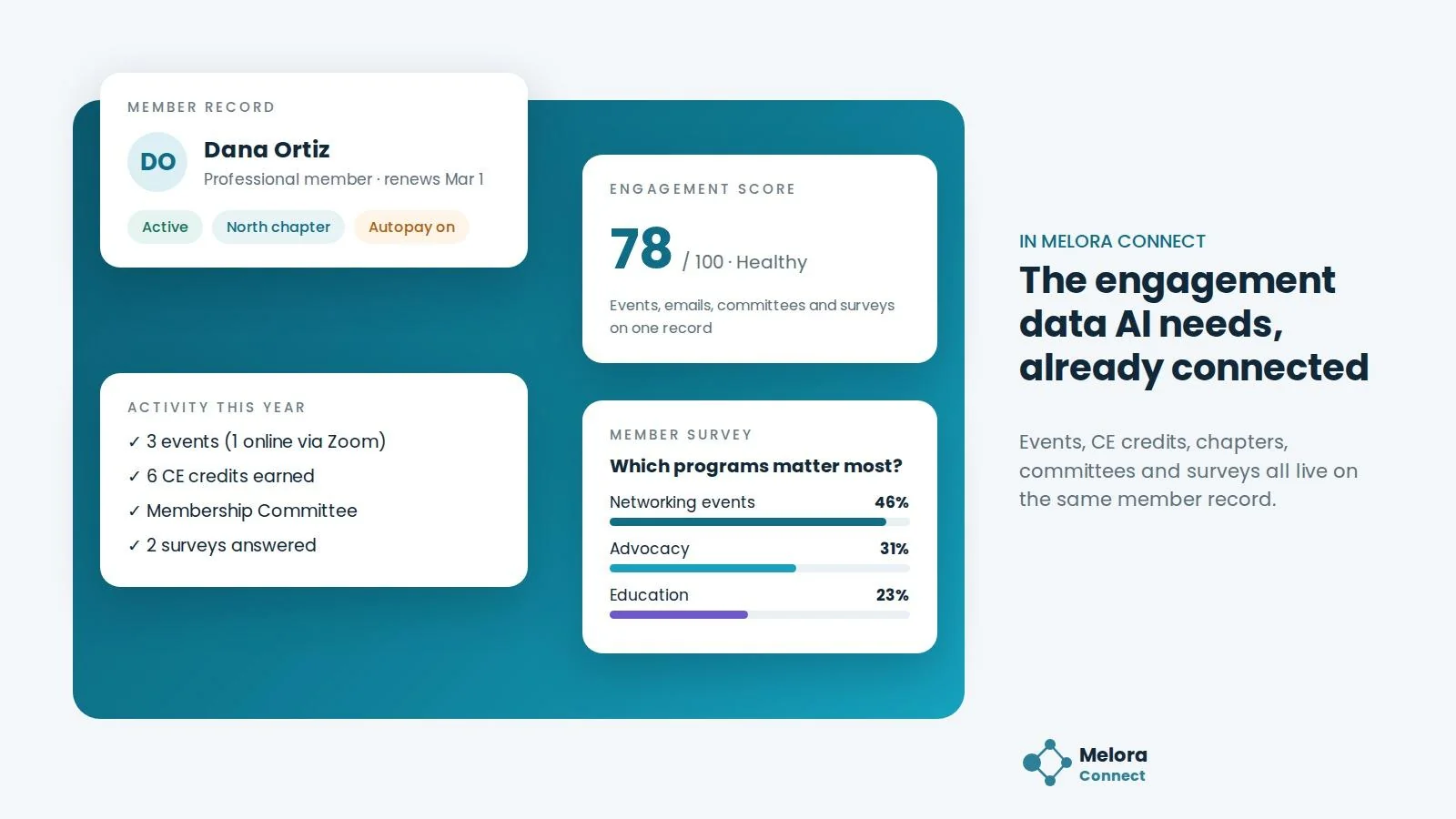
On top of that record, Melora Connect already handles much of the repetitive work associations hope AI will take off their plate. Renewal reminders and invoice runs go out automatically. Smart segments surface new, at-risk, and lapsed members, engagement scoring shows who is active, and a Monday morning briefing tells your team what changed and who needs attention. Campaigns pull merge fields straight from the live record, with nothing to sync. None of this is AI. It runs on rules your team can see and check, the same standard we suggest for any AI alert.
AI in Melora Connect today: teams can already connect their own AI assistant, such as Claude or ChatGPT, with an API key. The built-in staff AI assistant is still coming soon. And because you get a team, not a login, our staff help you connect your data first, so any AI you use has a clean record to work from.
When you evaluate AI features in any platform, including ours, use the questions above. The right AI should make your team faster and your data more useful, without taking decisions about your members out of human hands.
See the foundation first. Book a demo and we will show you how your member data would look on one connected record. Book a Melora Connect demo
Frequently asked questions about AI association management software
What is AI association management software?
It is an association management system that uses AI to help with tasks like drafting communications, answering questions, flagging at-risk members, and suggesting segments, using the member data already in the system.
Is AI in an AMS safe for member data?
It can be, if the vendor is clear about what data the AI uses, whether that data trains any models, who can access each feature, and how activity is logged. Get those answers in writing before you turn anything on.
Can we use ChatGPT or Claude with our AMS?
Often, yes. Some platforms, including Melora Connect, let you connect your own AI assistant, such as Claude or ChatGPT, with an API key. Use an organization account rather than a personal chat login: OpenAI and Anthropic both state that business and API data is not used to train their models by default.
Do small associations need AI features?
Not right away. A small association usually gets more from connected data and solid automation first. AI becomes worth it once those are in place and there is a specific task it can speed up.
What should come first: AI or clean data?
Clean, connected data. AI working on scattered or outdated records produces answers that look right but are not, which is worse than no answer at all.
The bottom line
AI association management software can save a small team real time, but only when it sits on top of connected, accurate member data and stays under your control. Look past the demo moment. Ask what the AI can see, who approves what it produces, and whether you can turn it off.
Start with the foundation, pick one task, keep a person in the loop, and measure the results. The associations that get the most from AI will not be the ones that adopt the most features. They will be the ones whose data was ready for it.
Bring your AI questions to a demo. Send us the vendor questions from this guide, and we will answer each one for Melora Connect, live. Book a Melora Connect demo
Sources
-
Naylor Association Solutions / Association Adviser, 2026 Association Benchmarking Report: AI Adoption Surges as Revenue Strategy Gets More Complicated, August 5, 2026.
-
Associations Now, Report: Associations Anxious to Preserve Membership Growth, June 2025 (on MGI’s 2025 Membership Marketing Benchmarking Report).
-
OpenAI, Enterprise privacy at OpenAI, updated January 8, 2026.
-
Anthropic Privacy Center, Is my data used for model training? (commercial products), checked November 2026.
-
National Institute of Standards and Technology, Generative Artificial Intelligence Profile (NIST AI 600-1), July 2024.