People · Events · Communities

Quick answer: AI for associations works best as small, specific helpers: renewal risk alerts, smarter email timing, a member assistant, credit checks, content tagging, a personalized portal, career matching, community moderation, event feedback analysis and policy tracking. Start with your team’s biggest daily frustration, use data you already have, and keep a person making the final call.
Key takeaways
-
The best AI use cases solve a problem your team already feels, run on data you already collect, and leave the final decision to a person.
-
Feedback analysis and content tagging are the easiest starts. Renewal risk alerts usually have the biggest effect on retention.
-
AI only works as well as the data behind it. If member data lives in several systems, connect it first.
-
Run one use case for 30 days next to your current process, measure time saved, then decide.
Most conversations about AI for associations stay abstract. Associations hear that it will “transform engagement” and “unlock data”, but nobody says what to actually do on Monday morning.
This guide is the practical version. It covers 10 specific ways associations can use AI today, what each one does, what it saves your team, and how to choose your first one. If you want the bigger picture first, start with our guide to how AI is changing association management.
What does AI for associations look like in practice?
AI for associations means using software that can learn from member data, read and write text, and spot patterns, so staff spend less time on repetitive work and more time on members. It does not mean a robot running your association. It means smaller, very specific helpers: one that flags a member who is drifting away, one that answers routine questions, one that reads 500 survey comments so you do not have to.
Associations are moving quickly. Naylor’s 2026 Association Benchmarking Report, based on 665 association professionals, found that heavy AI use “nearly tripled, from 12.5% in 2025 to 33.5% in 2026”, while associations reporting no AI use fell “from 42.3% to 21.0%.”
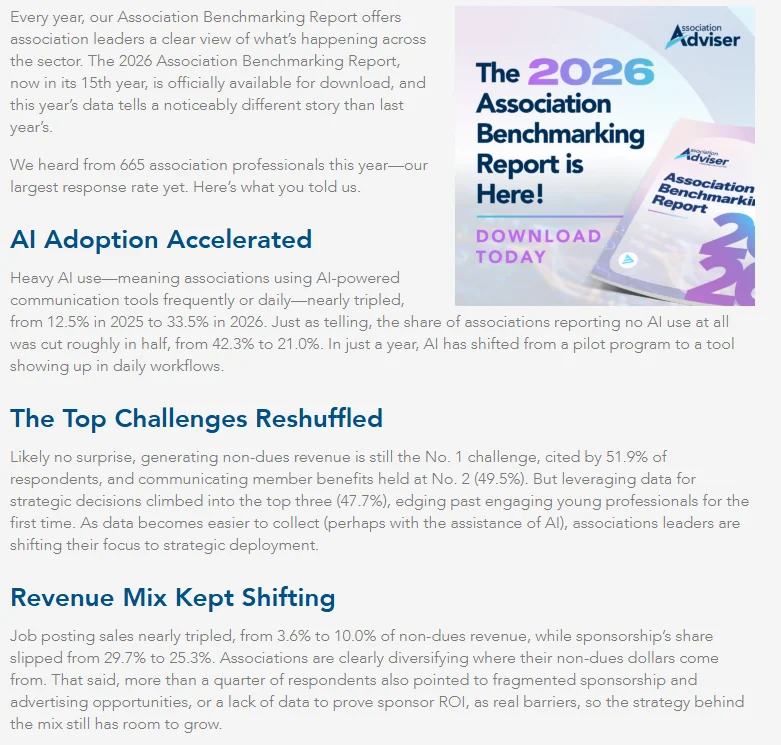
More use does not automatically mean better results. The best use cases share three traits: they solve a problem your team already feels, they run on data you already collect, and a person still makes the final call.
What are the 10 AI use cases for associations?
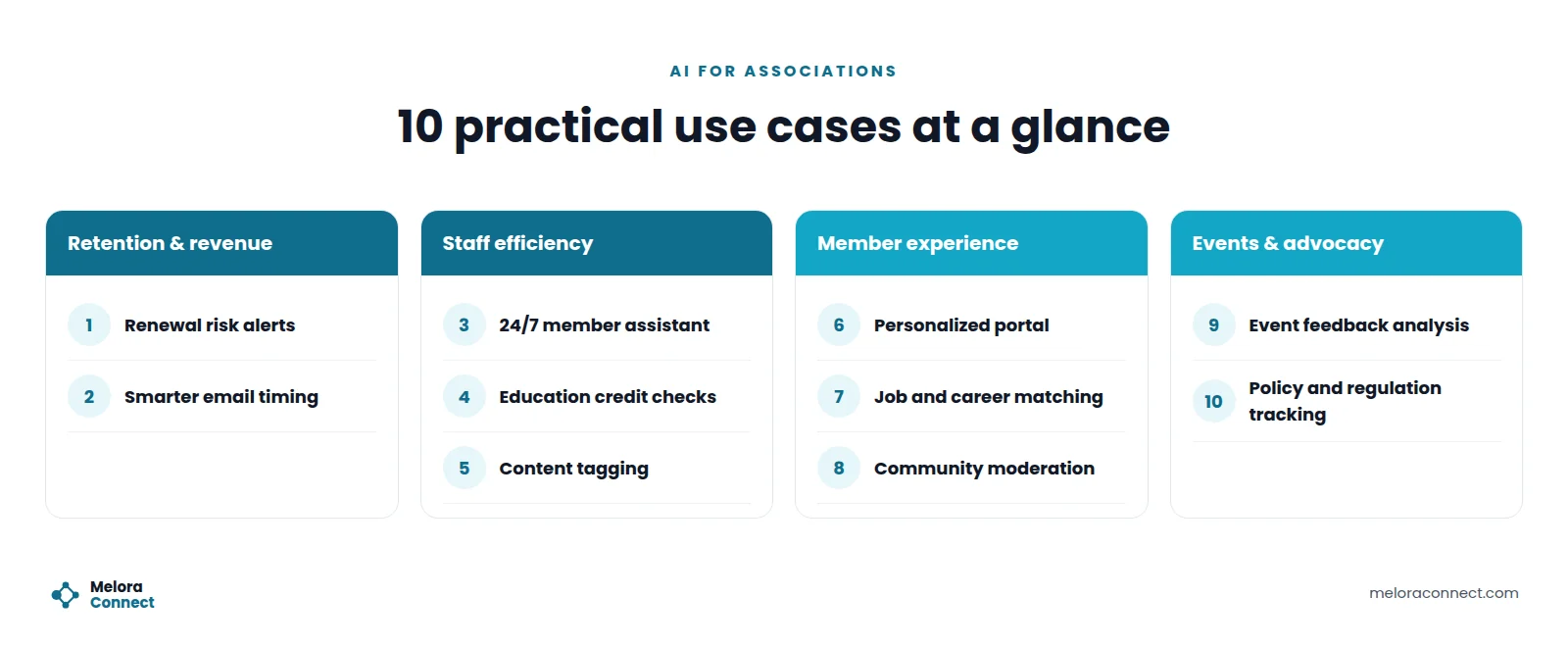
Here are the ten use cases at a glance, grouped into four areas. Effort and impact are our general estimates for a small or mid-sized association, not measured results.
| Use case | Main benefit | Effort to start | Impact |
|---|---|---|---|
| 1. Renewal risk alerts | Keeps members before they lapse | Medium | High |
| 2. Smarter email timing | Higher opens and clicks | Low | Medium |
| 3. 24/7 member assistant | Fewer routine emails to staff | Medium | High |
| 4. Education credit checks | Faster credit approvals | Medium | High |
| 5. Content tagging | Resources members can find | Low | Medium |
| 6. Personalized portal | More relevant member experience | High | High |
| 7. Job and career matching | More value from the job board | Medium | Medium |
| 8. Community moderation | Safer, healthier discussions | Low | Medium |
| 9. Event feedback analysis | Every comment actually read | Low | High |
| 10. Policy tracking | Faster advocacy updates | Medium | Medium |
How can AI help with retention and revenue?
1. Renewal risk alerts
How it works: AI watches for early warning signs across the member record: fewer event registrations, unopened emails, no portal logins, a late payment. When several signals stack up, the member is flagged weeks before their renewal date.
Where to start: Agree on three or four signals your team already trusts, review the flagged list every week, and make the first outreach personal rather than automated. Our membership management guide explains why the first year matters most, and our guide to predictive analytics for member retention shows how to turn those signals into a simple score with the free Member Risk Scoring Sheet.
2. Smarter email timing and content
How it works: Instead of sending every newsletter at the same moment, AI learns when each member tends to open email and what topics they click, then adjusts send times and suggests subject lines worth testing.
Where to start: Pick one recurring email, such as your monthly newsletter, and compare results against your usual send for two or three months. For more ways to lift engagement this way, see our guide to AI for member engagement.
How can AI save association staff time?
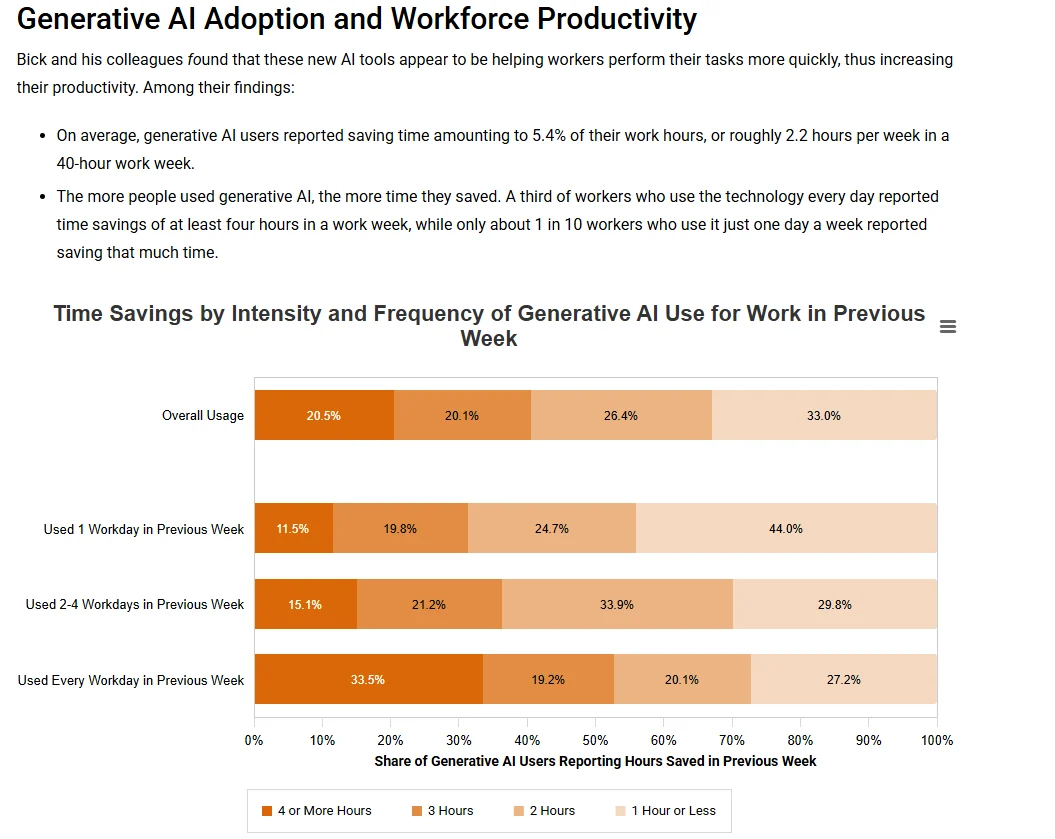
Small teams feel the time savings first. The Federal Reserve Bank of St. Louis reported in 2025 that, on average, generative AI users saved time amounting to 5.4% of their work hours, about 2.2 hours of a 40-hour week. The three use cases below aim that time at the tasks association staff repeat most.
3. A 24/7 member assistant
How it works: A chat assistant trained only on your own bylaws, FAQs, and event details answers common questions at any hour: how to reset a password, when dues are due, where to download a receipt. Anything sensitive or unclear goes straight to a person.
Where to start: List the 20 questions your team answers most often. If the answers are already written down, you have the starting material.
4. Continuing education credit checks
How it works: Members upload certificates and transcripts. AI reads the documents, checks hours and course types against your rules, and approves the standard cases. Only unusual submissions land in the staff queue.
Where to start: Document your credit rules clearly first. AI can only apply rules that are written down. In Melora Connect, CE credits are tracked on the member record today; the AI review step described here is a general practice, not a Melora feature.
5. Content tagging for your resource library
How it works: Years of webinars, newsletters, and reports often sit unused because nobody can find them. AI reads each item and adds consistent topic tags, which makes your library searchable and easier to recommend.
Where to start: Tag your 50 most valuable resources first and see whether members use them more.
For the full list of admin tasks AI can take off a small team, and what should stay with people, see our guide to AI for association staff.
How can AI improve the member experience?
6. A personalized member portal
How it works: Rather than showing every member the same homepage, the portal highlights events, resources, and groups that match their industry, career stage, and past activity.
Where to start: This one needs clean, connected data, so it usually comes after use cases 1, 5, and 9 are working.
7. Job and career matching
How it works: AI compares a member’s profile and credentials with open positions and education options, then suggests the jobs, courses, or certifications that fit their next step.
Where to start: Begin with simple matching on industry and role before adding more detail.
8. Community moderation
How it works: In member forums and discussion feeds, AI flags spam, off-topic posts, and messages that break your community rules, so a moderator can review them quickly.
Where to start: Use AI to flag, never to delete automatically. Members should always know a person makes the call.
How can AI help with events and advocacy?
9. Post-event feedback analysis
How it works: AI reads every open-ended survey answer after an event and groups the comments into clear themes, with the overall tone of each one. Your team reviews the summary and the key comments instead of a spreadsheet nobody has time to read.
Where to start: Run it on your last event survey. It is one of the fastest ways to see real value.
10. Policy and regulation tracking
How it works: For associations that do advocacy, AI can monitor public policy and regulatory updates in your industry and turn long documents into short draft briefs for staff to review and share.
Where to start: Choose the two or three topics your members ask about most, and always have an expert check the final brief.
Example: renewal season without the inbox flood
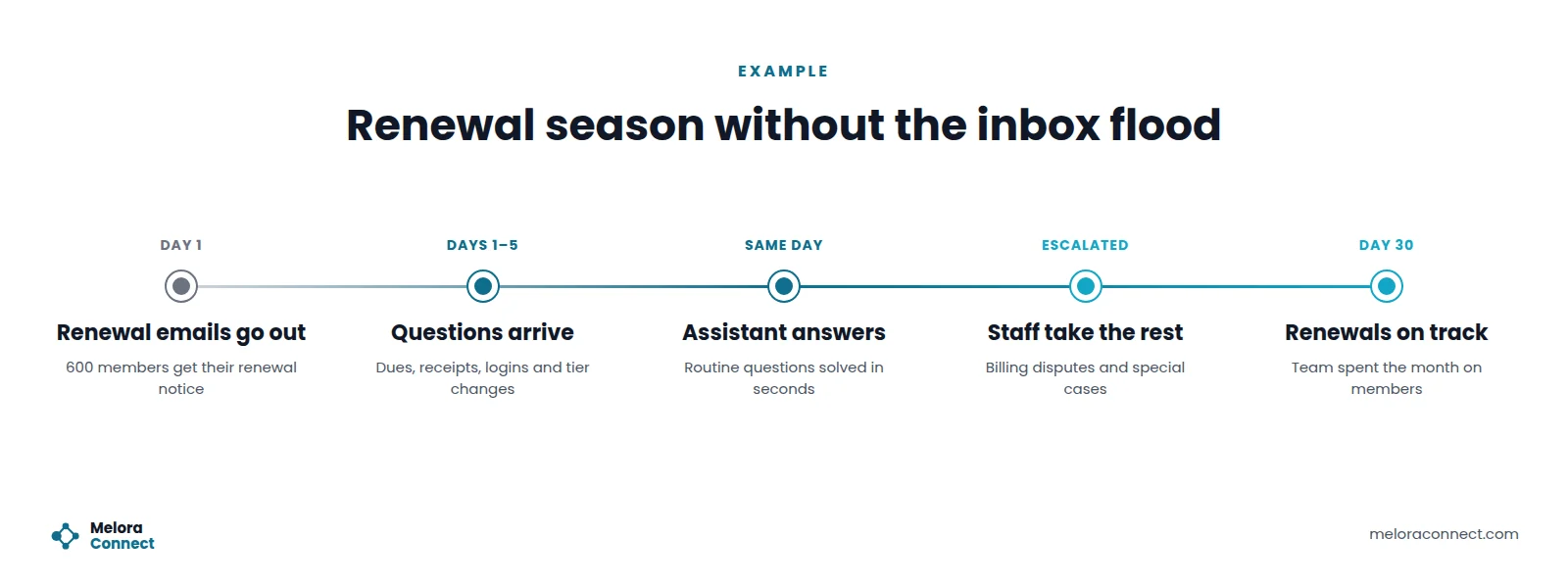
This is an illustrative example, not a customer story. Picture a trade association with 600 members and a two-person team. Every year, renewal notices go out and the inbox fills up: “Where is my receipt?” “Can I switch to the small-business tier?” “I forgot my password.” In the old setup, the team spends most of the month answering the same questions, and the members who are quietly thinking of leaving get no attention at all.
With a member assistant in place, routine questions are answered in seconds, day or night. Billing disputes and special cases still go to staff, now with the full conversation attached. The team uses the time it gets back to call the members flagged as at risk.
That change does not take more staff. It takes letting AI handle the questions that already have answers.
Which AI use case should you start with?
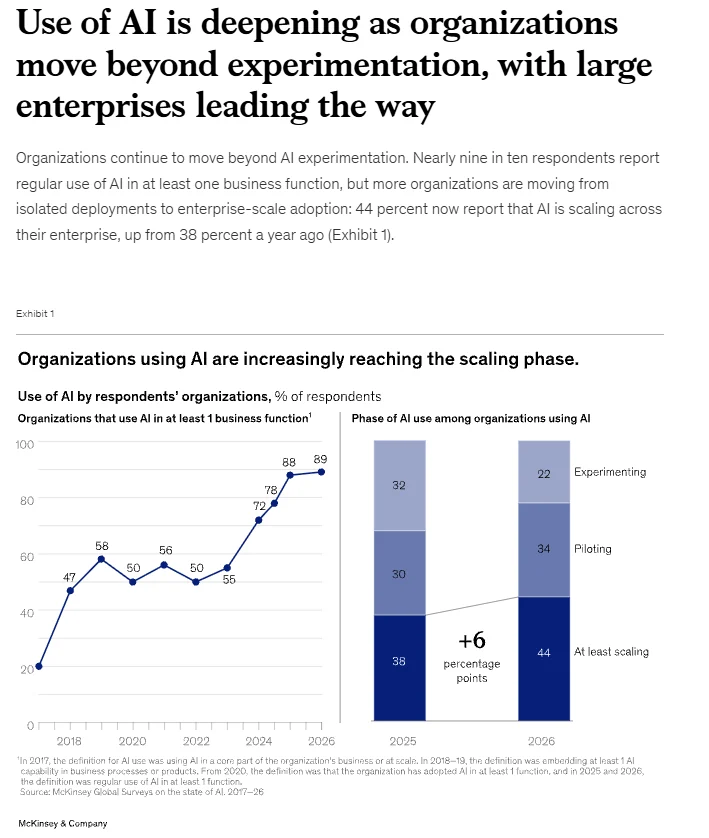
Start with your biggest daily frustration, not the most impressive feature. Scale is the hard part for most organizations, not trying AI. In McKinsey’s 2026 State of AI survey, “nearly nine in ten respondents report regular use of AI in at least one business function”, yet only 44 percent report that AI is scaling across their enterprise, up from 38 percent a year earlier. One clear problem with a measurable result is the fastest way past that gap.
| If your biggest pain is | Start with |
|---|---|
| Members leaving without warning | 1. Renewal risk alerts |
| The same emails, every week | 3. A 24/7 member assistant |
| A backlog of credit submissions | 4. Education credit checks |
| Survey results nobody reads | 9. Post-event feedback analysis |
| Resources members cannot find | 5. Content tagging |
| Low email engagement | 2. Smarter email timing and content |
| Board reports that take days to build | Our guide to AI association reporting |
Is your association ready for AI? A 6-point self-check
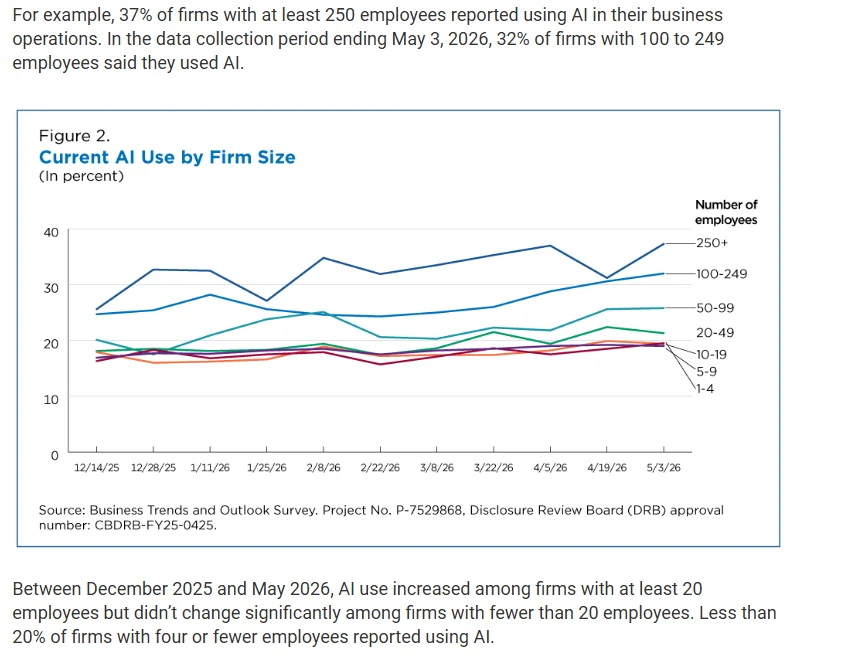
Before you run a pilot, check the foundation. Size matters less than organization. The U.S. Census Bureau reported in 2026 that 37% of firms with at least 250 employees used AI, while less than 20% of firms with four or fewer employees did. Those are businesses, not associations, but the pattern is familiar: small teams lag because they lack time and clean data, not because AI is out of reach.
AI only works as well as the data behind it, so count how many of these apply to you:
- Member data lives in more than one system, and nobody is sure which is current.
- Event attendance is not connected to the member record.
- You only find out a member is unhappy when they do not renew.
- Staff answer the same member questions every week.
- Survey comments are collected but rarely read in full.
- Board reports require exporting and merging several files.
0 to 1: you have a strong base for AI tools. 2 to 3: connect your member data first, then add AI. 4 or more: AI will struggle until your data lives in one place, so start there.
How do you use AI without losing member trust?
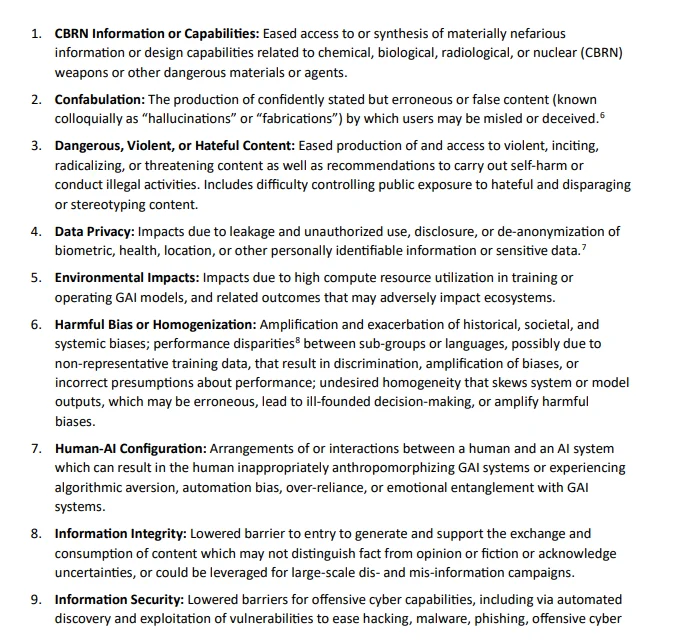
Members trust their association with personal and professional information. The risks are well documented: NIST’s Generative AI Profile (2024) lists 12 risks unique to or made worse by generative AI, including data privacy and “confabulation”, which it defines as “the production of confidently stated but erroneous or false content.”
Keep that trust with a few simple rules:
-
A person makes the final call on anything that affects a member’s status, credits, or account.
-
Be transparent. Tell members when they are chatting with an assistant and how their data is used.
-
Use your own content. Assistants should answer from your documents, not from guesses. This is your main defense against confabulation.
-
Protect data. Share only what each tool needs, and review access regularly.
-
Check the output. Review AI-written drafts and summaries before they reach members.
How do you run a 30-day AI pilot?
You do not need a large project to start. Try this:
-
Week 1: Choose one use case from the table above and write down how you handle it today, including roughly how long it takes.
-
Week 2: Prepare the data. Make sure the member records or documents involved are complete and in one place.
-
Week 3: Run it alongside your current process and compare the results.
-
Week 4: Decide. Keep it, adjust it, or try the next use case, based on time saved and member response.
Start with tested prompts. If drafting is your first use case, our free AI Prompt Library for Associations gives your team tested prompts for welcome emails, event copy, newsletters, and survey summaries. Get the prompt library
How Melora Connect supports these use cases
Every use case in this guide depends on the same thing: complete, connected member data. An AI tool cannot flag a member at risk if their event attendance lives in one system and their payments in another.
Melora Connect’s member CRM gives every member one record that everything else pulls from. Here is what is live today and what is coming:
| Use case area | In Melora Connect |
|---|---|
| Retention signals | Live today: smart segments for new, at-risk, and lapsed members, and engagement scoring that shows who is active |
| Staff priorities | Live today: a Monday morning briefing that tells staff what changed and what needs attention |
| Feedback and engagement | Live today: surveys, segmented email with merge fields, committees, and advocacy campaigns |
| Connected data | Live today: dues and payments, event registrations and check-ins, all on the same member record |
| AI features | Coming soon: a website assistant for routine member questions, help writing advocacy letters, and a staff AI assistant |
The live features run on clear rules rather than AI, so your team can always see why a member appears on a list. If you are comparing platforms in the meantime, our guide to AI association management software lists the questions to ask every vendor, including us.
And because you get a team, not a login, our staff help you put that connected record in place first, so every use case in this guide has good data to work with.
Want help choosing your first use case? See how your member data would look in one connected platform, and which use case it is ready for. Book a demo
Frequently asked questions about AI for associations
What is the easiest AI use case for an association to start with?
Post-event feedback analysis and content tagging are usually the easiest AI use cases for an association to start with. Both use data you already have, such as survey comments and past resources, the risk of a mistake is low, and staff can check the output quickly before anything reaches members.
Which AI use case has the biggest impact on retention?
Renewal risk alerts usually have the biggest impact on retention. They watch for signals such as fewer event registrations, unopened emails and late payments, then flag members weeks before renewal. That gives your team time to reach out personally before the member decides not to renew.
Do small associations need a data team to use AI?
No. Small associations do not need a data team to use AI. Most use cases need organized member data in one place and a clear process, not data scientists. Starting with one 30-day pilot on a single problem, such as survey analysis, is enough to learn what works.
How do associations keep member data safe when using AI?
Associations keep member data safe when using AI by sharing only the data each tool needs, keeping a person in charge of decisions, reviewing access regularly, and telling members how their information is used. Assistants should answer from your own documents, and staff should check AI output before it reaches members.
How do you start an AI pilot at an association?
Pick one use case tied to a daily frustration and write down how long it takes today. Prepare the data in week two, run the AI next to your current process in week three, and in week four keep, adjust or drop it based on time saved and member response.
Is AI going to replace association staff?
No. AI is better at repetitive work, such as answering routine questions, tagging content and summarizing comments, than at relationships and judgment. The goal is to give staff back time for calls, events and member problems that need a person, while a person still makes every decision that affects a member.
What do associations need before using AI?
Associations need connected member data before using AI: one record per member with dues, events, email activity and survey responses. They also need written rules and answers, such as FAQs and credit policies, that an AI tool can work from. Without both, AI tools give unreliable results.
The bottom line
AI for associations works best when it is practical: one clear problem, data you already have, and a person who makes the final decision. Start with the use case that removes your team’s biggest daily frustration, measure the result, and build from there.
The goal is not more technology. It is more time for the members who make your association worth joining.
See what your member data could do. We will show you one connected member record in Melora Connect and the signals it surfaces today. Book a Melora Connect demo