People · Events · Communities

Quick answer: AI for association staff means using AI tools to handle repetitive admin work, such as answering routine member questions, sorting the inbox, cleaning data and drafting emails, so people can spend more time with members. Start with one low-risk task, keep a person approving anything members see, fix rule-based work with automation first, and measure the hours saved.
Key takeaways
-
Most admin work follows clear patterns. Rule-based tasks belong to automation; reading, writing and spotting patterns is where AI helps.
-
AI prepares, people decide. Staff approve anything a member will see or that changes an account.
-
Run a one-week admin audit before you buy or try any tool, so you have a baseline.
-
Research on general workplaces shows real but modest time savings, concentrated in email and writing. Measure your own.
Ask association staff what they wish they had more time for, and the answer is almost always the same: members. Calling a new member, planning a better program, meeting a sponsor in person.
Instead, the week fills up with inbox triage, profile updates, application reviews and report building. AI will not replace the people who make an association work, but AI for association staff can take a real share of that admin off their desks.
This guide covers which admin tasks AI handles well, what stays human, how to find your first task, and what research says about time savings. It is part of our AI for associations hub, which covers the full range of use cases.
What is AI for association staff?
AI for association staff means using AI tools to handle repetitive administrative tasks, such as answering routine questions, sorting messages, cleaning data and drafting content, so staff can focus on members. For a staff member, it means fewer copy-and-paste tasks and more time for work that needs judgment and relationships.
It is not the same as automation. Automation follows rules you set: send a renewal reminder 30 days before expiry, create an invoice on the first of the month. AI works with language and patterns: it reads a message and decides what it is about, drafts a reply, or notices that two records look like the same person. Most associations need both, and automation usually comes first.
Where does association staff time go?
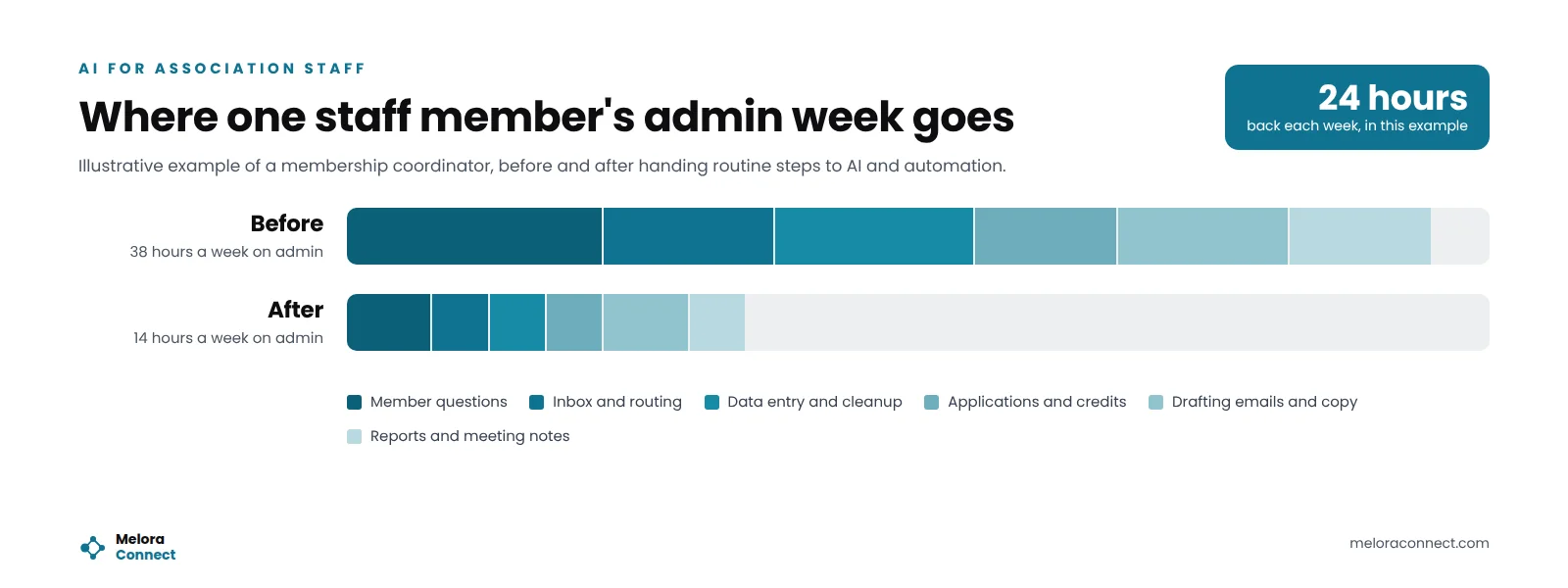
In many small associations, one person handles membership, events, communications and finance at the same time. The chart above is an illustrative example, not research data: a membership coordinator who spends about 38 hours a week on admin, most of it following clear patterns.
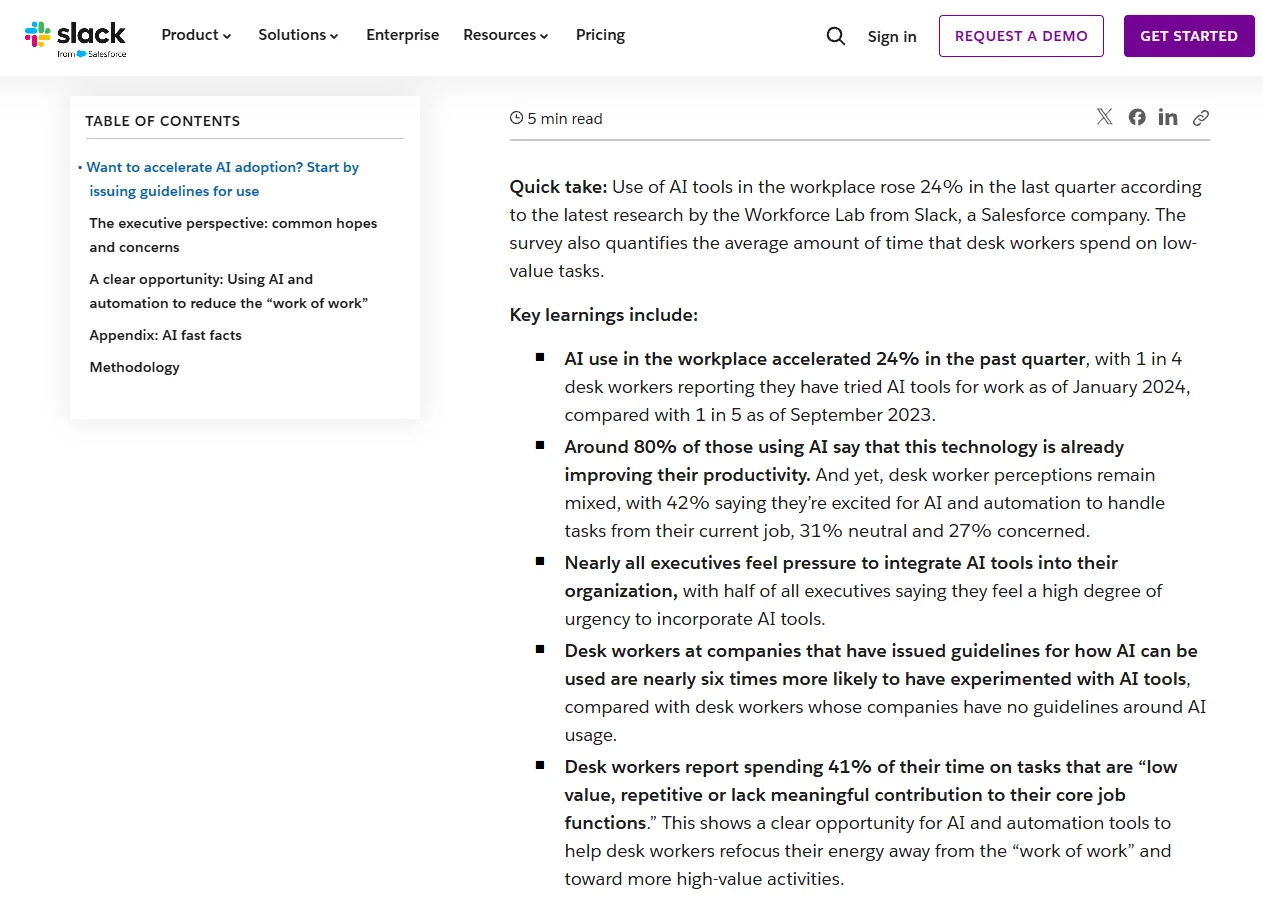
Workplace research outside associations points the same way. In the Slack Workforce Lab’s 2024 survey of more than 10,000 desk workers, people reported spending 41% of their time on tasks that are low value, repetitive or lack meaningful contribution to their core job. Slack calls this the “work of work,” and puts it at about two full days a week.
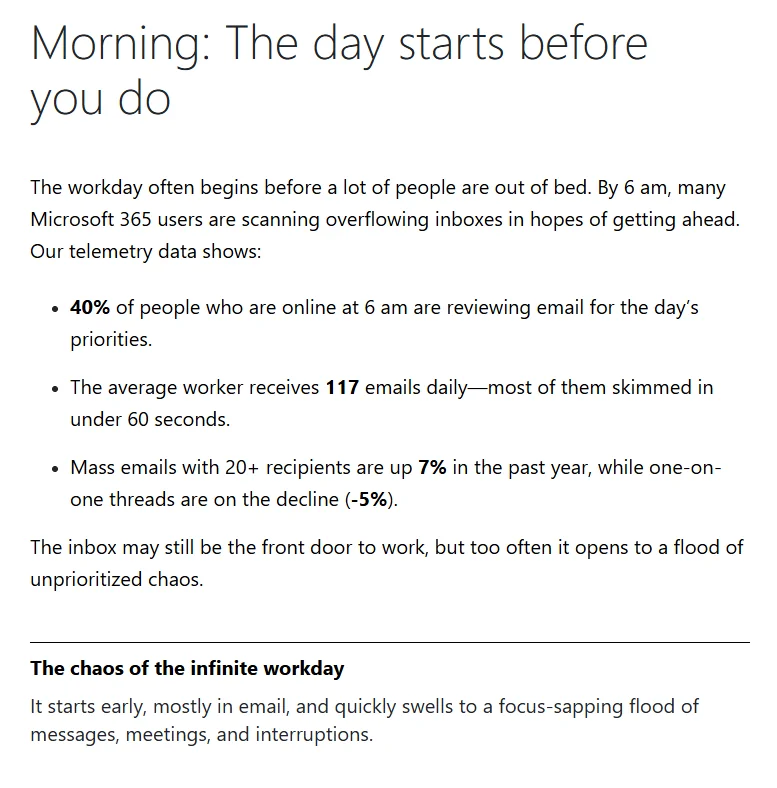
The inbox is a big part of it. Microsoft’s 2025 Work Trend Index report on the infinite workday, based on Microsoft 365 usage signals, found the average worker receives 117 emails a day, most skimmed in under 60 seconds, and is interrupted every two minutes by a meeting, email or notification. These are cross-industry figures, but anyone who has run a membership inbox during renewal season will recognize them.
Which admin tasks can AI take off your team’s plate?
These seven tasks show up in almost every association. Each one follows patterns that AI handles well, and each one keeps a person in charge of the outcome.
1. Answering routine member questions
“When are dues due?” “Where is my receipt?” “How do I reset my password?” An assistant trained on your own FAQ and policies can answer these at any hour, and pass anything complex to a person with the conversation attached.
2. Sorting and routing the inbox
AI can read incoming messages, tag them by topic, such as billing, events or membership, and send them to the right person. Urgent items rise to the top.
3. Data entry and cleanup
Duplicate records, missing fields and inconsistent company names slowly break your data. AI can spot likely duplicates, suggest merges and match form submissions to the right member record for staff to confirm. If your data still lives in several files, start by cleaning up spreadsheet data and moving to one record per member.
4. Checking applications and CE credit submissions
Standard membership applications and continuing education (CE) credit submissions follow written rules: eligibility criteria, approved course providers, hour limits. An AI tool can compare a submission against those rules and list what is missing or unusual. Staff still approve every application and every credit, and handle the cases that do not fit.
5. Drafting emails, newsletters and event copy
First drafts of renewal emails, event descriptions and newsletters take minutes instead of hours. Staff edit for voice and accuracy, which is faster than starting from a blank page. Our free AI Prompt Library for Associations gives your team tested prompts for welcome emails, event copy and newsletters.
6. Meeting notes and board reports
AI can turn a meeting recording into clear notes and action items, and summarize membership and event data in plain language for the board. Our guide to AI association reporting shows how to set up the data side so the summary is accurate, and the Board Report Template gives the summary a consistent structure each month.
7. Flagging payment exceptions
Instead of checking every payment by hand, staff can review only the exceptions: failed charges, mismatched amounts or members who paid twice. AI helps most by reading the notes attached to an exception and suggesting the likely cause.
Get prompts your team can use this week. Tested prompts for welcome emails, renewal reminders, event copy, newsletters and board summaries, written for association staff. Get the prompt library
What should AI prepare, and what should staff decide?
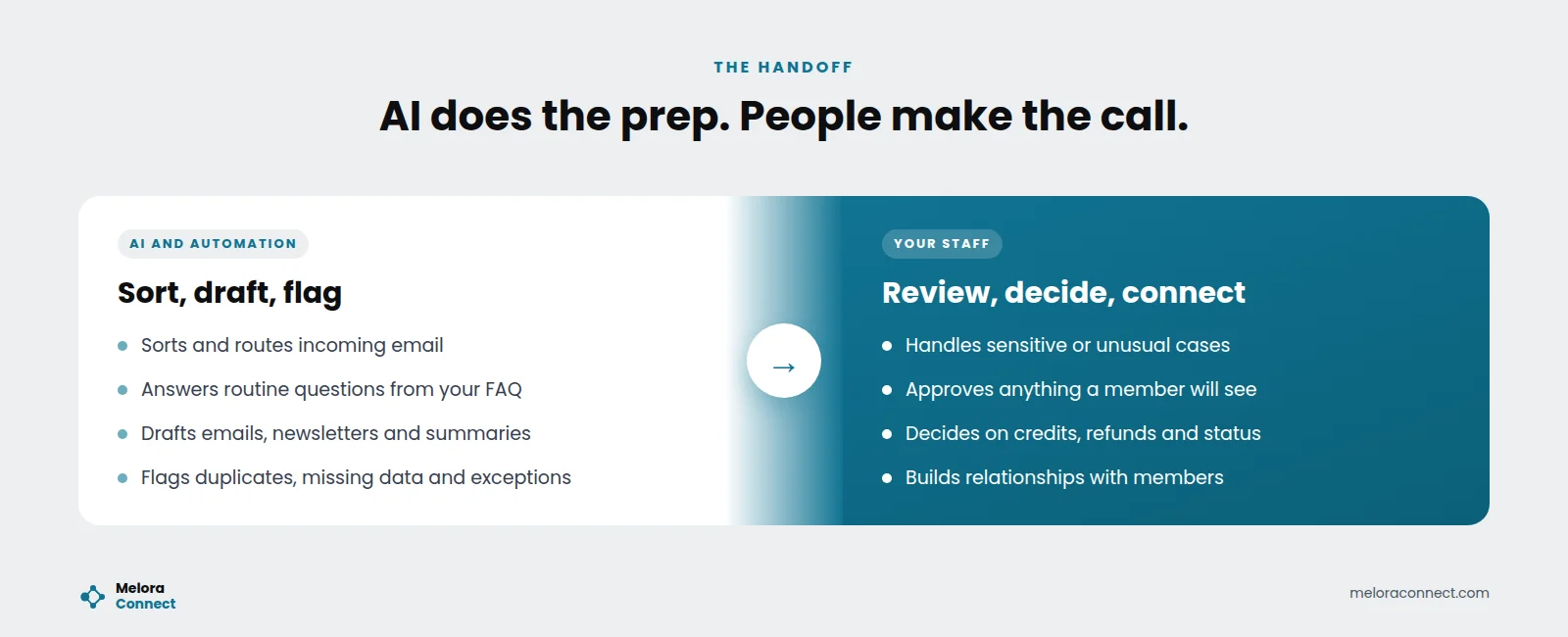
The safest way to think about AI for association staff is as a handoff. AI does the sorting, drafting and flagging. People make the decisions and own the relationships.
| Task | What AI does | What staff do |
|---|---|---|
| Member questions | Answers routine ones from your FAQ | Handles complaints and sensitive cases |
| Inbox | Tags and routes messages by topic | Answers anything unusual or urgent |
| Applications and CE credits | Checks submissions against written rules | Approves, declines and handles exceptions |
| Data cleanup | Finds duplicates and gaps | Confirms merges and corrections |
| Content | Writes first drafts | Edits, approves and sends |
| Payments | Explains likely causes of exceptions | Contacts members and resolves issues |
A simple test helps: if a mistake would reach a member, change their account, or affect their money or credentials, a person makes the final call.
Example: a membership coordinator’s Monday
This example is illustrative, not a customer story. Picture Nadia, the membership coordinator at a professional association with 1,200 members and a team of four. In the old setup, her Monday starts with 60 unread emails, a stack of profile updates from the weekend, and a board report due Wednesday. By lunch, she has answered the same dues question eleven times.
With a few automations and AI tools in place, Monday looks different. Members found their own receipts and reset their own passwords over the weekend. The inbox is sorted by topic. Profile updates are matched to member records and waiting for a quick confirmation, and a draft board summary is ready to edit. Three billing exceptions need a human touch, and that is where the morning goes. The afternoon goes to calling five new members.
Nadia’s team did not grow. Her Monday simply stopped belonging to the inbox.
Which time-savers do not need AI at all?
Some of the biggest admin savings come from simple automation, not AI. Automatic renewal reminders, invoices that generate themselves, saved-card autopay and self-service profile updates remove hours of work with no AI involved. Fix the basics first, then add AI where the work requires reading, writing or judging patterns. For a clear way to tell the two apart, see how AI is changing association management, which compares AI and automation side by side.
How do you find your first AI task? A one-week admin audit
Before you choose a tool, spend one week writing down every repetitive task and roughly how long it takes. Then sort each task with one question: does it follow clear rules, or does it need reading, writing or spotting patterns? Here is how a typical list sorts out:
| Task | Rules or patterns? | Best first fix |
|---|---|---|
| Renewal reminders and invoices | Clear rules | Automation, no AI needed |
| Receipts and profile updates | Clear rules | Member self-service in the portal |
| Inbox sorting | Patterns in text | AI tags messages, staff handle the tricky ones |
| Duplicate member records | Patterns in data | AI suggests merges, staff confirm |
| CE credit submissions | Rules plus judgment | Track credits on the member record; AI lists gaps, staff approve |
| Board summary narrative | Writing | AI writes a first draft, staff edit and approve |
Tasks with clear rules go to automation first. Only the tasks that need reading, writing or spotting patterns need AI, and even there a person keeps the final say. Add up the hours in each group and you have two things at once: your first AI pilot, and a baseline to measure it against.
How do you start using AI safely in 5 steps?
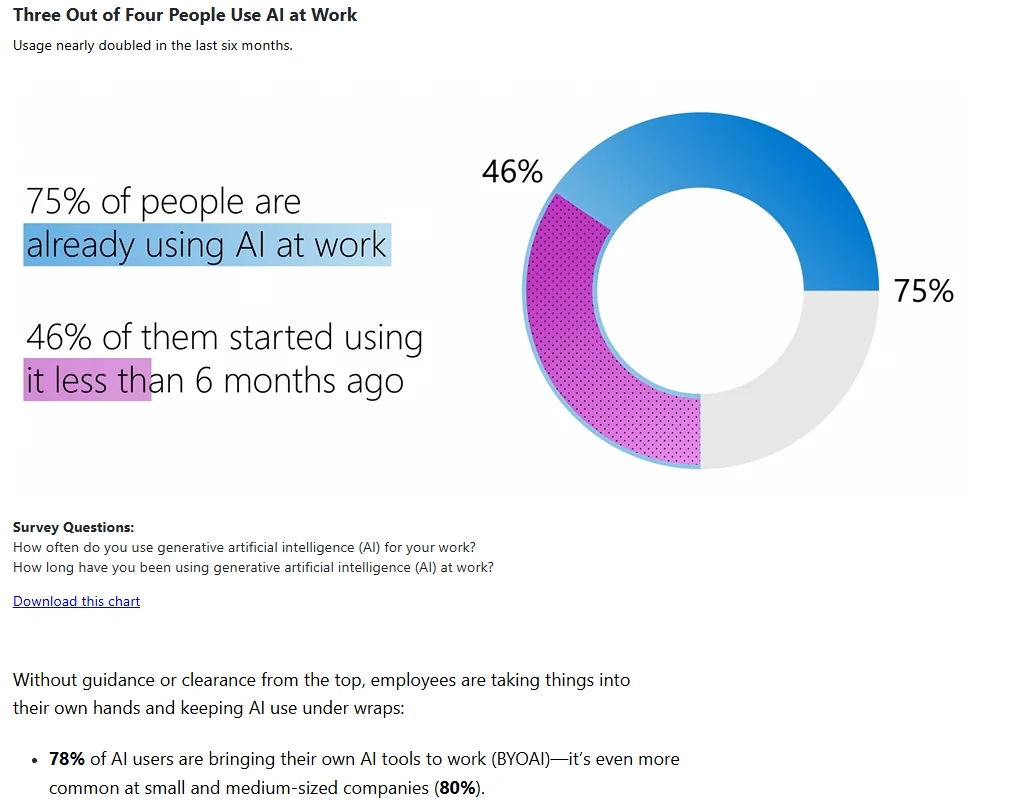
Your staff may already be using AI, with or without a plan. In the Microsoft and LinkedIn 2024 Work Trend Index, a survey of 31,000 people in 31 countries, 75% of knowledge workers said they use AI at work, and 78% of AI users said they bring their own AI tools. Among those users, 90% said AI helps them save time. A short policy makes that use visible and safe.
-
Run the one-week admin audit above to see which tasks eat the most hours.
-
Pick one task with clear rules and low risk, such as inbox sorting or first drafts of event copy.
-
Clean the data it depends on, so the tool works from accurate member records.
-
Keep a person in the loop for anything a member will see or that affects their account.
-
Measure the hours saved after a month, then decide what to add next.
Before anyone on your team uses AI with member information, agree on these basics:
- We have a written list of approved AI tools, and staff know which ones they may use with member data.
- No one pastes payment details, passwords or sensitive personal information into a general AI tool.
- Each tool gets only the data it needs for its task.
- A named person reviews every AI draft before it reaches a member.
- We tell members where AI is used, for example in answering routine questions.
- We review the policy and the hours saved every quarter.
How much time can AI actually save?
Less than the hype, and more than nothing. The research below comes from general workplaces, not associations, so treat it as a range, not a promise.
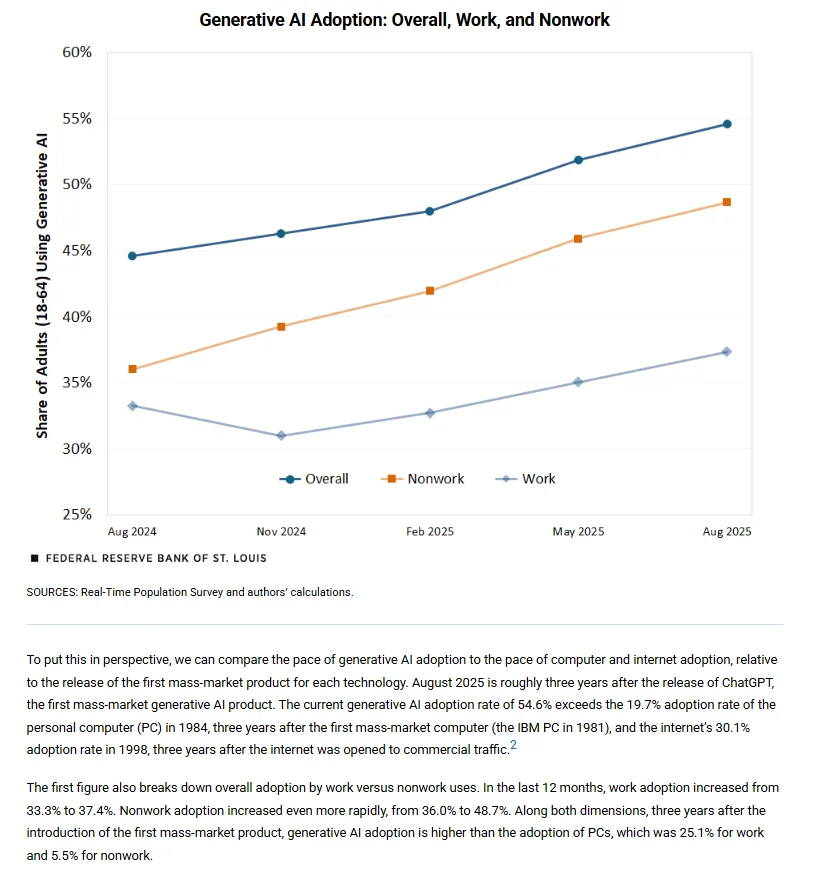
The Federal Reserve Bank of St. Louis’s 2025 analysis of generative AI adoption found that the share of US workers using generative AI at work rose from 33.3% to 37.4% in the 12 months to August 2025. Across all workers, including people who do not use it, reported time savings equaled 1.6% of all work hours.
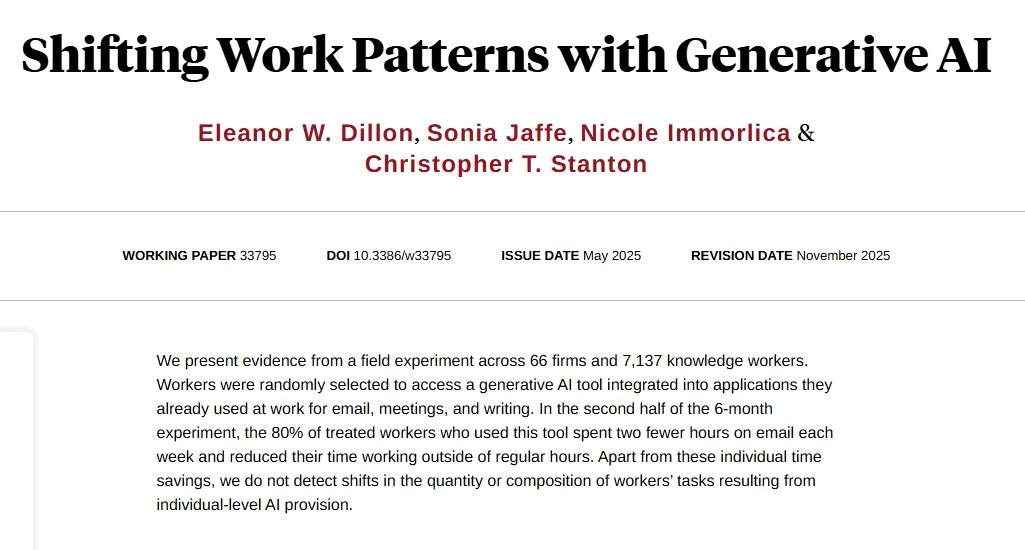
The clearest gains show up in email. In a six-month NBER field experiment with 7,137 knowledge workers at 66 firms, workers who used a generative AI tool built into their email, meeting and writing apps spent two fewer hours on email each week in the second half of the study. The researchers did not detect a shift in the quantity or mix of tasks people did.
The lesson for associations: hours come back task by task, so start where your audit shows real volume, such as the membership inbox. AI speeds up work that exists; automation and self-service remove it. Your own number comes from your audit baseline and a month of tracking.
How Melora Connect reduces admin work for association staff
Every AI tool works better on clean, connected data, and much of the admin load disappears once your systems stop needing to be synced. Melora Connect keeps one record per member, with built-in segmented email that pulls merge fields from the live record, so there is nothing to export or match.
Renewal reminders, invoices, and invoice runs are automated. Members can pay by card or ACH through MeloraPay, straight into your own Stripe account, set up saved-card autopay, and renew, register, join committees and update their own profiles in the member portal. Continuing education credits and chapters are live, so CE credits sit on the member record instead of in a separate spreadsheet.
Smart segments surface new, at-risk and lapsed members, a member engagement score shows who is drifting, and a Monday morning briefing tells your staff what changed and what needs attention. Slack and Microsoft Teams alerts put that news where your team already works. All of this is live today, and it runs on rules and data rather than AI.
You can already connect the AI assistant your team uses, such as Claude or ChatGPT, to Melora Connect with an API key, so it can look up members, events and dues invoices and make the changes the key allows. A staff AI assistant built into Melora Connect is coming soon. If you are comparing platforms with AI built in, our guide to AI association management software covers what to ask.
You get a team, not a login. Our staff configure those automations, migrate your data and set up your segments with you during onboarding, usually about 30 days from signed agreement to live, so the hours come back from your first renewal cycle.
Bring your admin audit. Show us your task list, and we will show you which items Melora Connect’s automation can take off your team’s week. Book a demo
Frequently asked questions about AI for association staff
What is AI for association staff?
AI for association staff means using AI tools to handle repetitive administrative work, such as answering routine member questions, sorting the inbox, cleaning data and drafting emails or reports. Staff keep the decisions and the relationships. The goal is not fewer people but more of their week spent with members, programs and partners.
Will AI replace association staff?
No. AI is good at preparation work: sorting, drafting, summarizing and flagging. Association staff still approve applications and credits, handle complaints and sensitive cases, decide on refunds and build the relationships that keep members renewing. Research on general workplaces shows AI saving hours on tasks like email, not removing whole jobs.
What admin task should associations automate first?
Start with rule-based work that needs no AI, such as renewal reminders, invoices and receipts, because automation removes those tasks entirely. For your first AI task, pick something low risk with high volume, such as sorting the membership inbox or drafting event copy, and keep a person approving everything members see.
How much time can AI save association staff?
It depends on your task list. General workplace research is modest: the St. Louis Fed found reported savings equal to 1.6% of all work hours, and an NBER field experiment found AI users spent two fewer hours a week on email. Run a one-week admin audit and measure your own savings.
Is it safe to use AI with member data?
It can be, with rules. Use only approved tools, share only the data each task needs, never paste payment details or passwords into a general AI tool, and have a named person review every draft before it reaches a member. Tell members where AI is used, and review your policy every quarter.
What is the difference between AI and automation for associations?
Automation follows fixed rules you set, such as sending a renewal reminder 30 days before expiry or creating invoices on a schedule. AI works with language and patterns, such as tagging an email by topic or drafting a newsletter. Most associations save the most time by automating rule-based tasks first, then adding AI.
The bottom line
AI for association staff is not about doing more with fewer people. It is about giving the people you have their time back. Automate the rule-based work, audit the rest, and hand AI the sorting, drafting and flagging while staff keep the decisions. When AI handles the preparation, your staff can spend their week where it matters most: with your members.
Give your team their time back. See automated renewals, invoice runs, smart segments and the Monday morning briefing on one member record in Melora Connect. Book a demo
Sources
- Slack (Workforce Lab), New Slack research shows accelerating AI use and quantifies the ‘work of work’, Feb 27, 2024.
- Microsoft WorkLab, Breaking down the infinite workday (Work Trend Index Special Report), Jun 17, 2025.
- Microsoft and LinkedIn, AI at Work Is Here. Now Comes the Hard Part (2024 Work Trend Index), May 8, 2024.
- Federal Reserve Bank of St. Louis, The State of Generative AI Adoption in 2025 (Bick, Blandin, Deming), Nov 13, 2025.
- NBER, Shifting Work Patterns with Generative AI, Working Paper 33795 (Dillon, Jaffe, Immorlica, Stanton), May 12, 2025 (revised Nov 2025).