People · Events · Communities

Quick answer: Most small and mid-sized associations migrate to new membership management software in 6 to 16 weeks. Large associations usually need 4 to 9 months, and complex organizations with many chapters and integrations 9 to 18 months. Data cleanup is the longest phase. With Melora Connect, the typical is about 30 days from signed agreement to live.
Key takeaways
-
Your data and your team’s time matter more than the software.
-
Data audit and cleanup is the longest phase, and you can start it before you sign.
-
Go live at least six weeks before your renewal peak.
-
A vendor team that configures and migrates with you shortens every phase.
Your data and your team’s time decide how long a migration takes far more than the software does. This guide breaks the timeline down by association size and by phase, explains why projects run late and the seven factors that stretch or shrink them, and shows how to choose a go-live date that does not collide with renewals. For the steps themselves, work from our AMS migration checklist. Want your own number? Try the free Migration Timeline Estimator below.
How long does a membership software migration take by association size?
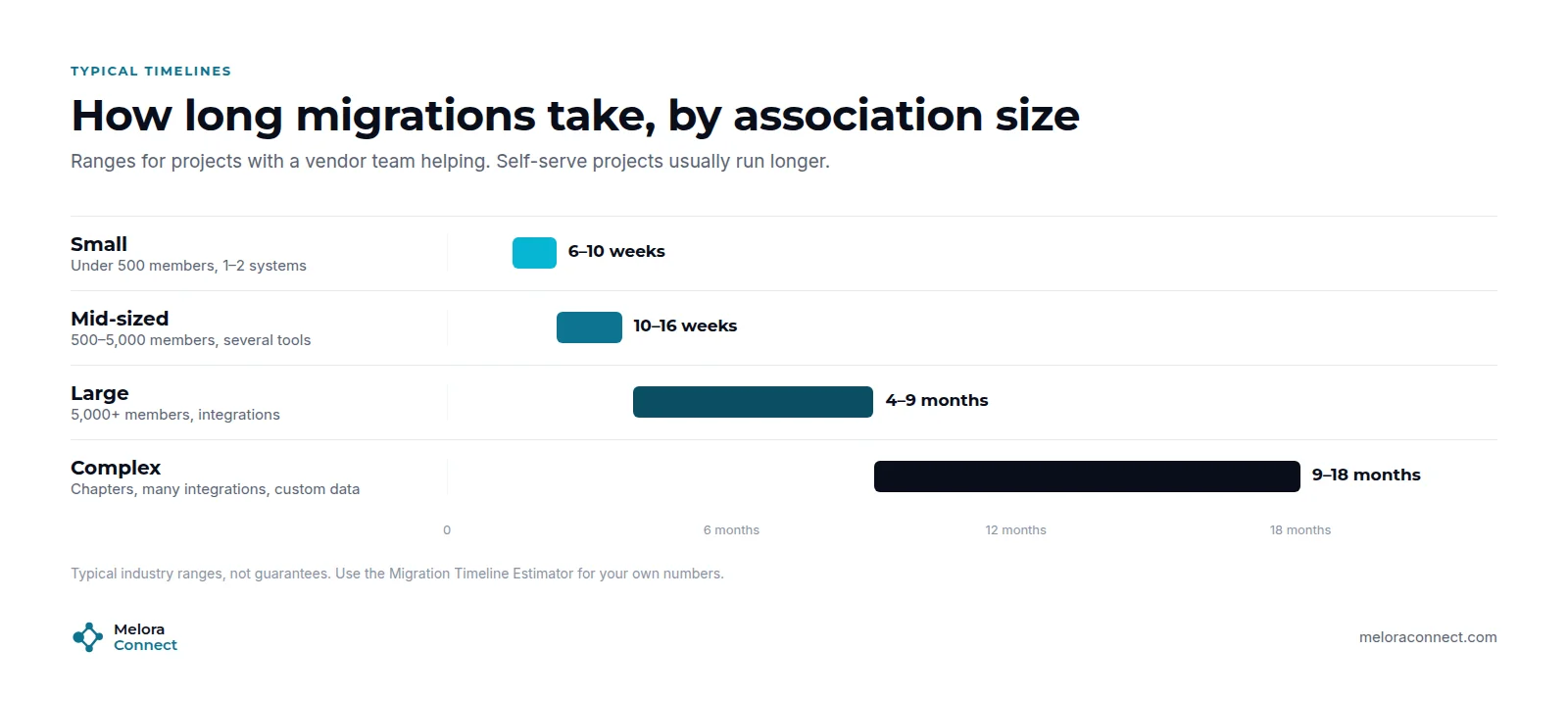
A membership software migration typically takes 6 to 10 weeks for a small association, 10 to 16 weeks for a mid-sized one, and several months for large or complex organizations.
| Association profile | Typical timeline |
|---|---|
| Small: under 500 members, 1 or 2 systems | 6 to 10 weeks |
| Mid-sized: 500 to 5,000 members, several tools | 10 to 16 weeks |
| Large: 5,000+ members, integrations | 4 to 9 months |
| Complex: many chapters, many integrations, custom data | 9 to 18 months |
These are typical industry ranges, not guarantees. Self-serve projects usually run longer. A vendor team that configures and migrates with you can run much shorter, as the Melora Connect section below explains.
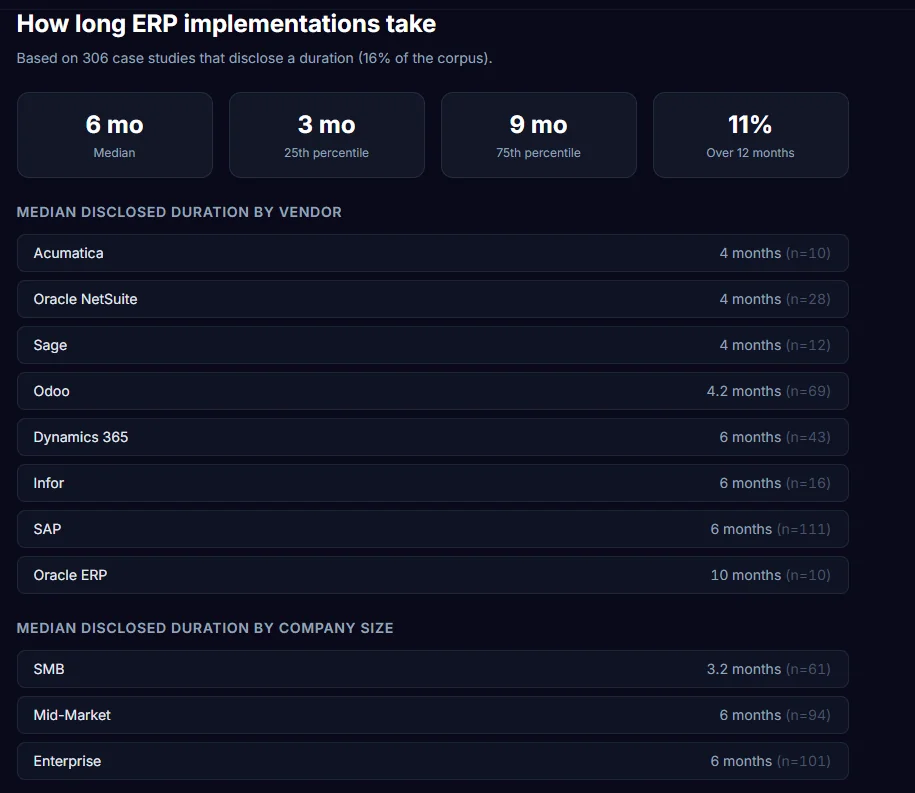
For a sense of scale, even full enterprise resource planning (ERP) projects, which are far bigger than most membership software migrations, are rarely measured in years when they go well. An August 2026 review of 128 published ERP case studies found a median implementation time of 6 months, with the middle half between 4 and 9 months. Those case studies were published by vendors and partners, so they lean toward success stories.
How long does each phase take?
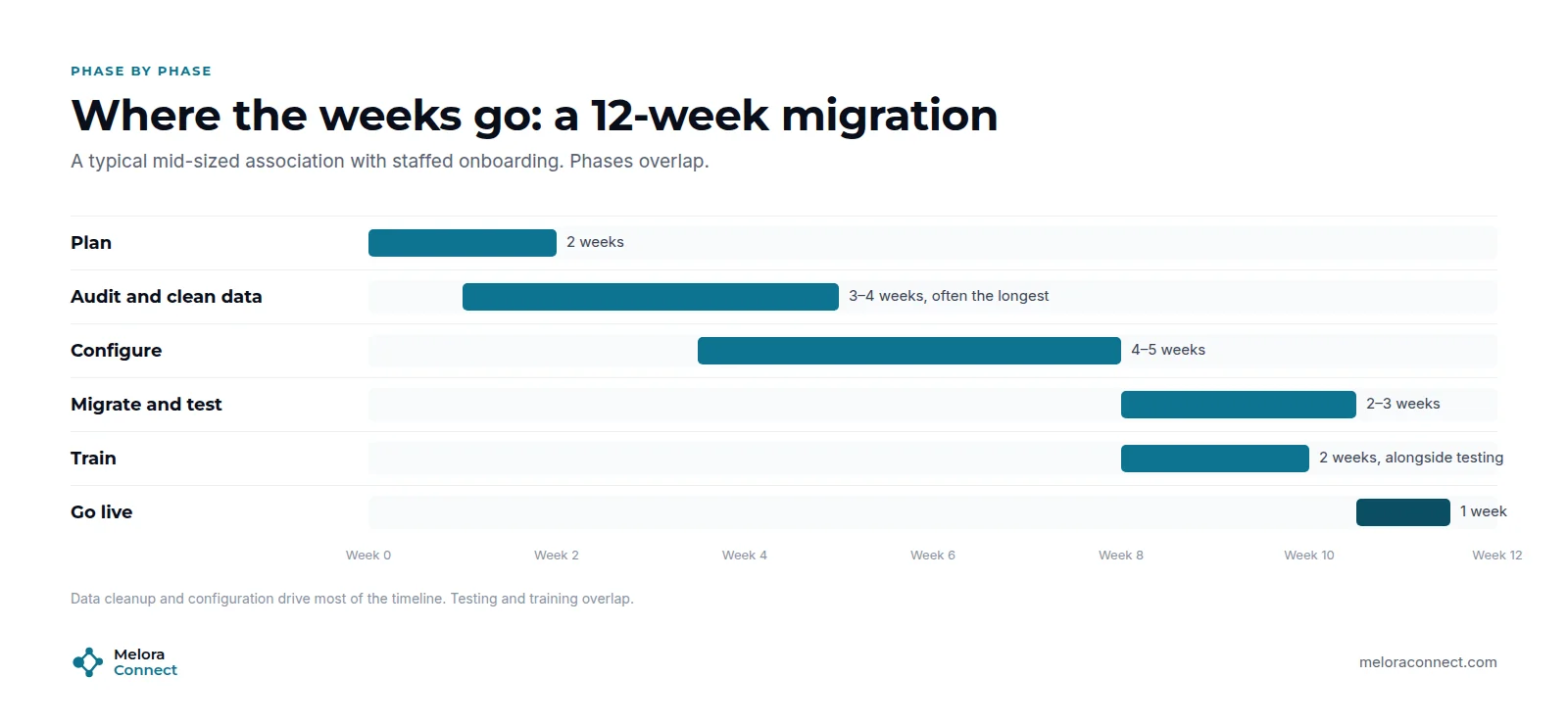
Here is how a typical 12-week industry migration for a mid-sized association breaks down. Phases overlap, so the total is shorter than the sum:
-
Plan (about 2 weeks): goals, team, go-live date and budget.
-
Audit and clean data (3 to 4 weeks): usually the longest phase, and the one most teams underestimate.
-
Configure (4 to 5 weeks): membership types, pricing, renewals, events, chapters, email, website and integrations.
-
Migrate and test (2 to 3 weeks): test imports, spot checks and reconciliation.
-
Train (about 2 weeks): runs alongside testing.
-
Go live (about 1 week): final import, member emails and a staffed support line.
For every step inside these phases, use the interactive AMS Migration Checklist.
Why do migrations run late?
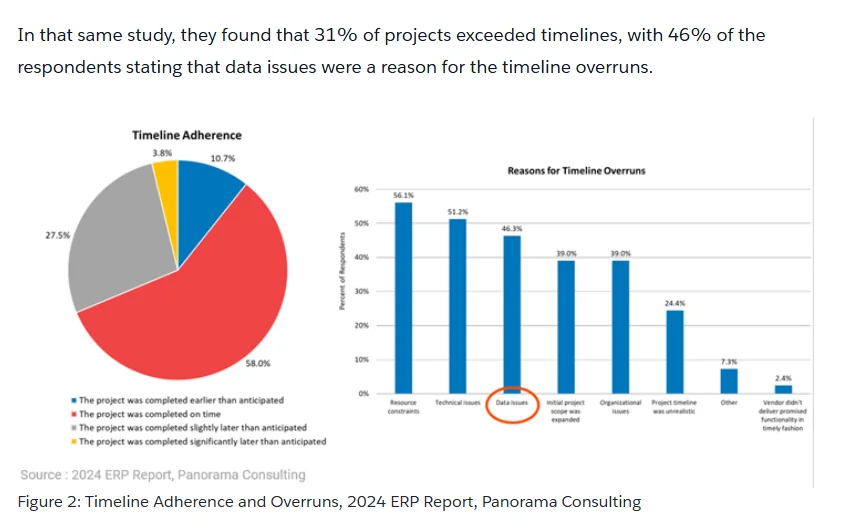
Migrations usually run late because of data problems and stretched teams, not because of the software. Research on larger system projects shows the same pattern. In Panorama Consulting’s 2024 ERP Report, as summarized by Informatica, 31% of projects exceeded their timelines, and 46% of those respondents named data issues as a reason. ERP projects are bigger than membership migrations, but the lesson scales down: start the data work first.
7 factors that change your timeline
-
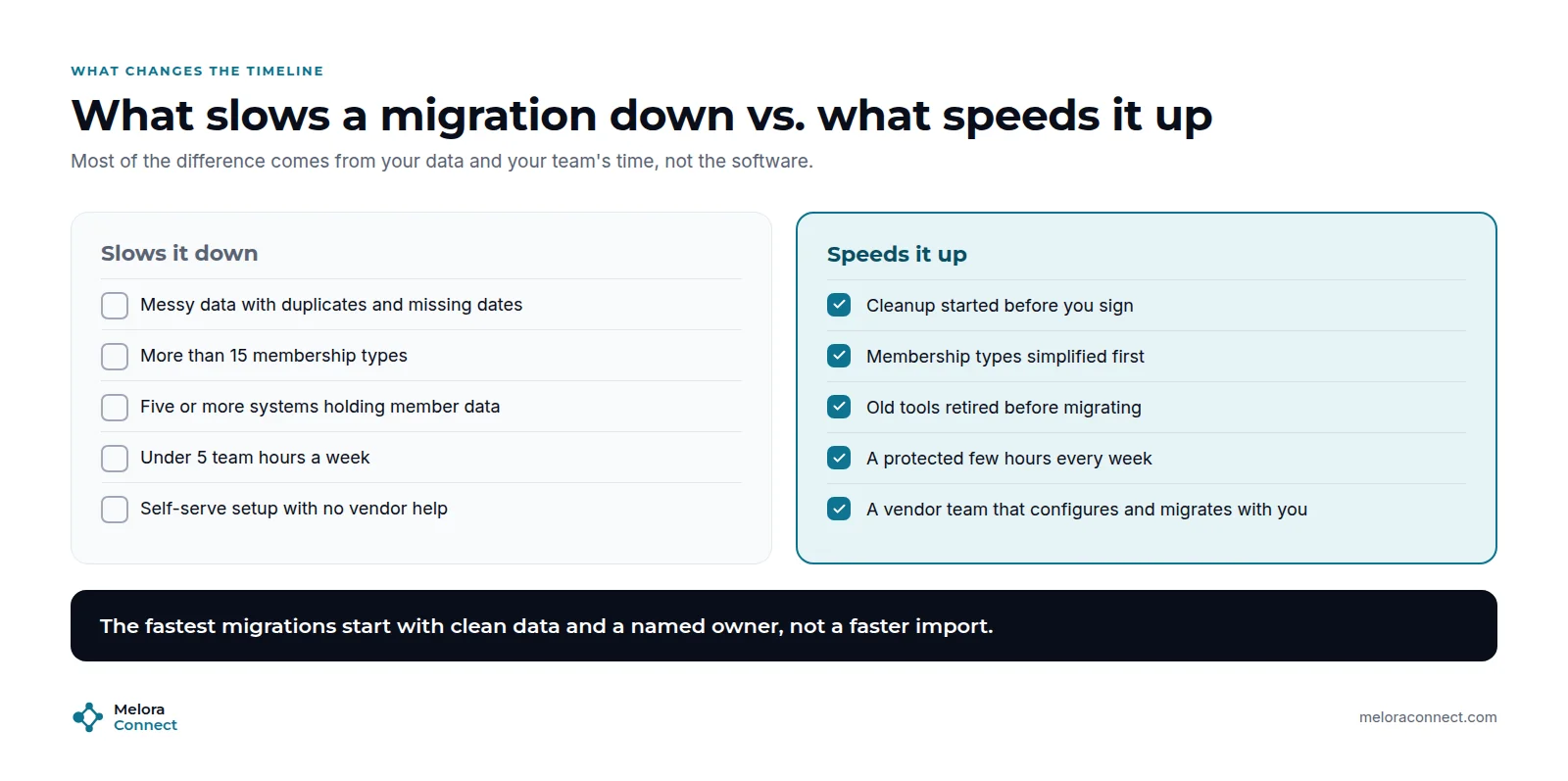
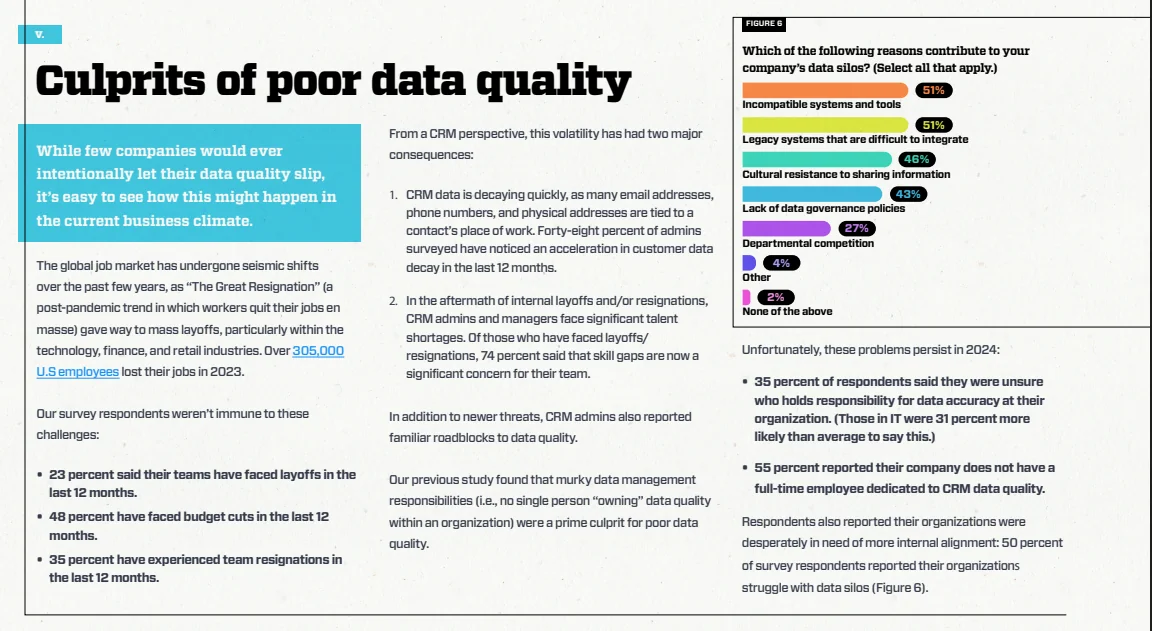
Data quality. Duplicates, missing renewal dates and inconsistent statuses can add weeks to cleanup. Validity’s 2024 research on CRM users found that unclear ownership of data quality is one of the familiar causes of poor data, so name a data owner on day one.
-
Number of data sources. Every extra spreadsheet or tool adds audit and testing time.
-
Membership types and pricing. More than 15 types slows configuration. Simplify before you build.
-
Integrations and structure. Accounting, website, learning and other connections each add configuration and testing, and so do chapters and continuing education (CE) records.
-
Your team’s time. Under five hours a week stretches every phase.
-
Onboarding model. A vendor team that configures and migrates with you is usually faster than self-serve.
-
Your calendar. Renewal season, your flagship event and staff holidays push go-live dates.
How do you choose your go-live date?
Work backwards from the dates you cannot move:
-
Go live at least six weeks before your renewal peak, so you can fix issues before invoices go out.
-
Avoid the weeks before your flagship event.
-
Add two to four weeks of buffer for a first migration.
-
Tell members six weeks before go-live, using the templates in the AMS Migration Communication Kit.
Estimate your own timeline
The free Migration Timeline Estimator asks seven questions about your members, data, systems and team, then shows an estimated range in weeks, a phase-by-phase timeline and a suggested go-live date. Add your renewal peak and it warns you if go-live lands too close. It works in English, French and Spanish.
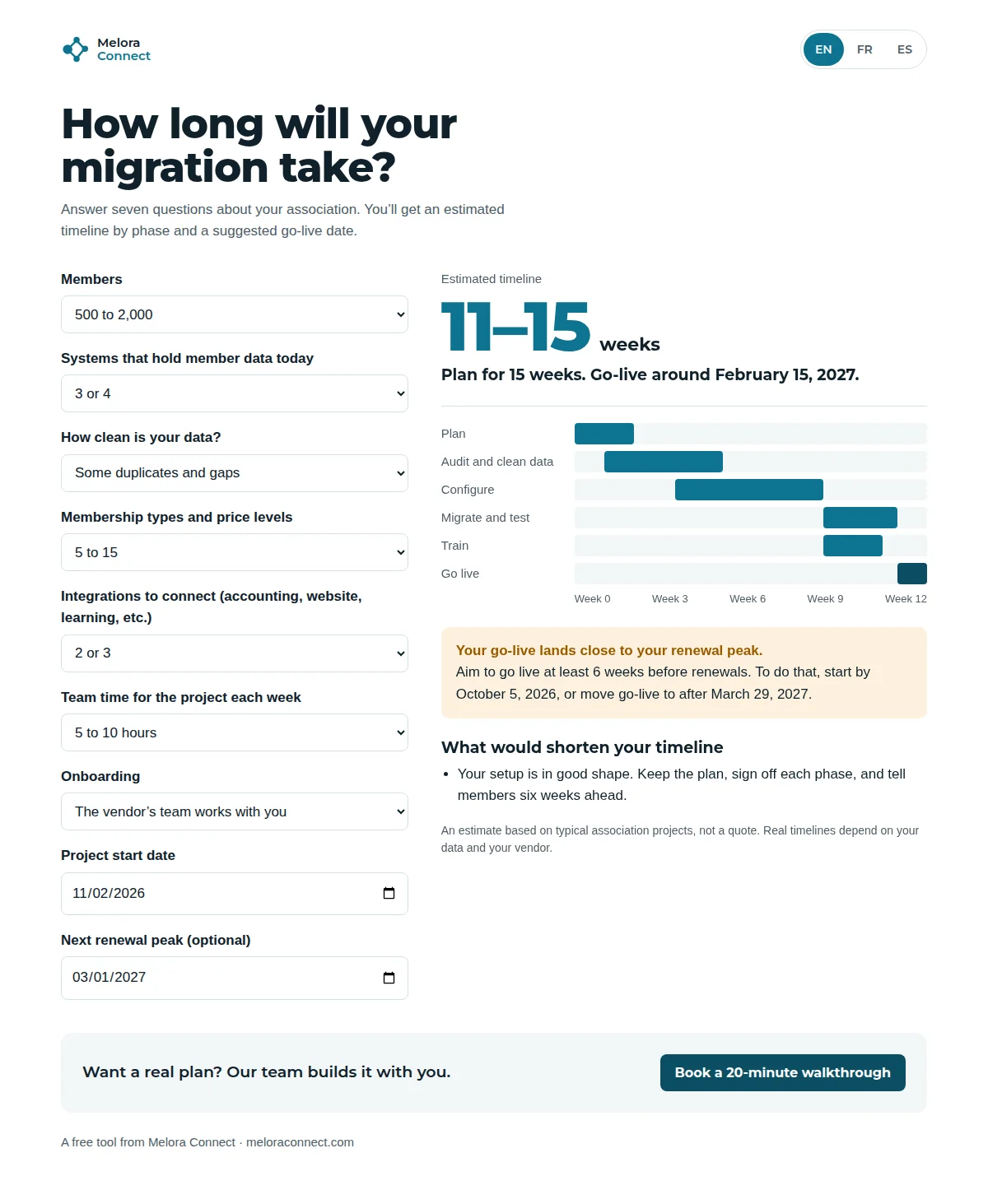
How long will yours take? Answer seven questions in the free Migration Timeline Estimator and get a phase-by-phase timeline and go-live date. Open the estimator
How to speed up without cutting corners
-
Start cleanup before you sign. It is the longest phase, and it does not need the new system. You can do it while you run your AMS selection process.
-
Simplify membership types first. Fewer types means faster configuration and clearer renewals.
-
Retire tools you will not need. Fewer sources means less to map and test.
-
Protect a few hours every week. A named project lead with time beats a big team without it.
-
Launch with essential integrations. Add the rest after go-live.
For the team and workstreams behind these phases, see our AMS migration project plan. For data mapping and cleanup, see how to switch membership management software without losing member data.
How Melora Connect keeps timelines short
With Melora Connect, the typical timeline is about 30 days from signed agreement to live. Our team does the configuration and the imports with you, rather than handing you a login and a help center, so the phases above run side by side instead of one after another. That is what “you get a team, not a login” means in practice, and it is where most of the time savings come from.
Structure no longer has to wait for a later phase either. Chapters and CE credits are live in Melora Connect, and online events connect to Zoom, so organizations that need them can configure them during onboarding. Staffed onboarding is included on every plan, with one-time packages from $999 to $4,999 on our pricing page. Your side still sets the pace: clean data and a project lead with a few hours each week are what keep a 30-day plan at 30 days.
Want a real plan, not just an estimate? Bring your member count, data sources and renewal calendar, and we will sketch your timeline with you. Book a demo
Frequently asked questions about migration timelines
How long does it take to migrate to new membership software?
Industry typical is 6 to 16 weeks for small and mid-sized associations and 4 to 9 months for large ones. Complex organizations with many chapters and integrations can need 9 to 18 months. With Melora Connect, it is typically about 30 days from signed agreement to live.
What is the longest phase of a migration?
Data audit and cleanup, especially when member data is spread across several tools or full of duplicates. It usually takes 3 to 4 weeks in a mid-sized migration, and it can start before you sign with a new vendor because it does not need the new system.
Can we migrate in a month?
Yes, when a vendor team configures and migrates with you, your data sources are few and your membership types are simple. That is how Melora’s typical onboarding reaches go-live in about 30 days. Teams trying to do it alone in a month usually end up skipping testing.
Why do migration projects run late?
Mostly because of data problems and limited staff time. In Panorama Consulting’s 2024 ERP research, data issues were among the most common reasons projects missed their timelines. Name a data owner early, clean before you import, and protect a few project hours every week.
When is the worst time to migrate?
During renewal season or in the weeks before your flagship event. Aim to go live at least six weeks before your renewal peak so you can fix any billing or reminder issues before invoices go out.
Does self-serve onboarding take longer?
Usually, yes. Teams configuring and migrating alone tend to need more time than those working with the vendor’s team, because the phases run one after another instead of side by side.
The bottom line
Most associations can move to new membership management software in a few months, not a year. The timeline depends far more on your data, your membership structure and your team’s time than on the software itself. Start cleanup early, simplify before you build, and pick a go-live date that leaves room before renewals.
Free download: Membership Data Migration Workbook. Cleanup is the longest phase, and you can start it today. An Excel workbook with a data inventory, field map and validation checks. Download the workbook
Go live in about 30 days, with our team doing the work with you. See how Melora Connect’s staffed onboarding runs configuration and imports side by side. Book a demo
Sources
-
Informatica, The Key to Successful ERP Modernization: Data Quality and Data Management (citing Panorama Consulting’s 2024 ERP Report), April 23, 2024.
-
ERP Research, ERP Implementation Statistics: What 928 Published Case Studies Actually Show, August 2026.
-
Validity, The State of CRM Data Management in 2024, May 2024.