

A membership data migration workbook is a spreadsheet that tracks every piece of member data through a software switch: where it lives, how each field converts, whether the numbers match after import, and who does each cutover task. This free Excel workbook has four tabs and flags any difference between your old and new systems automatically.
What’s inside the workbook
1. Data inventory
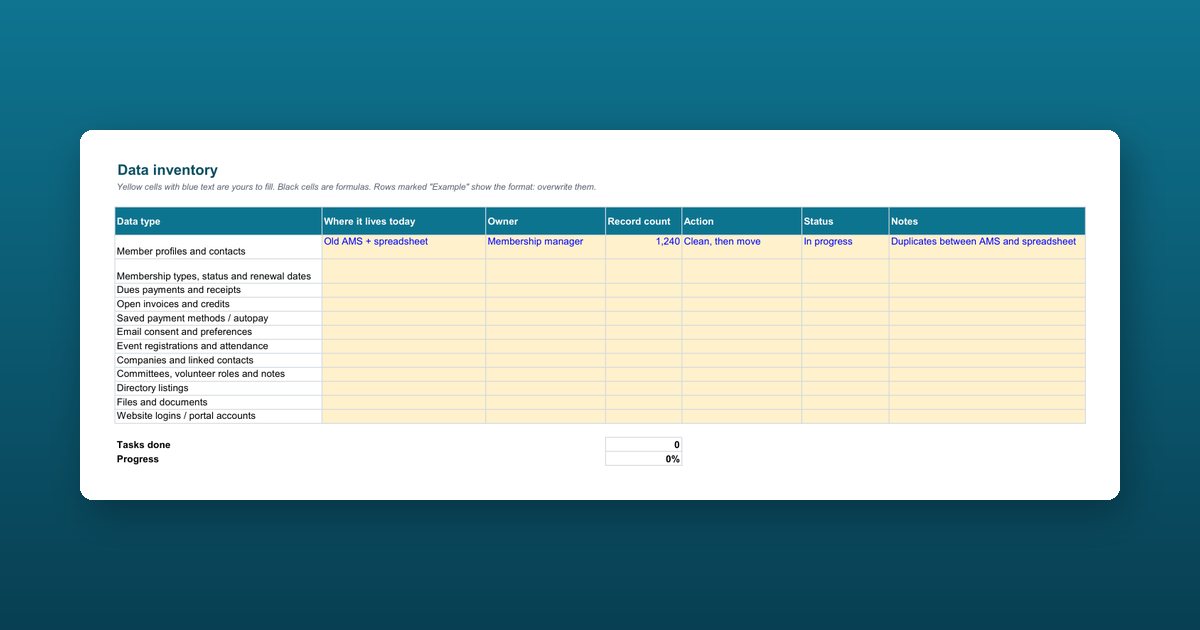
Twelve data types most associations hold, ready to fill in: member profiles and contacts, membership types and renewal dates, dues payments, open invoices and credits, saved payment methods, email consent, event registrations, companies and linked contacts, committees and notes, directory listings, files, and portal accounts. A progress cell counts how many are done.
2. Field mapping
Forty rows for old field, example value, new field, conversion rule, whether it’s required, who approved it, and status. Two worked examples show the format.
3. Validation
Twelve reconciliation checks between the old and new systems. Enter both numbers and the sheet calculates the difference and marks each check Pass or Investigate:
| Check | Why it matters |
|---|---|
| Total, active, and lapsed members | Nobody disappears or comes back to life |
| Members by type | Membership types mapped correctly |
| Records with a future renewal date | Renewals will run on time |
| Dues collected and open invoice balances | Finance totals still agree |
| Email opt-outs | Consent is respected after the move |
| Event registrations, directory listings, companies | History and relationships came across |
4. Cutover plan
Eighteen tasks in seven phases: audit, clean, map, test, parallel run, cut over, and archive, each with an owner, due date, and status.
The rule of thumb
Don’t switch off the old system until every validation check reads Pass, and keep a read-only copy for at least 12 months. Most data problems surface at the first renewal run, and that copy is how you answer them.
Who this workbook is for
Membership managers, operations staff, and the person on the project who owns the data. It suits associations, chambers of commerce, professional societies, and nonprofits moving from a legacy AMS, a CRM, or spreadsheets.
How to use the membership data migration workbook
List every place member data lives
On the Data inventory tab, record each data type, where it lives today, its owner, the record count, and what you'll do with it: move, clean then move, or archive.
Map every field and its conversion rule
On the Field mapping tab, write each old field, an example value, the new field, and the rule that converts it, such as dates from MM/DD/YYYY to YYYY-MM-DD. Get the map approved in writing before any import.
Reconcile after every test import
On the Validation tab, enter counts and totals from the old and new systems. Each check reads Pass or Investigate automatically. Fix the map and re-run until all twelve pass.
Run the cutover plan
Track the 18 cutover tasks from audit to archive with an owner, due date, and status. The tab shows how many are done.
Keep the old data read-only
Don't switch off the old system until every validation check reads Pass, and keep a read-only copy for at least 12 months.
Frequently asked questions
What is data mapping in a membership software migration?
Data mapping is the written list of which field in your old system goes to which field in the new one, with the rule that converts it. For example, a Status of Current or Grace becomes Active, and Expired becomes Lapsed. An approved map is what makes an import repeatable and checkable.
How do I make sure no member data is lost in a migration?
Reconcile counts and totals between the old and new systems after every test import: total records, active and lapsed members, members by type, future renewal dates, dues collected, open invoice balances, email opt-outs, event registrations, directory listings, and companies with linked contacts. The workbook flags any difference for investigation.
What member data should we migrate, and what should we archive?
Move what staff and members use: profiles and contacts, membership status and renewal dates, open invoices, email consent, and recent event and payment history. Archive what you only need for reference, such as very old transactions, and keep the archive for at least 12 months.
Can saved credit cards be moved to a new system?
Sometimes. Card tokens can move only when both payment processors support a token transfer. If they don't, members re-enter their card once. The cutover plan includes this step, and the AMS migration communication kit has the member email for it.
What is a parallel run?
A parallel run processes one renewal cycle or one event in both the old and the new system, then compares the results. It's the last check before cutover, and the cutover plan only moves on when every validation check reads Pass.
Does the workbook work in Google Sheets or LibreOffice?
Yes. It's a standard Excel file with simple formulas (counts and differences), so it opens and calculates in Google Sheets, LibreOffice Calc, and Numbers as well as Excel.
Is the workbook specific to Melora Connect?
No. It's vendor-neutral and works for a move between any two membership systems, including from spreadsheets.