
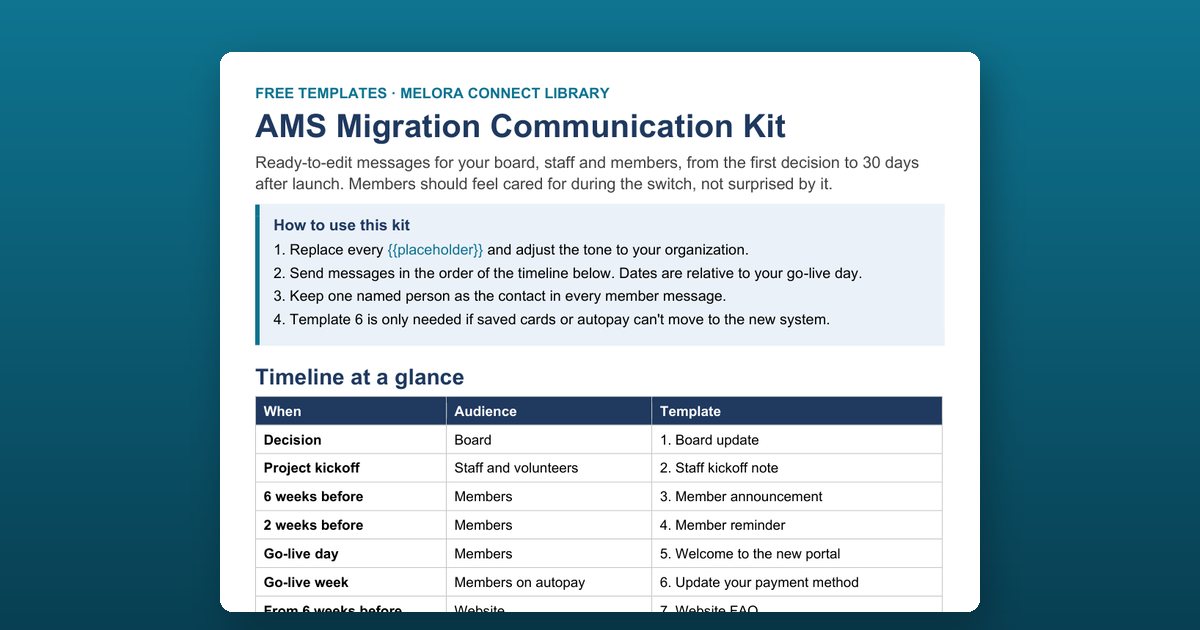
An AMS migration communication kit is a set of ready-to-edit messages that tell your board, staff, and members what is changing when you move to new membership software, and when. This free Word kit has nine templates timed from the decision to 30 days after launch, with placeholders you replace in minutes.
The communication timeline
Dates are relative to your go-live day. Send the messages in this order:
| When | Audience | Template |
|---|---|---|
| Decision | Board | 1. Board update |
| Project kickoff | Staff and volunteers | 2. Staff kickoff note |
| 6 weeks before | Members | 3. Member announcement |
| 2 weeks before | Members | 4. Member reminder |
| Go-live day | Members | 5. Welcome to the new portal |
| Go-live week | Members on autopay | 6. Update your payment method |
| From 6 weeks before | Website | 7. Website FAQ |
| Go-live month | Front desk and phones | 8. Phone and front-desk script |
| 30 days after | Members | 9. “We heard you” follow-up |
What each template does
1. Board update
Names the new system and the goals, the project lead and go-live date, what you need from the board, and how you’re managing the risks.
2. Staff kickoff note
Tells staff and key volunteers what changes for them, who the super-users are, and when training happens, and promises that nobody is left alone with the new system.
3. Member announcement
Reassures members that their membership, renewal date, and history come with them, and lists three things they’ll be able to do.
4. Member reminder
Sets expectations two weeks out: the password email, unchanged renewal dates, safe event registrations, and the short window when online payments pause.
5. Welcome to the new portal
The launch-day email with the password link and three first actions, inviting members to report anything that looks wrong.
6. Update your payment method
Only for members on autopay or with saved cards, if those can’t move. One link, one minute, and an invoice option.
7. Website FAQ
Six questions and answers to publish six weeks before go-live: why you’re changing, history, what members need to do, renewal dates, events, and who to ask.
8. Phone and front-desk script
What to say when members call, with answers for login problems, wrong data, and frustration.
9. “We heard you” follow-up
Closes the loop 30 days after launch with what members told you and what you changed.
Who this kit is for
Executive directors, membership managers, and communications staff at associations, chambers of commerce, professional societies, and nonprofits. Use it whether you’re leaving a legacy AMS or moving off spreadsheets and a separate email tool.
How to use the AMS migration communication kit
Replace the placeholders
Fill in every {{placeholder}}, such as {{org_name}}, {{new_system}}, {{go_live_date}}, and {{contact_name}}, and adjust the tone to sound like your organization.
Put the messages on your project calendar
Schedule each template against your go-live date using the timeline at the top of the kit, from the board update at decision time to the follow-up 30 days after launch.
Name one real person in every member message
Use the same named contact, with a phone number and email, in every member message. Members trust a switch when they know who to call.
Use the payment email only if you need it
Send template 6 only to members on autopay or with saved cards, and only if their cards can't move to the new payment system.
Close the loop after launch
Thirty days after go-live, send template 9 to tell members what they reported and what you changed.
Frequently asked questions
When should we tell members we're changing membership systems?
Six weeks before go-live, with a reminder two weeks before and a welcome email on launch day. Six weeks gives members time to ask questions without the news going stale, and it lets you publish a website FAQ alongside the announcement.
What should the member announcement email say?
That their membership, renewal date, and history move with them; what they'll be able to do in the new portal; that they don't need to do anything yet; when you'll write again; and the name, phone, and email of a real person who will answer.
How do we tell members to re-enter their saved card?
Keep it short and reassuring: explain that saved cards couldn't move to the new, more secure payment system, give one link to add a card before the renewal date, and offer an invoice instead. Template 6 does exactly this.
What should staff say when members call about the new system?
Template 8 is a front-desk and phone script with answers for members who can't log in, whose data looks wrong, or who are frustrated, and a reminder to log every call on the member's record.
How should we follow up after launch?
Thirty days after go-live, send a short you-said-we-did update: two pieces of feedback and what you changed, how many members have already set up their accounts, and their login link.
Do we need to update the board as well?
Yes. Template 1 tells the board which system you chose, the goals, the go-live date, what you need from them, and how you're managing risk, such as reconciling data and keeping the old system read-only for 12 months.
Can we use the kit with any membership software?
Yes. The messages are vendor-neutral. Replace {{new_system}} and {{old_system}} with the names of your platforms.