People · Events · Communities

Quick answer: Event management software for nonprofits handles registration, ticketing, donations, check-in, communication and reporting in one place, and links every interaction to the supporter’s record. Look for flexible pricing, one supporter record, donations alongside tickets, volunteer-friendly check-in, virtual events and board-ready reports, and compare the total yearly cost, not the headline price.
Key takeaways
-
The feature that matters most later is one supporter record: every ticket, gift, check-in and volunteer shift on the same profile.
-
Compare the total yearly cost, including payment processing, add-ons, onboarding and staff time. Free tools rarely stay free once you run several events a year.
-
When a ticket includes a gift, receipts need to separate the two. The IRS requires a written disclosure for quid pro quo payments over $75.
-
Follow up within 48 hours, by segment. That is where first-time guests become long-term supporters.
Event management software for nonprofits matters because, for a nonprofit, an event is never just an event. The spring breakfast is a fundraiser. The annual gala is a sponsor showcase. The volunteer evening is a retention program. And every one of them is a chance to turn a guest into a supporter.
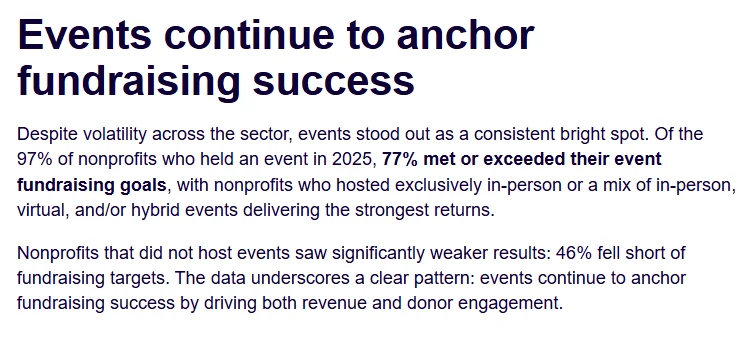
Events are also still where the money is. In Bonterra’s 2026 Fundraising Outlook, a survey of 1,273 nonprofit professionals, 97% held an event in 2025 and 77% met or exceeded their event fundraising goals. Among nonprofits that did not host events, 46% fell short of their targets.
That is a lot to ask of a registration form and a spreadsheet. Yet many nonprofits still run events across four or five disconnected tools, then spend the following week matching names, chasing payments, and sending thank-you notes too late to matter. The event raises money, but the relationships it started slip away.
This guide explains what event management software for nonprofits should actually do, how pricing works and where hidden costs hide, and the best practices that turn one event into long-term support. It is written for nonprofits, foundations, associations, and community organizations running events with small teams and lots of volunteers. For the wider category, including how associations and chambers use it, see our complete guide to event management software.
What is event management software for nonprofits?
Event management software for nonprofits is a platform that handles registration, ticketing, donations, attendee communication, check-in, and reporting in one place, and connects every interaction to the supporter’s record. It replaces the patchwork of form builders, payment pages, spreadsheets, and email tools that most small teams start with.
The last part of that definition is what separates it from generic ticketing tools. A ticketing app sells seats. Nonprofit event software should also tell you who gave, who volunteered, who came for the first time, and who stopped coming. You will also hear it called nonprofit event planning software, although planning logistics like venues and run-of-show is a related but different category; see our guide to event management vs. event planning software.
Why do nonprofits need different event software?
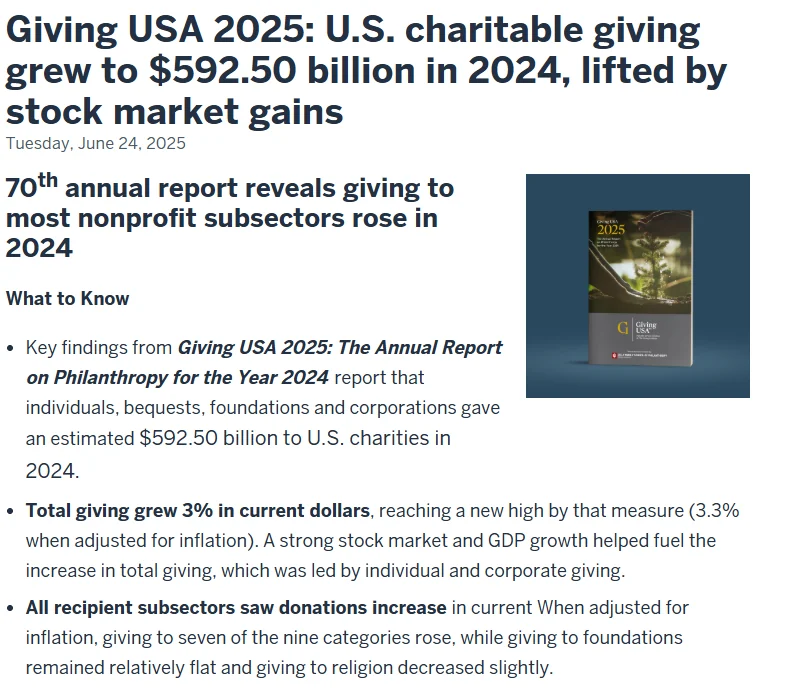
Nonprofit events depend on individual supporters. According to Giving USA 2025, published by the IU Lilly Family School of Philanthropy, U.S. charitable giving reached $592.50 billion in 2024, and individuals gave $392.45 billion, about two-thirds of all giving. Every guest at your event is one of those individuals.
That is why nonprofit events work differently from commercial ones, and the software has to reflect it:
-
Revenue arrives in several forms. Tickets, donations, sponsorships, and membership dues often flow through the same event.
-
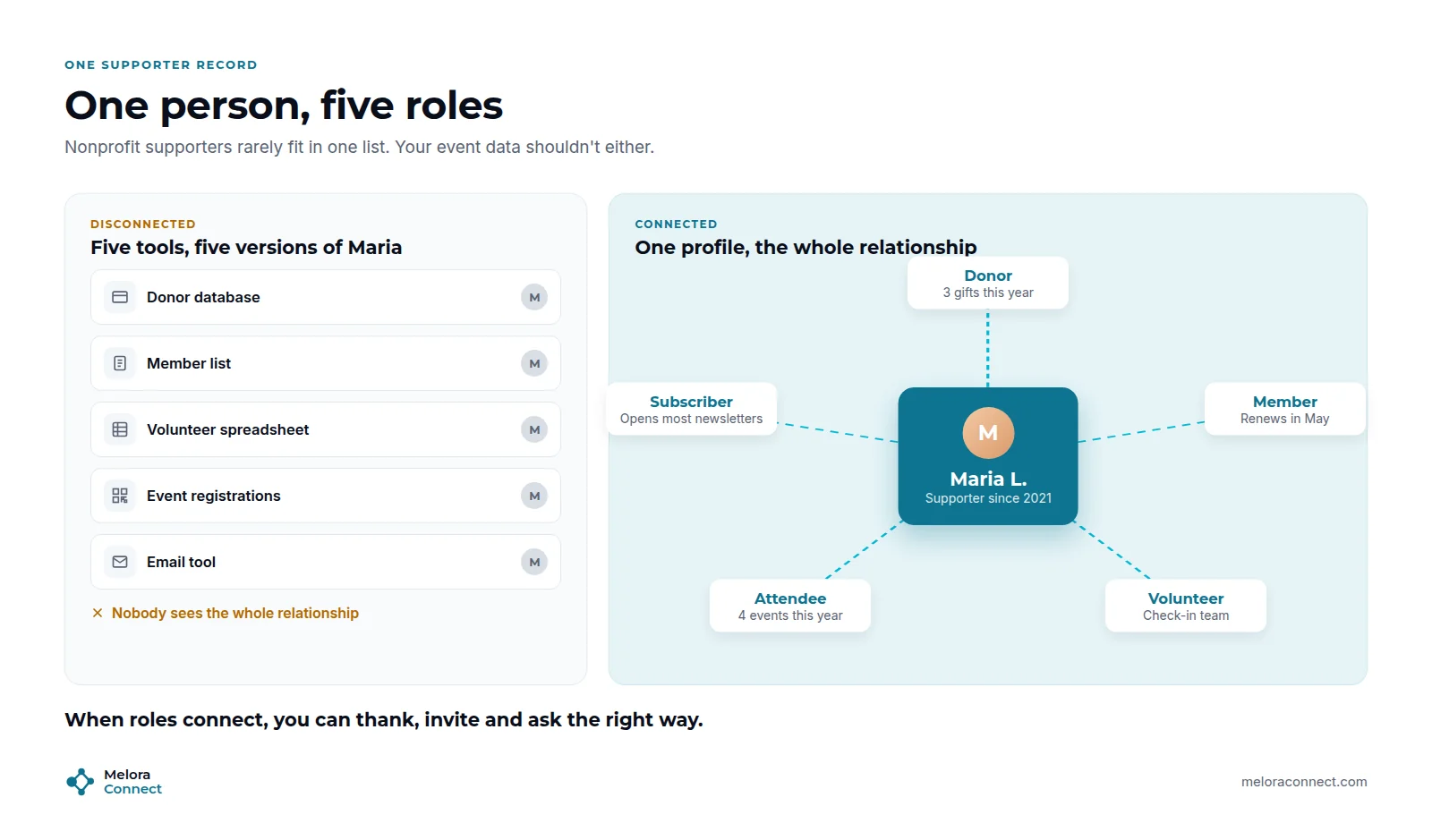
Supporters wear several hats. The same person can be a donor, a member, a volunteer, and an attendee, sometimes all in one month.
-
Volunteers run event day. Check-in, walk-ins, and payments at the door are often handled by people who use the system once a year.
-
Budgets are tight and teams are small. Every hour spent reconciling spreadsheets is an hour not spent on the mission.
-
Boards and funders want proof. Attendance, revenue, and new supporters per event need to be easy to report.
What features should nonprofit event management software have?
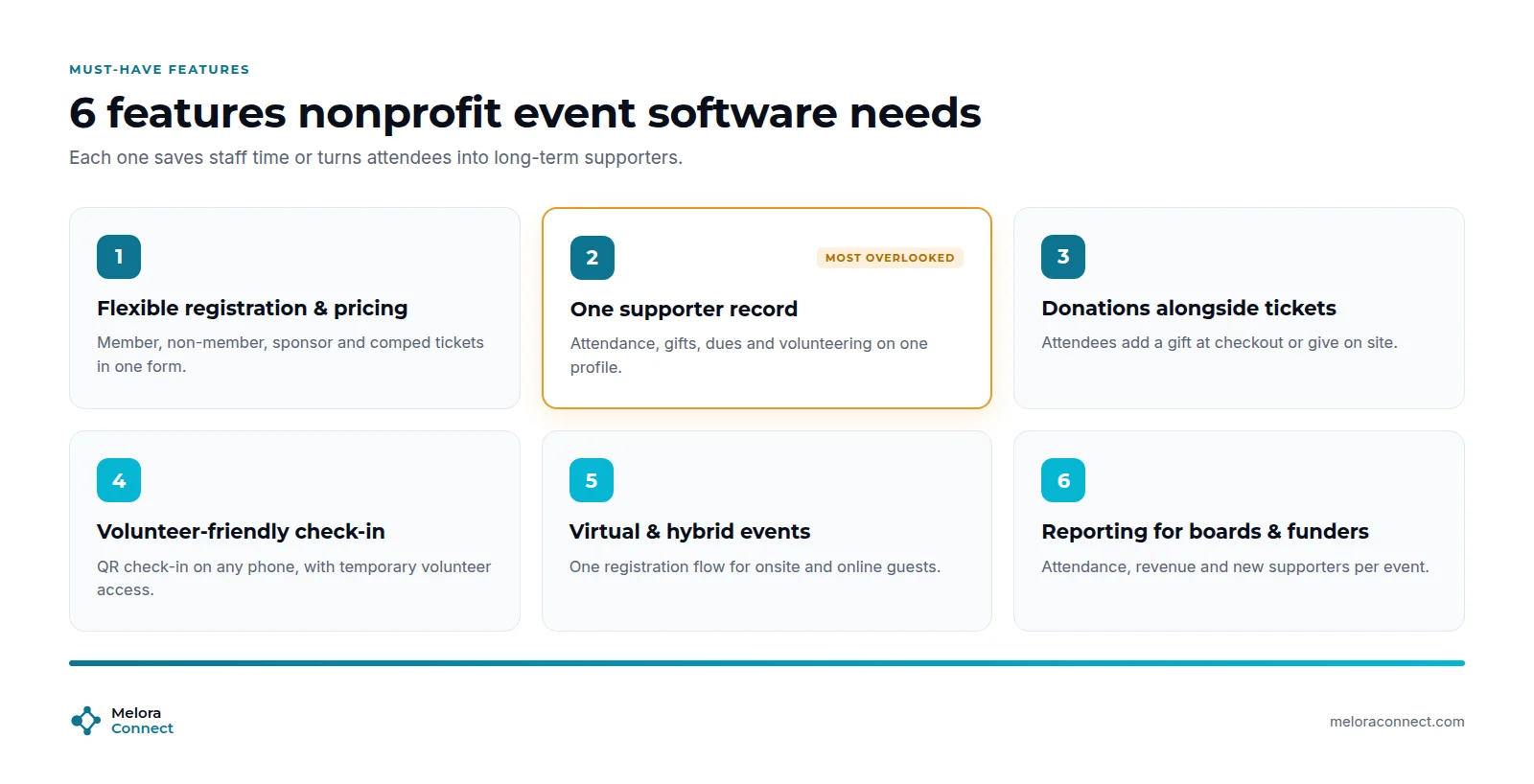
Nonprofit event management software should have six must-have features. Here they are, with what to look for in each.
1. Flexible registration and pricing
One registration form should handle member and non-member prices, sponsor tables, comped guests, and group bookings, and apply the right price automatically. If staff have to check every registration against a member list, the software is not doing its job.
2. One supporter record
This is the feature buyers overlook most, and the one that matters most later. Every registration, gift, check-in, and volunteer shift should land on the same profile as membership and email history. That is what lets you see that the woman who just bought two gala tickets also volunteered last spring and has not renewed her membership. For more on why one record changes everything, see What Is Membership Management?
3. Donations alongside tickets
Guests who are already paying for a ticket are often happy to add a gift. Look for a platform where tickets, donations, and dues are processed in the same system, so every dollar is attributed to the right person and the right event without manual matching, and supporters get their receipt right away.
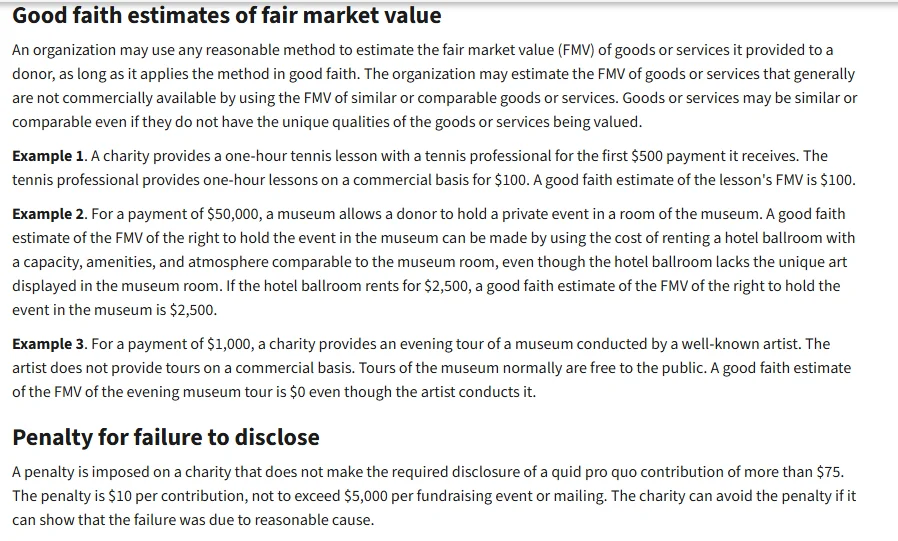
The receipt matters. Under the IRS rules on quid pro quo contributions (page updated 2026), a nonprofit must give a written disclosure when a donor’s payment is more than $75 and partly for goods or services. In the IRS example, a donor who pays $100 for a concert ticket worth $40 can deduct $60. The penalty for not disclosing is “$10 per contribution, not to exceed $5,000 per fundraising event or mailing.” Software that records the ticket value and the gift separately makes that disclosure easy. This is general information, not tax advice.
4. Volunteer-friendly check-in
Event-day tools should be simple enough for a volunteer to learn in five minutes: QR check-in on any phone, walk-in registration, on-site payments, and temporary access that you can switch off after the event. Live check-in numbers help staff manage the room.
5. Virtual and hybrid events
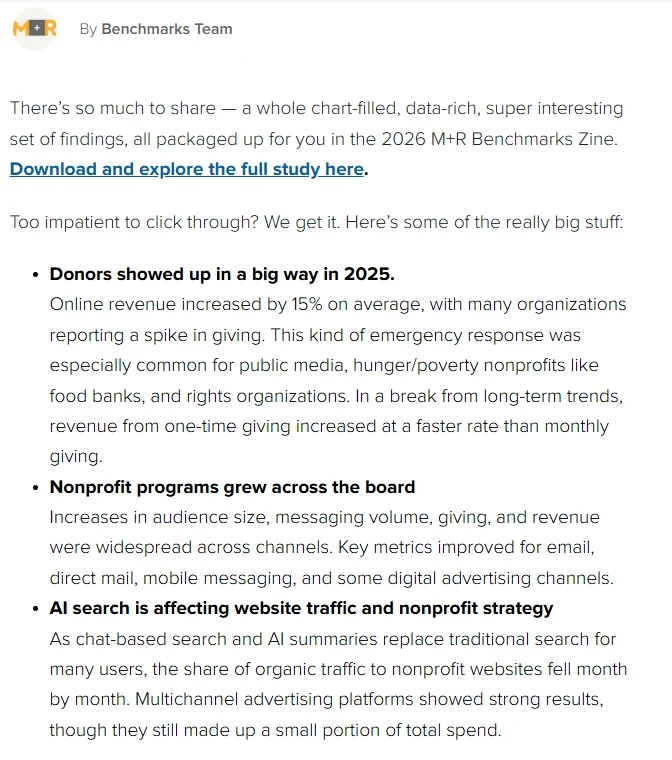
Webinars, online town halls, and hybrid galas widen your reach to supporters who cannot attend in person, and online giving is growing. The 2026 M+R Benchmarks Study found that nonprofit online revenue increased by 15% on average in 2025.
Choose software that runs in-person, virtual, and hybrid events through one registration flow, so online attendees end up in the same records as everyone else.
6. Reporting for boards and funders
You should be able to answer “How did the event do?” in minutes: attendance, revenue by source, first-time attendees, and new members or donors. If the board report takes a day of exporting and merging, budget that day into the software’s true cost. Our free Board Report Template shows which numbers to bring to the board.
Use this table to pressure-test any platform in a demo:
| Feature | Why it matters for nonprofits | Red flag |
|---|---|---|
| Registration and pricing | Members, sponsors, and guests pay the right price automatically | Staff check member status by hand |
| Supporter record | Gifts, attendance, dues, and volunteering on one profile | Event data lives in its own database |
| Donations | Tickets, gifts, and dues processed together and attributed correctly | Donations reconciled from a separate page |
| Check-in | QR check-in, walk-ins, and on-site payments run by volunteers | Printed lists and a cash box at the door |
| Virtual and hybrid | One registration flow for onsite and online guests | A separate tool and list for webinars |
| Communication | Automated confirmations, reminders, and segmented thank-yous | One generic email to everyone, two weeks later |
| Reporting | Attendance, revenue, and new supporters per event in real time | Board reports built by hand in a spreadsheet |
How much does event management software cost for nonprofits?
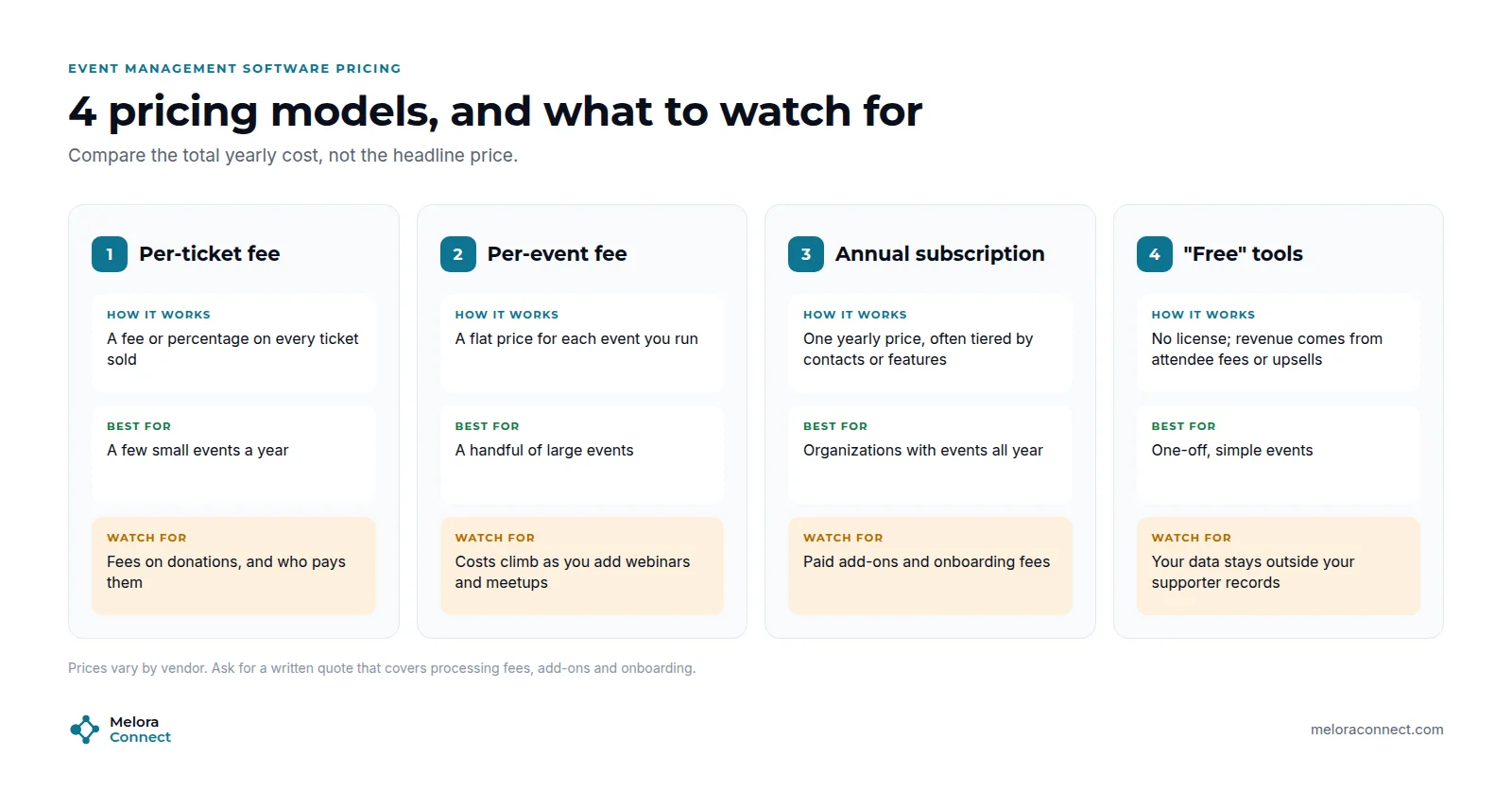
Event management software pricing for nonprofits varies widely by vendor, so the most useful thing you can do is understand the model before you compare numbers. Always ask for a written quote.
Common pricing models
| Pricing model | How it works | Watch for |
|---|---|---|
| Per-ticket fee | A flat fee or percentage on every ticket sold | Fees taken from donations, and whether you or the attendee pays them |
| Per-event fee | A fixed price for each event | Costs climb quickly as you add webinars and small meetups |
| Annual subscription | One yearly price, often tiered by contacts or features | Paid add-on modules and separate onboarding fees |
| “Free” tools | No license fee; the vendor earns from attendee fees or upsells | Your data stays outside your supporter records |
If you run events all year, an annual subscription usually gives the most predictable budget. If you run one large gala and nothing else, a per-event or per-ticket model may be enough. For named platforms and their ticket fees side by side, see our list of the best event management software.
Hidden costs to budget for
Beyond the license, budget for payment processing on tickets and gifts (and check that funds land in your own account), add-on modules, separate onboarding fees, and the staff time it takes to run it all. Our guide to membership management software costs lists the hidden fees to ask about.
Is free event software good enough?
For a single, simple event, often yes. The trouble starts when free tools become your system. Attendee data sits in someone else’s platform, donations need matching by hand, and nobody can see that a first-time guest is also a lapsed member. When you run more than a few events a year, the staff hours you spend stitching free tools together usually cost more than a connected platform.
What are the best practices for nonprofit event management?
Before the event
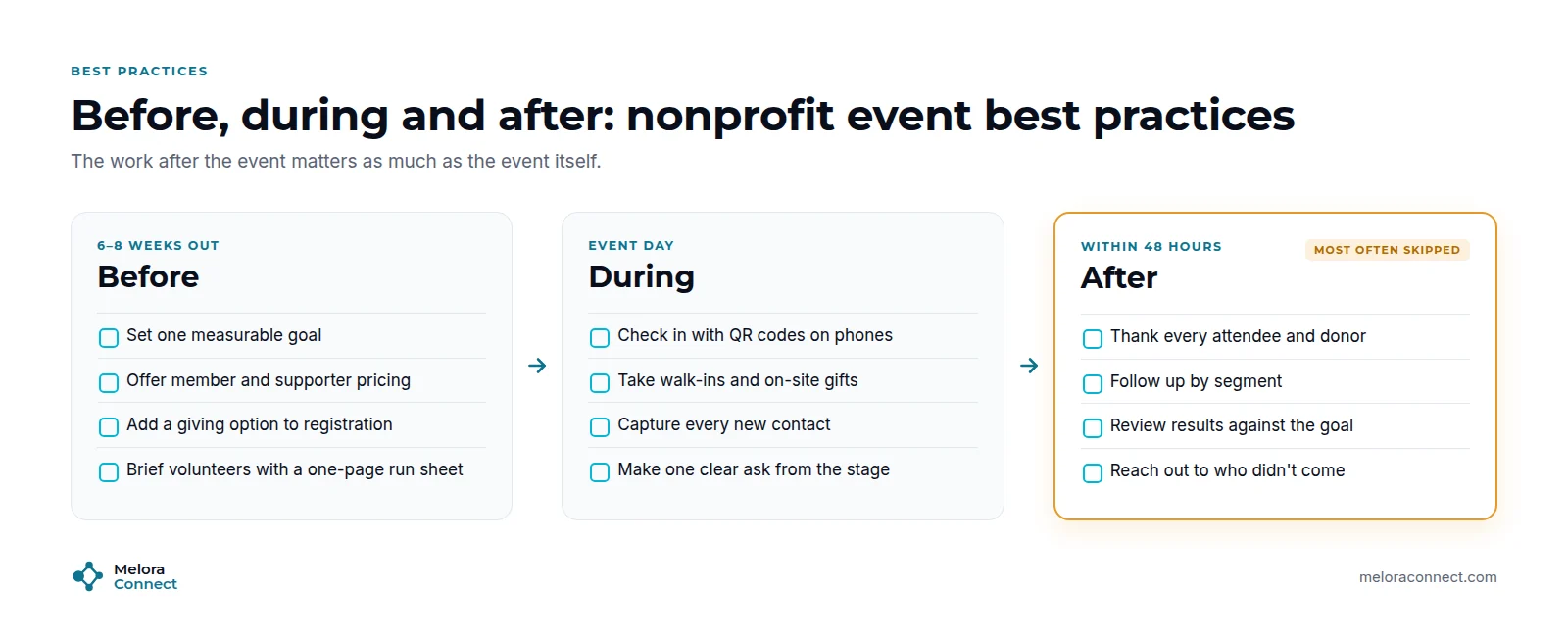
Set one measurable goal per event, such as dollars raised, new members, or volunteer sign-ups, so you know what success looks like. Offer member and supporter pricing to reward loyalty, add a giving option to registration, and send volunteers a one-page run sheet with their shift, role, and who to call.
During the event
Make the front door fast: QR check-in on phones, walk-in registration, and on-site payments. Capture every new contact properly, not on a clipboard. And from the stage, make one clear ask, whether it is a gift, a membership, or a volunteer shift, instead of three competing ones.
After the event: the 48-hour rule
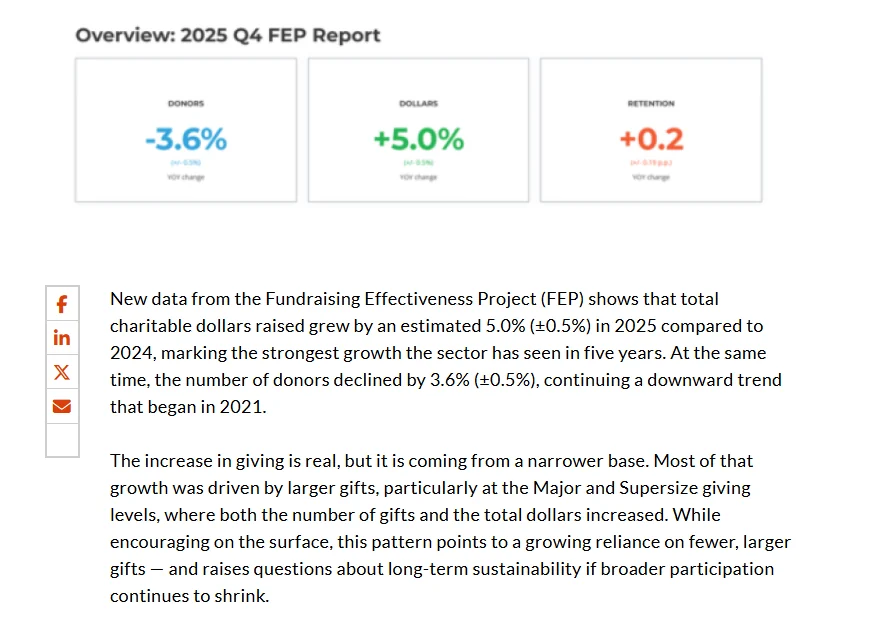
This is the step most nonprofits skip, and where most of the long-term value lives. Keeping donors is harder than raising dollars. The Fundraising Effectiveness Project, reported by AFP in 2026, found that dollars grew by an estimated 5.0% (±0.5%) in 2025, while the number of donors declined by 3.6%. Overall donor retention edged up from 43.1% to 43.3%, which means more than half of donors did not give again.
The 48-hour rule works in four steps:
-
Thank every attendee and donor within 48 hours.
-
Follow up by segment. First-time guests get an invitation to get involved, and donors get an impact update.
-
Reach out to the regulars who missed it. Members who usually attend but did not come get a personal note.
-
Review results against the goal you set, and record what to change next time.
For more ways to turn one event into ongoing involvement, see our member engagement strategies.
Example: the breakfast that found its next donors
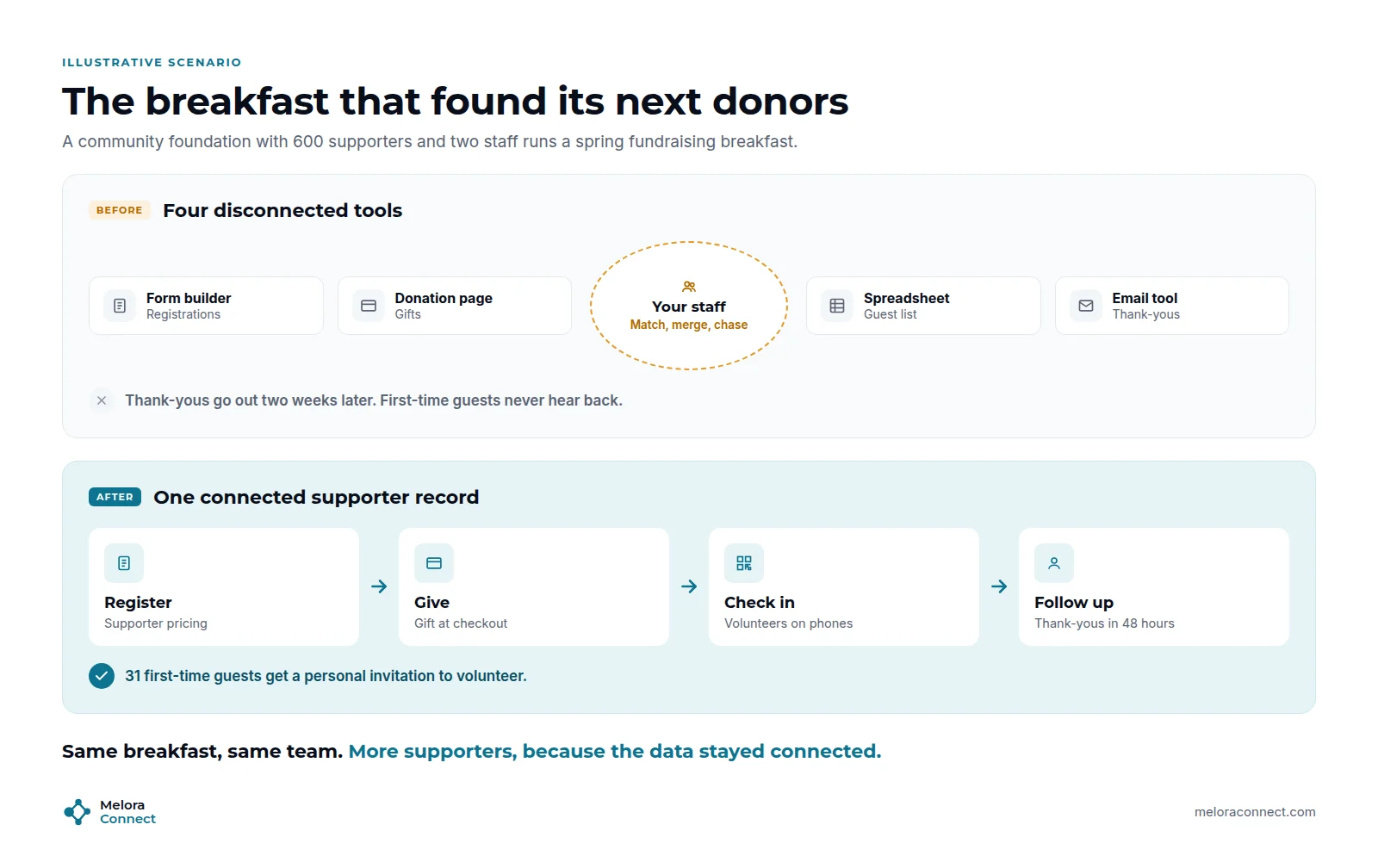
This is an illustrative example, not a specific customer.
Picture a community foundation with 600 supporters and two staff running its spring fundraising breakfast. Registrations come in through a form builder, gifts through a separate donation page, the guest list lives in a spreadsheet, and thank-yous go out from an email tool.
In the four-tool setup, staff spend the week after the breakfast matching registrations to donations, merging the guest list, and drafting thank-yous. The notes go out two weeks later. The 31 people who came for the first time get the same generic email as everyone else, and most of them are never heard from again.
With connected event management software, supporters register at their price and add a gift at checkout. Volunteers check guests in on their phones, and attendance lands on each supporter’s record the same morning. Within 48 hours, every attendee gets a thank-you, donors get an impact note, and the 31 first-time guests get a personal invitation to volunteer at the next event.
Same breakfast, same team. More supporters, because the data stayed connected.
Example: the gala that kept its guests
Also illustrative. The breakfast shows what happens after an event. A gala shows the front end. Picture a local arts nonprofit hosting its spring gala for 220 guests, with eight sponsor tables.
In a patchwork setup, tickets sell on one site, sponsor tables are invoiced by hand, donations come through another page, and volunteers check names off a printed list. Afterward, nobody knows which guests were first-time supporters, and the sponsors’ guest names never reach the database at all.
With connected event management software, each sponsor buys a table as one group order and adds guest names later, individual guests buy tickets and add a donation in one checkout, and volunteers check people in at the door. Every guest, including the sponsors’ guests, lands in the supporter records. The next morning, first-time guests get a personal thank-you, and several become monthly donors.
Same gala, same volunteers. Nothing needed matching by hand, so the follow-up could start the next morning.
What should you ask nonprofit event software vendors?
A demo is the best time to test the parts of event day that are unique to nonprofits. Before you book demos, prepare these four questions for every vendor:
-
Can a guest buy a ticket and add a gift in one checkout, with the gift receipted separately and credited to the right supporter?
-
How are sponsor tables and group bookings sold, and can the buyer add guest names later?
-
What can a volunteer do on event day, and can you switch their access off when the event ends?
-
Are any fees taken from donations, and do all funds land in your own account?
For the full selection process, from mapping your events to scoring finalists, see our guide on how to choose event management software.
Free download: Event Software Comparison Scorecard. Score up to three platforms against the same 10 criteria, plus a true-cost worksheet for your budget. Download the scorecard
How Melora Connect supports nonprofit events
Our team comes from event production, and we built Melora Connect for organizations where events, membership, and fundraising are part of the same relationship.
In Melora Connect, tickets, dues, and donations are processed in one place through MeloraPay, by card or ACH, with every payment landing in your own Stripe account. In the events module, event pages, ticket tiers, discount and access codes, group and table orders, and members-only events cover everything from a free volunteer evening to a sponsored gala, and online events carry their own join link (a Zoom integration is coming soon). Every registration and check-in updates a single supporter record, and smart segments surface new, at-risk, and lapsed supporters, so post-event follow-up goes to the right people with the right message.
On event day, your team checks guests in at the door from the same system. The Melora Connect Go app for attendees and the HQ app for staff and volunteers, with QR check-in, are coming soon. And because small teams should not have to become software administrators, you get a team, not a login: we configure the platform with you and support you through your first events. Our pricing is published, with plans from $3,000 a year. See how this works for nonprofits and civic organizations.
Want to put these questions to us? We will run your next fundraiser through Melora Connect live, from ticket tiers and table orders to check-in on one supporter record. Book a demo
Frequently asked questions about event management software for nonprofits
What is event management software for nonprofits?
Event management software for nonprofits is a platform that handles registration, ticketing, donations, communication, check-in, and reporting for nonprofit events in one place. What sets it apart from a ticketing app is that it connects every interaction, from a ticket to a gift to a volunteer shift, to the supporter’s record.
What features should nonprofit event software have?
Nonprofit event software should have six core features: flexible registration and pricing, one supporter record, donations alongside tickets, volunteer-friendly check-in, support for virtual and hybrid events, and reporting for boards and funders. Automated confirmations, reminders, and segmented thank-you emails round out the list.
How much does event management software cost for a nonprofit?
The cost of event management software for a nonprofit depends on the pricing model: per-ticket fees, per-event fees, or an annual subscription. Compare the total yearly cost, including payment processing, add-ons, onboarding, and the staff time needed to run the platform, and always ask for a written quote.
Is free event management software good enough for a nonprofit?
Free event management software is often good enough for a single, simple event. For nonprofits running several events a year, free tools usually cost more in staff time, need donations matched by hand, and keep event data separate from supporter records, so nobody sees the whole relationship.
Can guests add a donation to an event ticket?
Many event platforms let guests add a donation at checkout; ask each vendor to show it. Keep the ticket value and the gift separate on the receipt. The IRS requires a written disclosure when a payment over $75 is partly for goods or services. This is general information, not tax advice.
How can volunteers handle check-in at nonprofit events?
Choose check-in tools a volunteer can learn in five minutes: check-in on a phone, walk-in registration, and on-site payments. Give volunteers a one-page run sheet with their shift, role, and who to call, and make sure their access can be switched off when the event ends.
How can nonprofits get more value from events after they end?
Nonprofits get more value from events by following the 48-hour rule: thank every attendee and donor within two days, follow up by segment, invite first-time guests to get involved, and review results against the event’s goal. Fast, personal follow-up helps turn first-time guests into repeat supporters.
How do we choose between nonprofit event platforms?
Shortlist two or three platforms, ask each to run one of your real events in a demo, and put the same four nonprofit questions to every vendor: gifts at checkout, sponsor tables, volunteer access, and fees on donations. Then score them on the same criteria and compare total yearly cost.
The bottom line
The best event management software for a nonprofit is not the one with the most features or the lowest headline price. It is the one that keeps every ticket, gift, and check-in connected to the person behind it, and that your small team and volunteers can actually run.
Start with the six must-have features, compare the total yearly cost, and treat the 48 hours after each event as part of the event. That is where one-time guests become long-term supporters.
Ready to see your next fundraiser on one supporter record? Bring your gala or breakfast plan and we will build it in Melora Connect live. Book a Melora Connect demo