People · Events · Communities

Quick answer: Online event management software is a cloud-based platform for planning, promoting, registering, running and following up on in-person, virtual and hybrid events from a browser. For associations, look for one registration flow for every format, automatic member pricing, built-in payments, a simple way for online attendees to join, and attendance recorded on each member’s record.
Key takeaways
-
“Online” describes how the software is accessed. Good platforms run in-person, virtual and hybrid events from one place.
-
Every format should share one registration flow, one set of payments and one attendee list.
-
Online attendees need a simple way to join, and recordings matter: many people watch on demand.
-
For associations, attendance and CE credits belong on the member record, not in a separate spreadsheet.
Association events used to mean a ballroom, a registration table and a box of printed badges. Today, the same annual meeting might have 200 people in the room and 200 more joining online, and the staff running it might be working from three different cities. That shift has made online event management software a core tool for associations, not an optional one.
This guide explains what online event management software is, the ten features that matter most, what changes between traditional and online event management, how to evaluate platforms fairly, the red flags to avoid, and how to match each event to a format. For the fundamentals, start with our guide to event management software.
What is online event management software?
Online event management software is a cloud-based platform that lets organizations plan, promote, register, run and follow up on in-person, virtual and hybrid events from a web browser or mobile app. There is nothing to install, so staff, volunteers and attendees can reach what they need from anywhere.
It is usually part of a wider event management platform. For associations, the best online event management software also connects to member records, so every registration, check-in and continuing education credit becomes part of each member’s history with your organization.
Why are associations moving event management online?
Three changes are driving the move. Events now come in more formats, and members expect to choose between attending in person or online. Teams are smaller and often remote, so they need tools that work anywhere. And associations increasingly see event attendance as engagement data that should inform renewals, not a ticket count that lives in a separate tool.
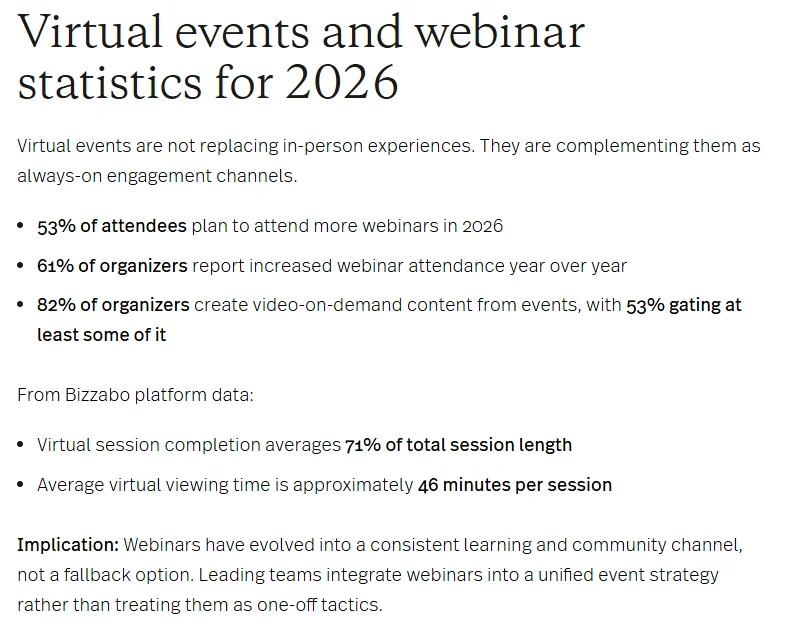
Online formats are growing alongside in-person ones, not replacing them. Bizzabo’s 2026 events statistics and benchmarks roundup reports that 61% of organizers saw webinar attendance increase year over year and 53% of attendees plan to attend more webinars in 2026. In Bizzabo’s own platform data, 63% of events are in person, 33% are virtual and only 4% are hybrid. These are B2B event figures, not association benchmarks, but the pattern is familiar: most organizations run a mix of formats, and few run true hybrid events because they are the hardest to manage.
What does one registration for every format mean?
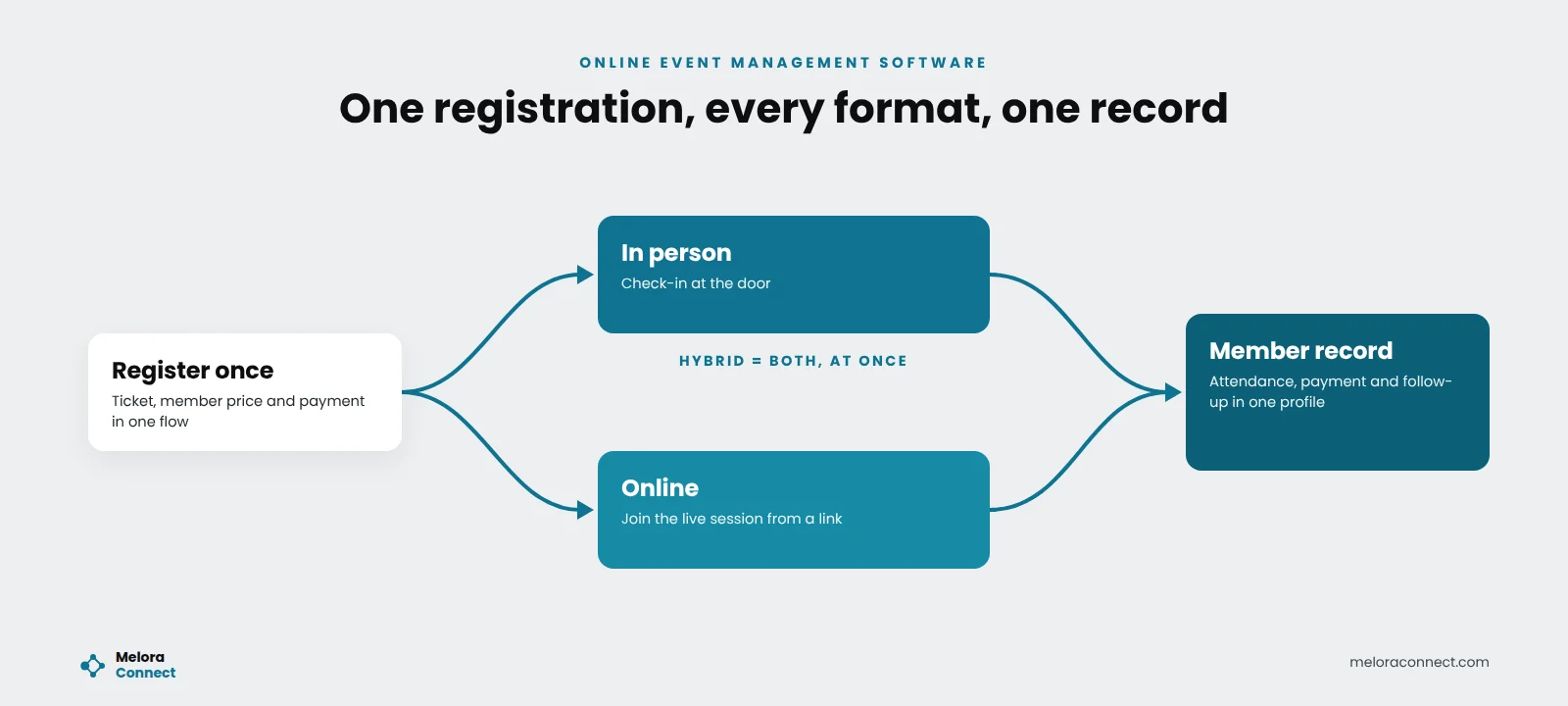
The most important thing online event management software can do is give every format the same foundation: one registration flow, one set of payments and one place where attendance is recorded. A member registers once, picks in person or online, pays, and lands on one attendee list. A hybrid event is simply both paths at once.
When in-person and online attendees are managed in separate systems, everything after registration breaks down. Members who switch formats register twice, follow-up emails go to the wrong list, and nobody can say who actually attended.
What features should online event management software have?
Look for these ten features. The first five decide whether every format can share one foundation; the last five decide how much work your team does on event day and afterward.
1. Event pages and a shared calendar
Branded event pages with the agenda, speakers, location or online access details, and pricing, plus one calendar for every event your organization runs.
2. Online registration and ticketing
Multiple ticket types, member pricing applied automatically, and a short registration form members finish in one sitting. Our event registration software guide walks through that flow step by step.
3. Secure online payments
Card and bank payments, automatic receipts, and money that lands in your own account without manual reconciliation.
4. Virtual event integration
A clear way for online attendees to join, such as a join link that comes with their registration, or an integration with the video platform your members already use so their attendance is recorded automatically. Ask how recordings are shared afterward, too.
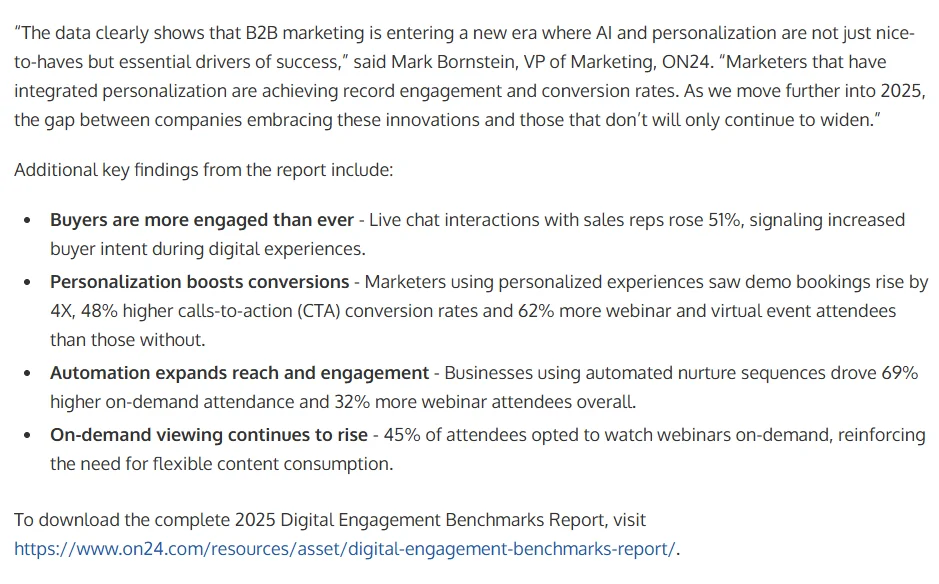
On-demand access matters more than many teams expect. In ON24’s 2025 Digital Engagement Benchmarks report, 45% of attendees opted to watch webinars on demand. That figure comes from B2B marketing webinars, but associations see the same habit with education sessions, which is why it helps when registration, the recording and any CE credit live in one system.
5. True hybrid support
Hybrid events need in-person and online audiences managed at the same time, with one registration flow, one attendee list, and the option for a member to switch formats without registering again.
6. Check-in at the door and badges
Fast check-in from a phone, tablet or laptop, walk-in registration, onsite payments, and badges when you need them. QR codes speed up the line at larger events.
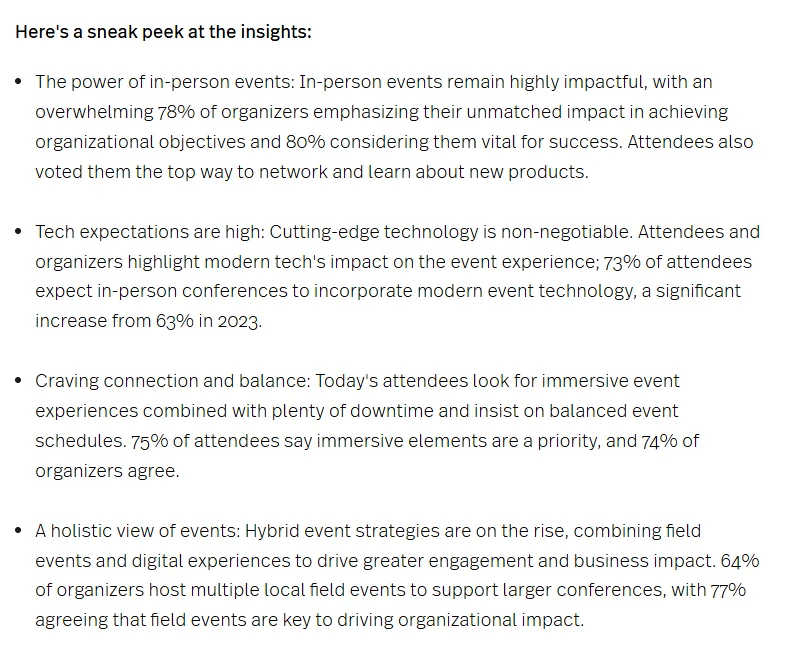
Attendees notice the technology. Bizzabo’s 2025 State of Events report found that 73% of attendees expect in-person conferences to incorporate modern event technology, up from 63% in 2023. The survey covered B2B event organizers and attendees, but members carry the same expectations from the other events they attend.
7. An attendee app
A mobile app with the agenda, session documents, announcements, a personal QR code, and ways for attendees to connect with each other. Useful for large conferences; less important for a monthly webinar.
8. Automated reminders and follow-up
Confirmation emails with the location or join link, reminders before the event, and thank-you messages, recordings or surveys after it, all sent automatically to the right people.
9. Real-time reporting
Live registration and check-in numbers while the event is running, and clear reports on attendance and revenue afterward.
10. A connection to your member records
For associations, this is the feature that matters most over time. Every registration and attendance record, and any continuing education (CE) credit earned, should update the member’s profile, so you can see who engaged this year and who needs a nudge before renewal. Our guide to member engagement metrics covers what to measure once that data is in one place.
Online vs. traditional event management: what changes?
| Area | Traditional approach | Online event management software |
|---|---|---|
| Registration | Paper forms or a separate ticketing site | Online, with member pricing applied automatically |
| Payments | Checks and manual reconciliation | Online payments with automatic receipts |
| Virtual attendees | Managed in a separate tool | Same registration and attendee list, with a join link |
| Check-in | Printed lists and name tags | Check-in from any device at the door |
| Staff access | At the office | From any browser or phone |
| Reporting | Assembled after the event | Live during the event |
| CE credits | Sign-in sheets and certificates by hand | Credits tied to attendance on the member record |
| Member data | Exported and matched by hand | Updated automatically |
Example: a hybrid annual meeting
This example is illustrative, not customer data. A state professional association hosts its annual meeting for 400 members: 186 in person and 214 online. In the old setup, the team ran two events at once. In-person registration lived in one tool and the online session in another. Members who switched from in person to online at the last minute had to register twice, and CE certificates went out by hand from a sign-in sheet. Afterward, nobody could say exactly who had attended.
With online event management software, everyone registers in one flow and chooses in person or online. Staff check people in at the door from the attendee list, and online attendees join from the link in their confirmation email. By the next morning, attendance and CE credits for both groups are on each member’s profile, and the team sends one thank-you email with the recording and a survey to everyone.
That change did not take a bigger team. It took one system for every format.
How do you evaluate online event management software?
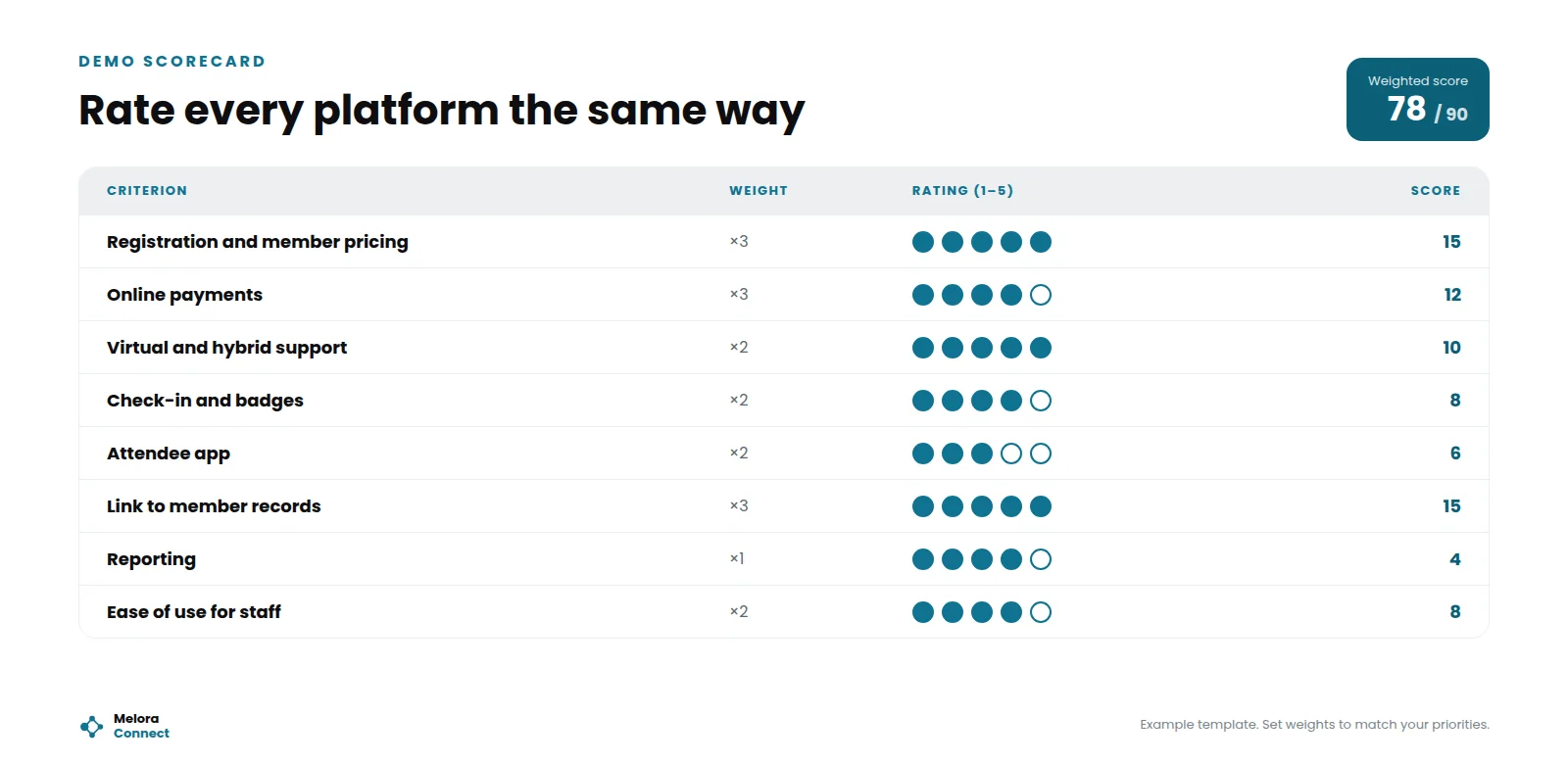
Use a weighted scorecard so every platform is judged the same way: our Event Software Comparison Scorecard is a ready-made one. Weight the criteria that matter most to your association, rate each one from 1 to 5 during the demo, and compare totals. The scores in the image above are an example template, not a rating of any product.
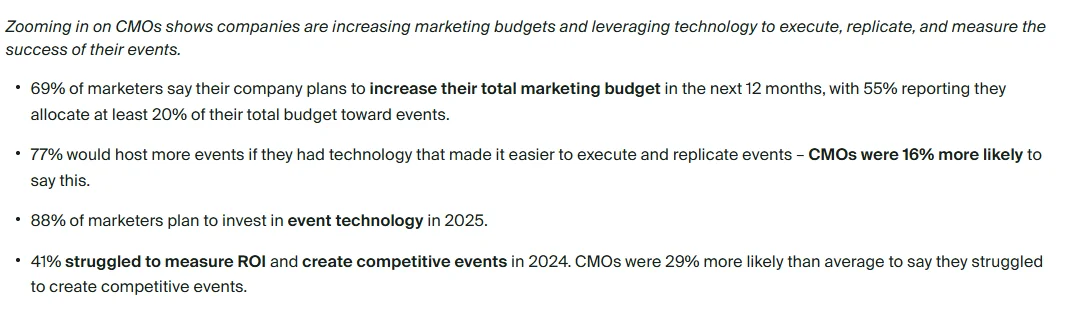
Give “ease of use for staff” real weight. In Splash’s 2025 Outlook on Events survey, 77% of US marketers said they would host more events if they had technology that made events easier to execute and replicate, and 41% struggled to measure ROI and create competitive events in 2024. Those are corporate marketers, not association staff, but small teams feel the same limit.
Then ask these questions in every demo, because they are specific to online and hybrid events:
- Can in-person, virtual and hybrid events share one registration flow?
- Is member pricing applied automatically, without a discount code?
- How do virtual attendees join, and how is their attendance recorded?
- Can a member switch from in person to online without registering again?
- Can CE credits be tied to attendance and kept on the member record?
- Can volunteers check people in without full admin access?
- Does attendance update member records automatically?
For the full selection process, see our guide on how to choose event management software. If events are part of a wider system search, the AMS selection process guide has the complete vendor question list and demo script.
Comparing online event platforms? Score up to three platforms against the same weighted criteria, with a true-cost worksheet, in our free Event Software Comparison Scorecard. Download the scorecard
What are the red flags in online event management software?
Watch for these six warning signs during a demo or trial period:
-
Separate sign-ups for online and in-person attendees. Every hybrid event becomes two events.
-
Member pricing that depends on discount codes. Members hunt for codes and staff handle refunds. See association event software vs. general event platforms for why this matters.
-
Attendance that can only be exported, not recorded on member records. Engagement data stays stuck in spreadsheets.
-
Check-in that requires a laptop at the door. Lines form and volunteers cannot help.
-
No live numbers on event day. You find out about empty rooms afterward.
-
A setup so complex that only one person on staff can run it. Your events depend on one person’s calendar.
In person, online or hybrid: which format fits each event?
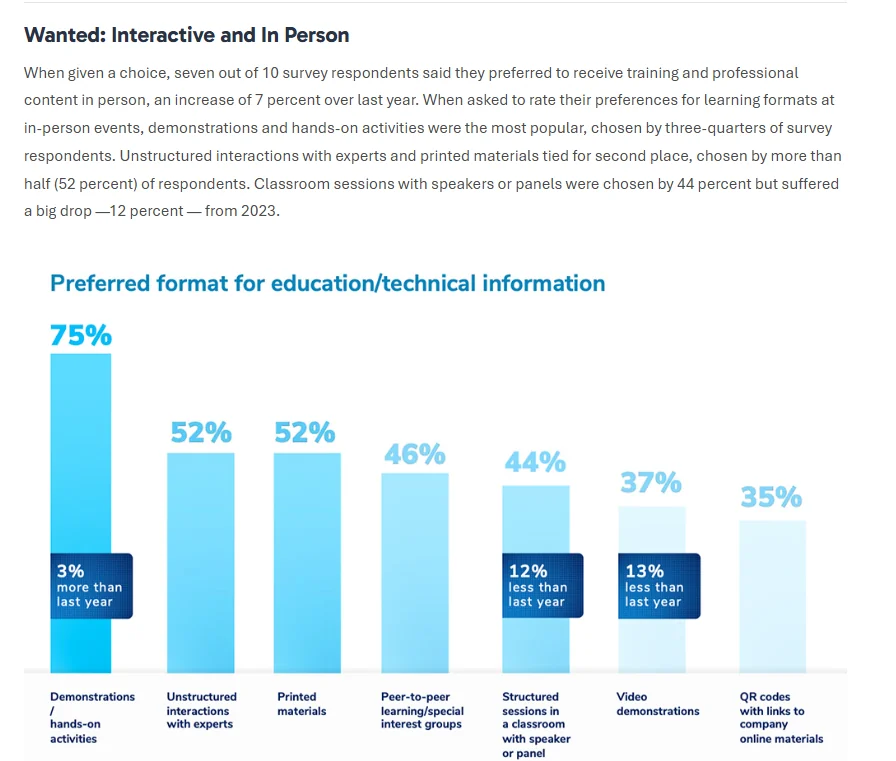
Online event management software lets you offer every format, but not every event needs all of them. Members still value the room for learning: in the Freeman Trends Report 2024, as reported by PCMA’s Convene, seven out of 10 respondents said they preferred to receive training and professional content in person. That was a general survey of event attendees, not only association members, so test it against your own registration data.
Use this table as a starting point and adjust it to your members:
| Event | Format that usually fits | Why |
|---|---|---|
| Monthly education webinar | Online | Short sessions, members spread out, easy to record, share and attach CE credits to |
| Networking breakfast | In person | The value is the room; an online stream adds little |
| Annual conference | In person, with key sessions streamed | Keeps the room full while reaching members who cannot travel |
| Annual meeting or town hall | Hybrid | More members can hear updates firsthand and ask questions |
| Committee or chapter meeting | Online or hybrid | Saves travel for volunteers with day jobs |
| Gala or awards dinner | In person | The experience is the event |
Whatever the mix, the rule from earlier still holds: every format should share one registration flow and one attendee list.
How Melora Connect approaches online event management
Most associations we talk to do not struggle to stream a session. They struggle with everything around it: two registration lists, payments in another tool, and attendance that never reaches the member record.
In Melora Connect, one registration flow serves in-person, virtual and hybrid events. Each online event carries its own join link, which attendees receive with their registration. Connect your Zoom account and Melora Connect creates the Zoom meeting for a virtual event, moves it when the time changes, and checks in the people who joined after the event. Committee meetings can get a Zoom meeting or a Google Meet link the same way. Ticket tiers, member pricing, discount and access codes, group and table orders, and members-only events are built in. Tickets, dues and donations are paid by card or ACH through MeloraPay into your own Stripe account.
On event day, your team checks in-person attendees in at the door from the same list online attendees registered on, and the events dashboard shows registrations and check-ins in one view. Attendance for both formats sits on the member record. CE credits and chapters are live, so an education webinar can carry CE credits that stay with each member, and chapter events run in the same system. Segmented emails with merge fields send the join details beforehand and the thank-you afterward. Coming soon: the Melora Connect HQ staff app for QR check-in and walk-in registration, the Melora Connect Go member app with a personal QR code, the agenda and session documents, and event chat. See the whole module on our Melora Connect events page.
Running two audiences at once is hard enough without two systems. You get a team, not a login: we set up your first hybrid event with you, from the ticket types and member pricing to the join link in the confirmation email.
See one registration for every format. Bring your next hybrid event or webinar, and we will set up the registration options with you live. Book a demo
Frequently asked questions about online event management software
What is online event management software?
Online event management software is a cloud-based platform for planning, promoting, registering, running and following up on in-person, virtual and hybrid events from a browser or mobile app. Nothing is installed, so staff and volunteers can work from anywhere. For associations, it should also record registrations and attendance on each member’s record.
What features should online event management software have?
Online event management software should have event pages, online registration with member pricing, secure payments, a clear way for virtual attendees to join, hybrid support, check-in at the door, automated reminders and follow-up, real-time reporting, and a connection to member records. Associations should also ask how CE credits are tracked for each session.
Can online event management software handle in-person events too?
Yes. “Online” refers to how the software is accessed, through a browser or app, not only to virtual events. Good online event management software runs in-person, virtual and hybrid events in one place, with one registration flow, one set of payments and one attendee list, so every format follows the same process.
What is a hybrid event?
A hybrid event has an in-person audience and an online audience taking part in the same event at the same time. Members choose how to attend when they register. To run one well, both audiences should share one registration flow and one attendee list, so follow-up, reporting and attendance records cover everyone.
How do associations track CE credits for online events?
Associations track CE credits for online events by tying each credit to attendance in the same system that handled registration. When a member attends an eligible webinar or session, the credit is recorded on their member record, so staff no longer reconcile sign-in sheets and members can see their credits in one place.
Is online event management software good for nonprofits and small associations?
Yes, especially for small teams, because it removes manual work and lets staff and volunteers manage events from anywhere. Look for one registration flow, built-in payments and attendance on the member record. Nonprofits that also take donations at events should read our guide to event management software for nonprofits.
The bottom line
The right online event management software gives every event, in any format, the same strong foundation: one registration, one set of payments and one record of who attended. For associations, that record should include CE credits and sit on the member profile, where it can inform renewals. When your events run from one place, your team can stop managing tools and start welcoming members, wherever they join from.
Run every format from one place. See registration, payments, check-in and attendance on one member record in Melora Connect. Book a demo
Sources
- Bizzabo, The Events Industry’s Top Marketing Statistics, Trends, and Benchmarks for 2026, Feb 5, 2026 (last modified Mar 13, 2026).
- ON24, ON24 Unveils 2025 Digital Engagement Benchmarks Report Finding AI-Generated Content and Personalization are Key for Revenue Acceleration, Mar 11, 2025.
- Bizzabo, 2025 State of Events: B2B Insights & Industry Benchmarks, Jan 23, 2025.
- Splash (Cvent), Splash’s 2025 Outlook on Events: 88% of Marketers Identify Events as Key Revenue Driver, Mar 27, 2025.
- PCMA (Convene), What Event Attendees Want Now, on the Freeman Trends Report: 2024 Attendee Intent and Behavior, Jan 16, 2024.