People · Events · Communities

Quick answer: Event registration software lets people sign up and pay for an event online while giving organizers one accurate list of attendees, payments, and details. For associations, the best event registration software shows member pricing automatically, keeps forms short, takes payment in the same flow, and records every registration on the member’s record.
Key takeaways
-
Members should see their price automatically, without a discount code.
-
Ask only for what you will use, and prefill what you know about logged-in members.
-
Take payment inside the registration flow, and design every step for a phone.
-
Watch one number: registration conversion rate.
Every event starts with a decision: “Yes, I will be there.” How easy your event registration software makes that decision decides how many people actually make it.
For many associations, registration still means a form in one tool, payment in another, a discount code sent by email, and a spreadsheet to tie it all together. Members feel the friction, and staff spend the weeks before every event fixing it.
This guide explains what event registration software is, the five steps of a registration flow people finish, which features matter for associations, and how to tell where your registrations leak. For the bigger picture of planning and running events, see our guide to event management software.
What is event registration software?
Event registration software is a tool that lets people sign up and pay for an event online, while giving organizers one accurate list of attendees, payments, and details. For associations, it usually includes event pages, ticket types, member pricing, registration forms, online payments, confirmations, reminders, and check-in data.
Event registration software is often part of a larger event management platform. Registration is the piece that turns interest into commitment, and it is the piece members interact with most.
Why does registration matter more than it seems?
Registration is the first real experience of your event. A confusing form, a surprise fee, or a broken discount code tells members something before they ever walk in the door.
It also shapes your data. The information collected at registration powers everything that follows: badges, dietary planning, session counts, follow-up emails, and the record of who engaged with your association this year. Messy registration means messy data at every later step.
What are the 5 steps of an event registration flow?
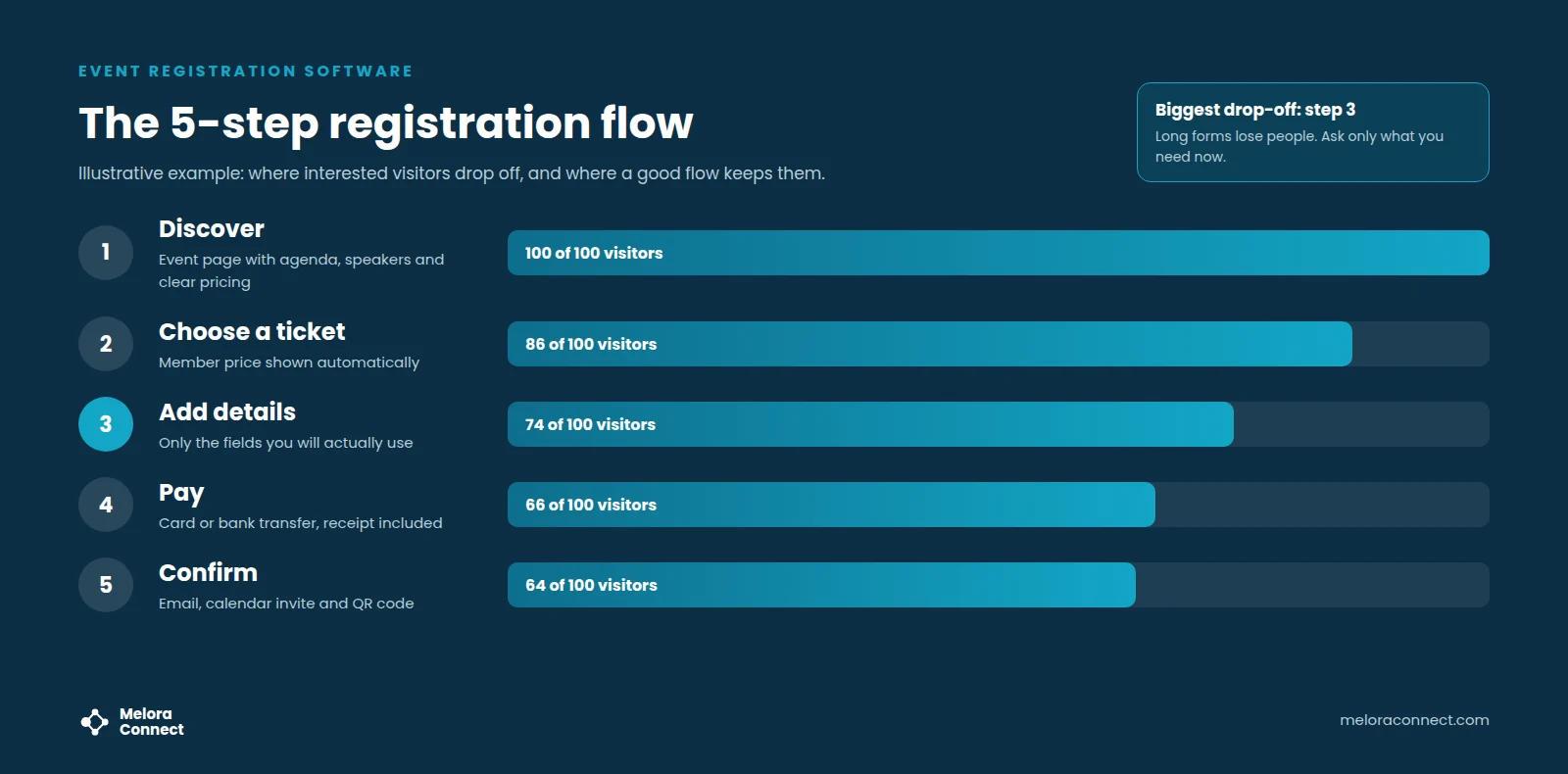
Every registration flow has the same five steps: discover, choose a ticket, add details, pay, and confirm. At each one, some people give up. Good event registration software is designed to keep as many as possible moving forward. The drop-off numbers in the chart above are illustrative, not research data.
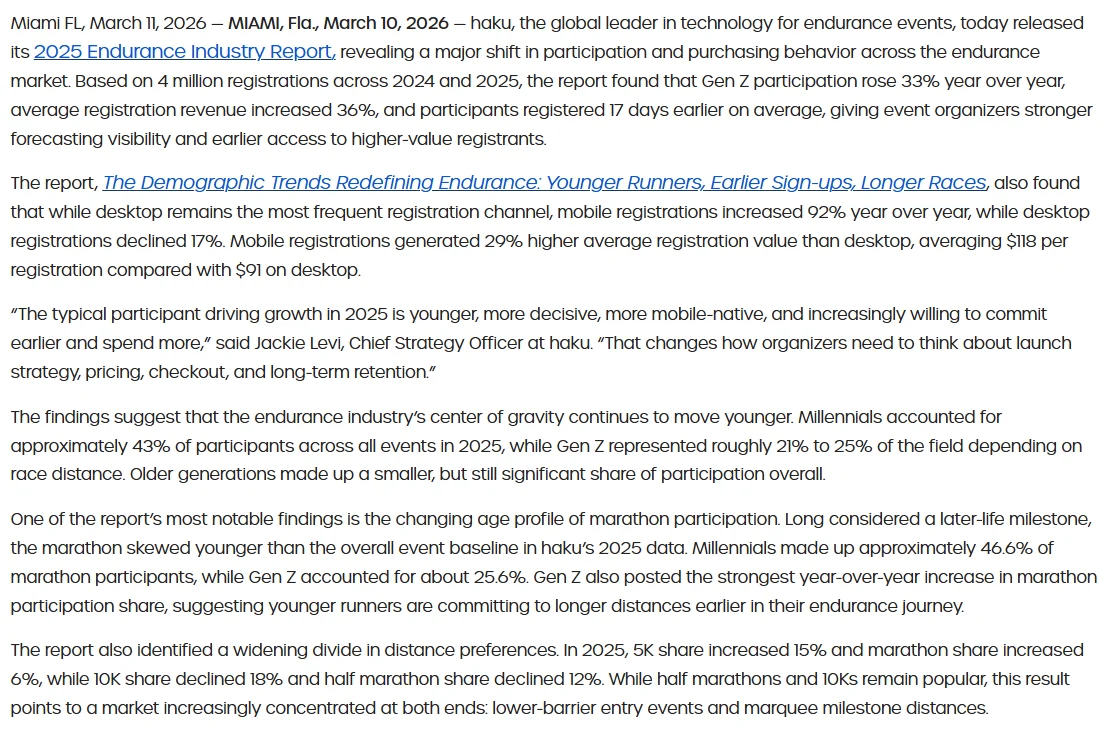
Design every step for a phone. In haku’s 2025 Endurance Industry Report, published by Running USA, mobile registrations increased 92% year over year, while desktop registrations declined 17%. Those are endurance-race registrations, and desktop remains the most frequent channel there, but the direction is clear.
1. Discover
People land on your event page from an email, your website, or a post. The page should answer the key questions right away: what, when, where, who is speaking, and how much it costs. If the price is hidden, many visitors leave to look for it and never come back.
2. Choose a ticket
Keep ticket options few and clearly named. For associations, the most important rule is simple: members should see their price automatically, without hunting for a code.
3. Add details
This is where most people drop off, because every extra field adds effort. Ask only for what you will use for this event. If a member is logged in, fill in what you already know, such as name, email, and organization.
4. Pay
Offer the payment methods your attendees prefer, such as card and bank transfer, and show the total clearly before they click. A receipt should arrive automatically, so nobody has to email your team for one.
5. Confirm
Send a confirmation right away with the date, location or link, a calendar invite, and a ticket or QR code for check-in. Then send helpful reminders as the event gets closer.
Example: a summit registration without the discount code
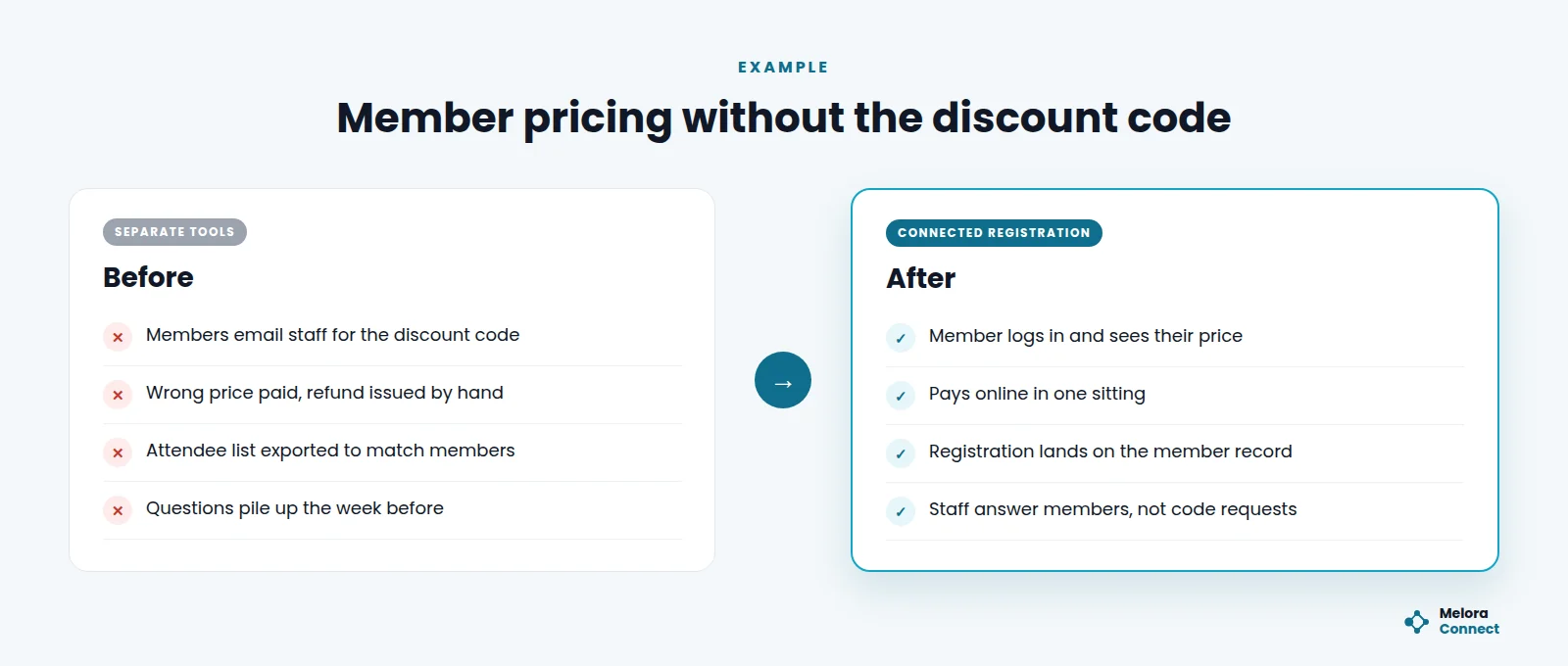
This example is illustrative. Grant handles registration for a state accounting society’s annual summit, with a member price of $95 and a non-member price of $160. In the old setup, members need a discount code. Some cannot find the email, so they write to Grant. Others pay the full price by mistake and ask for a refund. After registration closes, he exports the attendee list and matches it against the member database by hand.
With connected event registration software, a member logs in and sees $95 automatically. Their name, firm, and email are already filled in, they pay in one sitting, the receipt arrives on its own, and the registration lands on their member record. Grant spends the week before the summit answering questions about sessions instead of resending codes and issuing refunds.
That change did not take more staff. It took registration that knows who your members are.
Event registration software features: what to look for
Use this table to pressure-test any event registration software you evaluate.
| Feature | What to look for | Red flag |
|---|---|---|
| Event pages | Clear agenda, speakers, location, and pricing on one page | Key details hidden in a PDF |
| Ticket types | Member, non-member, early bird, group, and sponsor tickets | Every price change needs a new form |
| Member pricing | Price applied from membership status | Members rely on discount codes |
| Forms | Custom fields, pre-filled data for logged-in members | Long forms asking for data you already have |
| Payments | Card and bank transfer, automatic receipts | Payments checked by hand against bank statements |
| Confirmations | Automatic email, calendar invite, and QR ticket | Staff send confirmations one by one |
| Reminders | Scheduled reminders to registered attendees | Reminders sent from a separate list |
| Formats | One flow for in-person, virtual, and hybrid events | Separate sign-ups for each format |
| Data | Registrations added to the member record | Attendee lists exported and merged |
If many of your events are online or hybrid, our guide to online event management software covers what changes when one registration has to serve every format.
Comparing registration tools? Score up to three platforms against the same criteria, with a true-cost worksheet for your budget, in our free Event Software Comparison Scorecard. Download the scorecard
Registration for members and non-members
Associations often welcome non-members to events, and that is a good thing: events are one of the best ways to recruit. Make sure your event registration software captures non-member attendees as contacts, so you can invite them to join after the event. Every non-member registration is a membership lead. Do not force non-members to create a full account before they can buy a ticket; a guest checkout keeps the door open. For why discount codes make a poor substitute for member pricing, see association event software vs. general event platforms.
How do you design a registration form people finish?
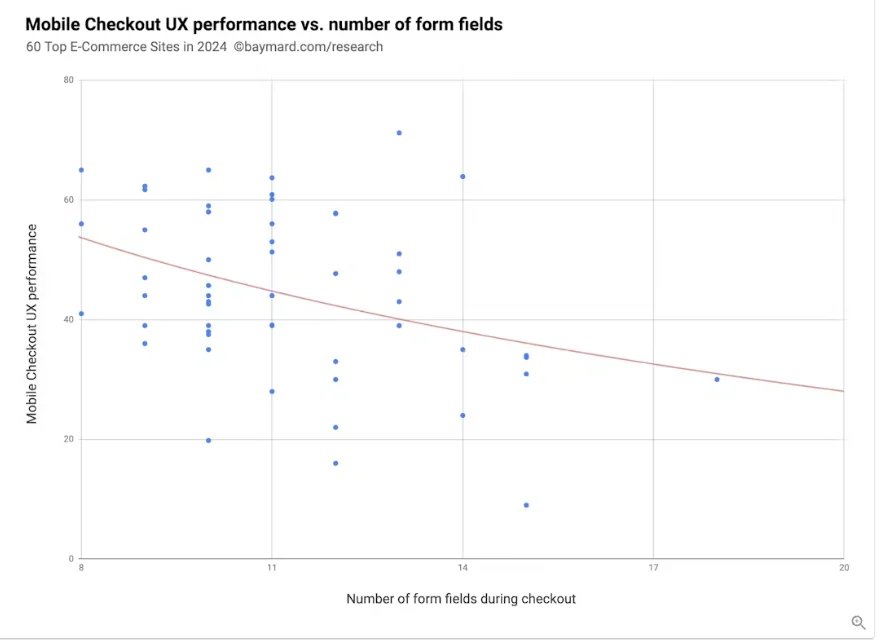
A shorter form usually means more completed registrations. Checkout research from online retail points the same way: Baymard Institute’s 2024 analysis of checkout form fields found the average checkout has 11.3 form fields, while most sites need only 8 form fields in total for a checkout flow.
Sort every field by when you really need it:
| Field | When to ask | Why |
|---|---|---|
| Name and email | Always | Needed for the ticket and confirmation |
| Ticket type | Always | Sets the price and access |
| Organization and job title | At registration, if printed on badges | Used on the badge and for networking |
| Dietary needs and accessibility | Only for in-person events with meals or venue needs | Helps you plan, and shows you care |
| Session choices | Closer to the event | People decide better once the agenda is final |
| Detailed profile questions | After the event, or never | They slow registration and are rarely used |
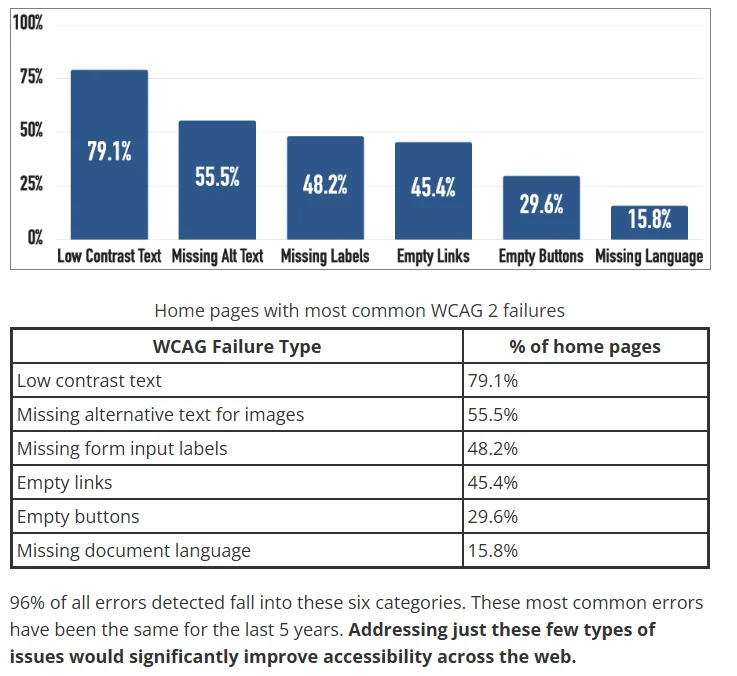
Short is not enough if some members cannot use the form at all. WebAIM’s 2025 Million report found missing form input labels on 48.2% of the top one million home pages, and 34.2% of form inputs were not properly labeled; 94.8% of home pages had detected WCAG failures.
Before you open registration, check three things:
- Every field has a visible label, not just placeholder text.
- Error messages say what went wrong and how to fix it.
- Someone on staff reads every accessibility request and follows up before the event.
Where do registrations leak? Symptoms and first fixes
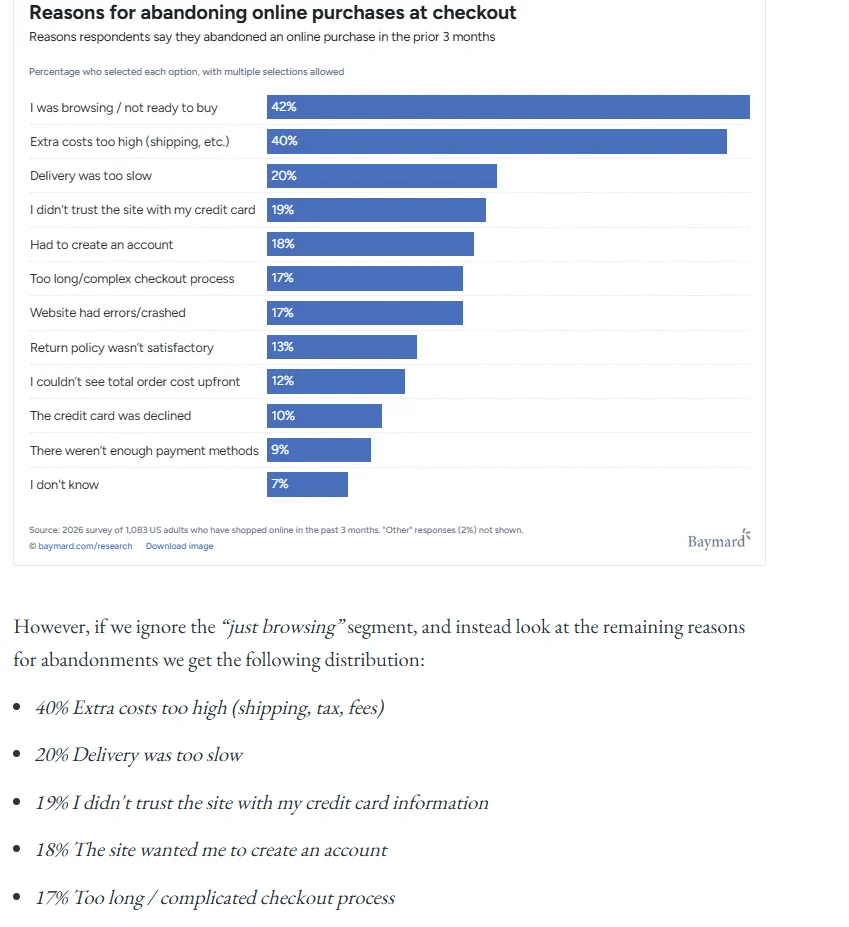
The closest large dataset comes from online shopping. The Baymard Institute’s cart abandonment research, last updated in 2025, puts the average documented abandonment rate at 70.22% across 50 studies of online retail checkouts. The top reasons map closely to registration: extra costs too high (40%), the site wanted me to create an account (18%), a too long or complicated checkout process (17%), and not enough payment methods (9%).
Each leak in a registration flow leaves a symptom you can see. Find yours in the left column, then start with the fix on the right.
| Symptom | Likely cause | First fix |
|---|---|---|
| Many page visits, few registrations | Price hidden or too many ticket options | Show member and non-member prices at the top; keep to three or four ticket types |
| People start the form but do not finish | Too many fields, or a forced account | Cut fields you will not use for this event; prefill for logged-in members; allow guest checkout |
| Members email staff for codes or refunds | Member pricing depends on discount codes | Apply member pricing from membership status |
| Registrations do not match payments | Form and payment live in different tools | Take payment inside the registration flow, with automatic receipts |
| Many registrations, empty seats | Weak reminders, or registration opened very early | Send reminders a week and a day out; resend the details the morning of |
Which registration metric should you watch?
If you watch one number, make it registration conversion rate (completed registrations ÷ visitors to the event page × 100), and change one thing at a time to see what moves it.
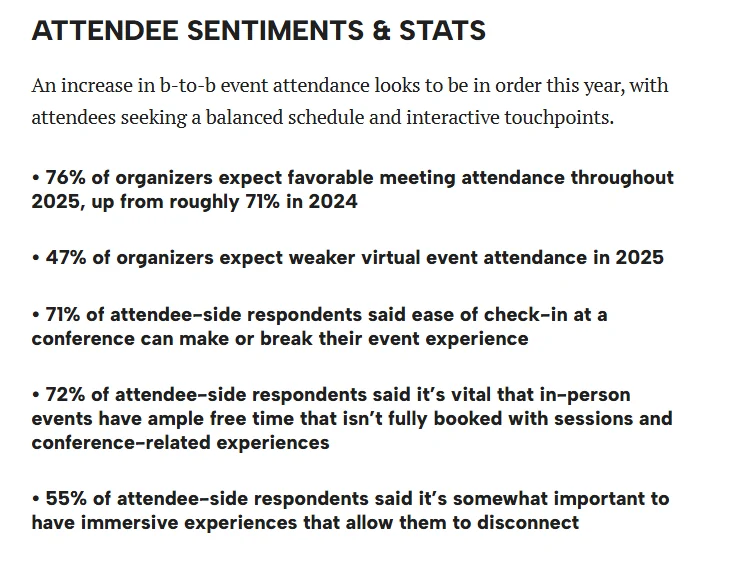
Many organizers do not measure this at all. Event Marketer’s 2025 roundup of B2B events data reports that 54% of US marketers are not tracking registrations to measure their events’ impact (Splash data), and that 71% of attendees say ease of check-in at a conference can make or break their event experience (Bizzabo data).
Our guide to member engagement metrics covers what to measure once people show up.
How Melora Connect approaches event registration
Most associations we talk to do not struggle to create a registration form. They struggle with everything around it: member pricing, payments, confirmations, and getting the data back into the member record.
In Melora Connect, one registration flow serves in-person, virtual, and hybrid events, with each online event carrying its own join link (a Zoom integration is coming soon), and every registration lands on the member’s profile. Ticket tiers, member pricing, discount and access codes, group and table orders, and members-only events are built in. Payments run through MeloraPay by card or ACH, and every dollar lands in your own Stripe account, with dues, tickets, and donations in one place. Segmented emails with merge fields go out from the same platform, and your team checks attendees in at the door from the same list. A personal QR code in the Melora Connect Go app, and walk-in registration in the HQ staff app, are coming soon. See the whole module on our Melora Connect events page.
The goal is simple: a member should be able to say yes to your event in two minutes, and your team should never retype what they entered. You get a team, not a login. We set up your ticket types, member pricing, and forms with you before the first registration opens.
See member pricing without the discount code. Bring your next event’s ticket types, and we will set them up live with member and non-member pricing. Book a demo
Frequently asked questions about event registration software
What is event registration software?
Event registration software is a tool that lets people sign up and pay for events online, while giving organizers one accurate list of attendees, payments, and details. For associations, it usually includes event pages, ticket types, member pricing, forms, online payments, confirmations, reminders, and check-in data.
What is the difference between event registration software and event management software?
Event registration software focuses on sign-up and payment. Event management software covers the whole event lifecycle, including planning, promotion, registration, check-in, engagement, and follow-up. Registration is usually one part of an event management platform, and for associations it should connect to the member record.
How can associations offer member pricing for events?
The simplest way for associations to offer member pricing is event registration software connected to member records. Logged-in members see their price automatically, based on membership status, without a discount code. Non-members see the standard price and are captured as contacts you can invite to join after the event.
How long should an event registration form be?
An event registration form should be as short as possible. Ask only for what you need for this event, such as name, email and ticket type, pre-fill what you already know for logged-in members, and collect session choices or profile questions closer to the event or afterward.
Why do people abandon event registration?
People usually abandon event registration because of surprise fees, being forced to create an account, a long or complicated form, or missing payment options. Retail checkout research from Baymard Institute shows the same top reasons. Show prices early, allow guest checkout, cut fields and offer card and ACH.
What is registration conversion rate?
Registration conversion rate is the share of event page visitors who complete registration: completed registrations divided by visitors to the event page, times 100. Track it for every event, change one thing at a time, such as removing a field or showing the member price, and watch what moves it.
The bottom line
Event registration software is where interest becomes attendance. For associations, the best registration experience is short, clear, and connected: members see their price, pay in one sitting, and get everything they need in one confirmation. When registration knows who your members are, every sign-up makes your membership data stronger, not messier.
Make your next registration effortless. See member pricing, payments, and check-in on one member record in Melora Connect. Book a demo